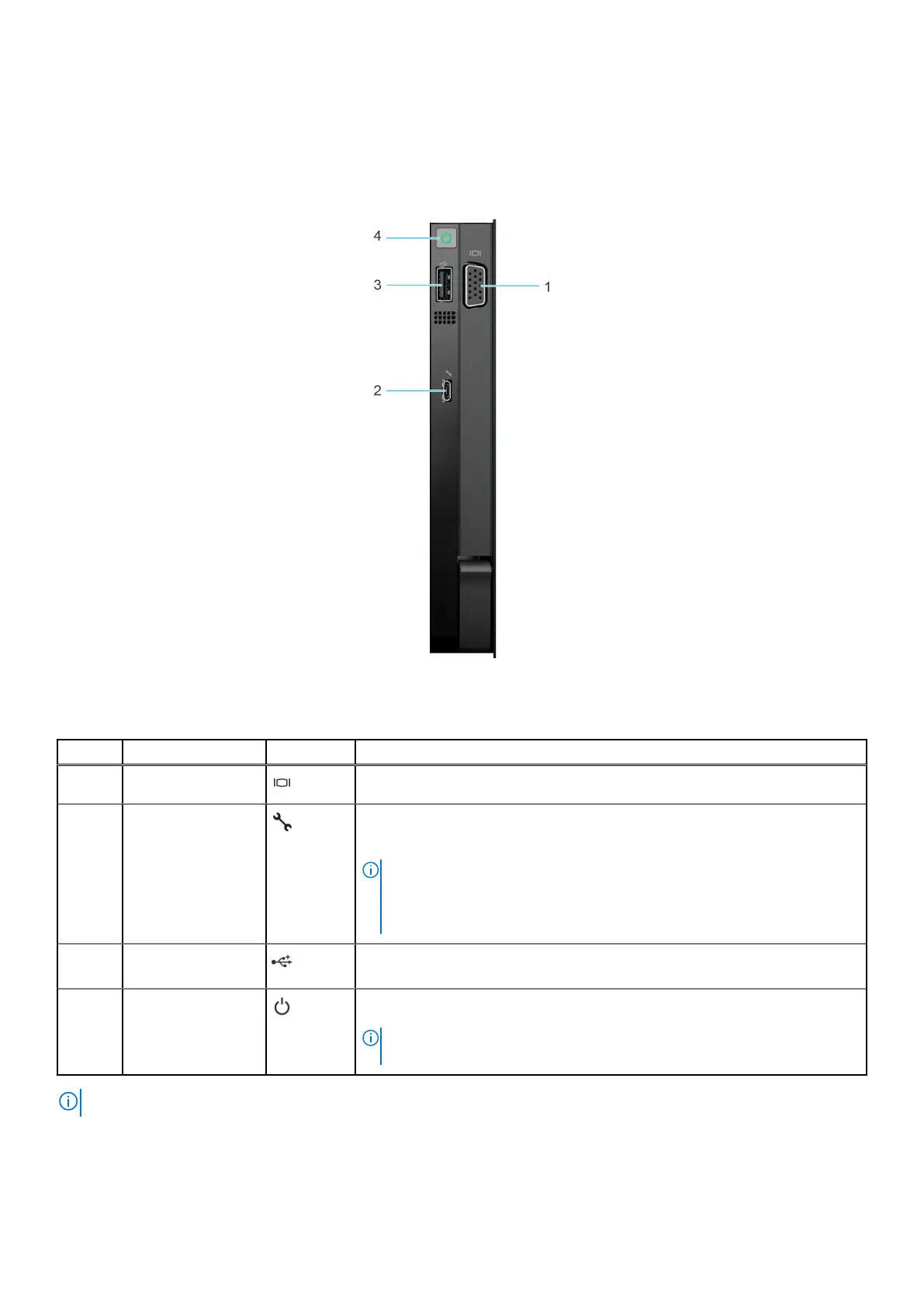
Right control panel view
Figure 7. Right control panel
Table 4. Right control panel
Item Indicator or button Icon Description
1 VGA port Enables you to connect a display device to the system.
2 iDRAC Direct
(Micro-AB USB)
port
The iDRAC Direct (Micro-AB USB) port enables you to access the iDRAC
direct Micro-AB USB features. For more information, see the Integrated Dell
Remote Access Controller User's Guide at www.dell.com/poweredgemanuals.
NOTE: You can configure iDRAC Direct by using a USB to micro USB (type
AB) cable, which you can connect to your laptop or tablet. Cable length
should not exceed 3 feet (0.91 meters). Performance could be affected by
cable quality.
3 USB 2.0 port The USB port is 4-pin, 2.0-compliant. This port enables you to connect USB
devices to the system.
4 Power button Indicates if the system is powered on or off. Press the power button to
manually power on or off the system.
NOTE: Press the power button to gracefully shut down an ACPI-compliant
operating system.
NOTE: For more information about ports, panels, and slots, see the Technical specification section.
Dell PowerEdge R960 system overview 13














 To Next Page