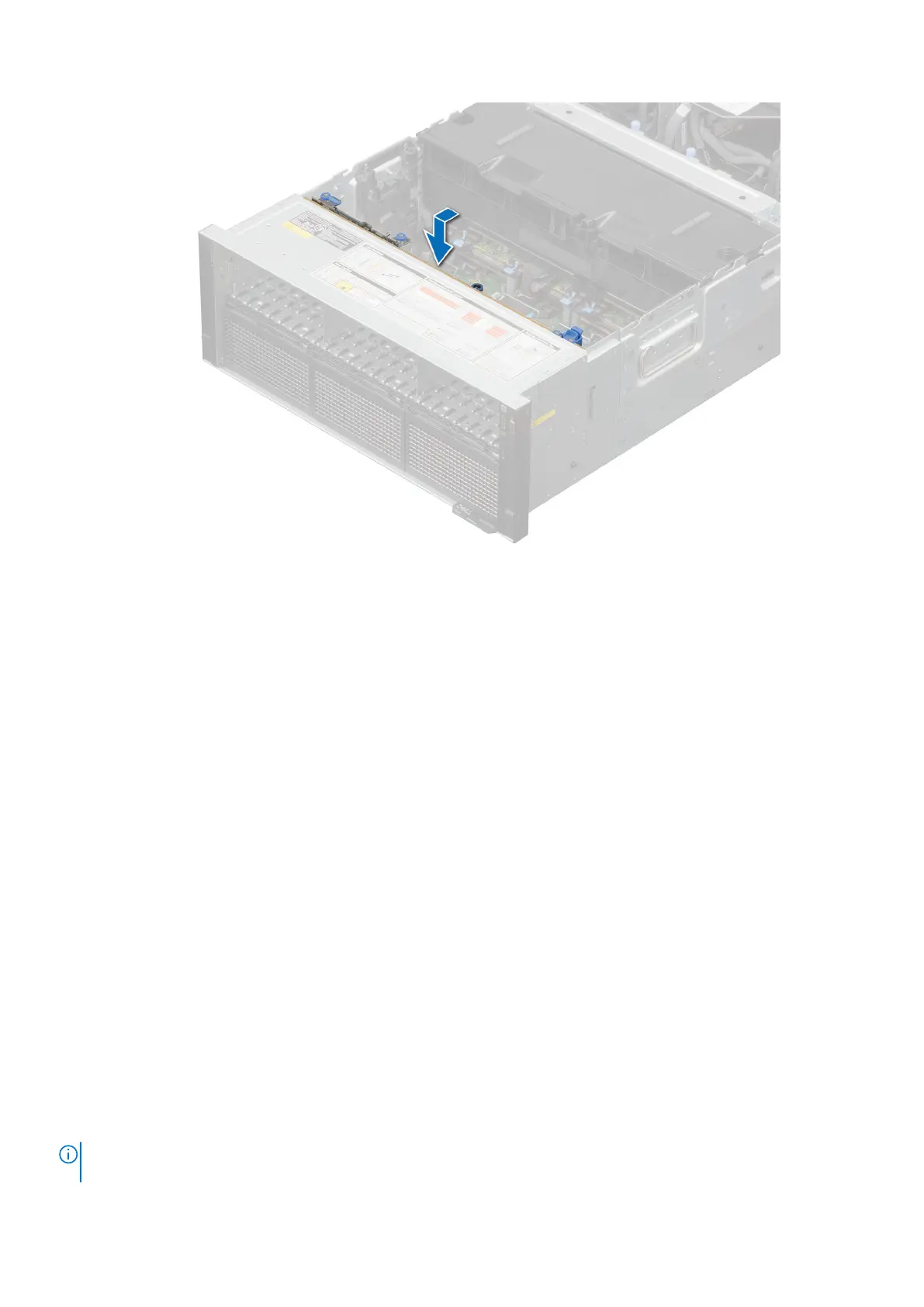
Figure 56. Installing the drive backplane
Next steps
1. Connect the drive backplane cables to the connectors on the system board and backplane.
2. If removed, install the PEM.
3. Install the drives.
4. If removed, install the rear mounting front PERC module.
5. If removed, install the air shroud or install the GPU air shroud.
6. Install the cooling fan cage assembly.
7. If removed, install the air shroud top cover.
8. If removed, install the support bar.
9. Follow the procedure listed in After working inside your system.
Side wall brackets
Removing the side wall bracket
There are two side wall brackets on either side of the system. The procedure to remove is similar.
Prerequisites
1. Follow the safety guidelines listed in the Safety instructions.
2. Follow the procedure listed in the Before working inside your system.
3. Remove the support bar.
4. Remove the air shroud top cover.
5. Remove the cooling fan cage assembly.
6. If required, remove the air shroud or remove the GPU air shroud.
NOTE:
Ensure that you note the routing of the cables as you remove them from the system board. Route the cables
properly when you replace them to prevent the cables from being pinched or crimped.
94 Installing and removing system components






 To Next Page