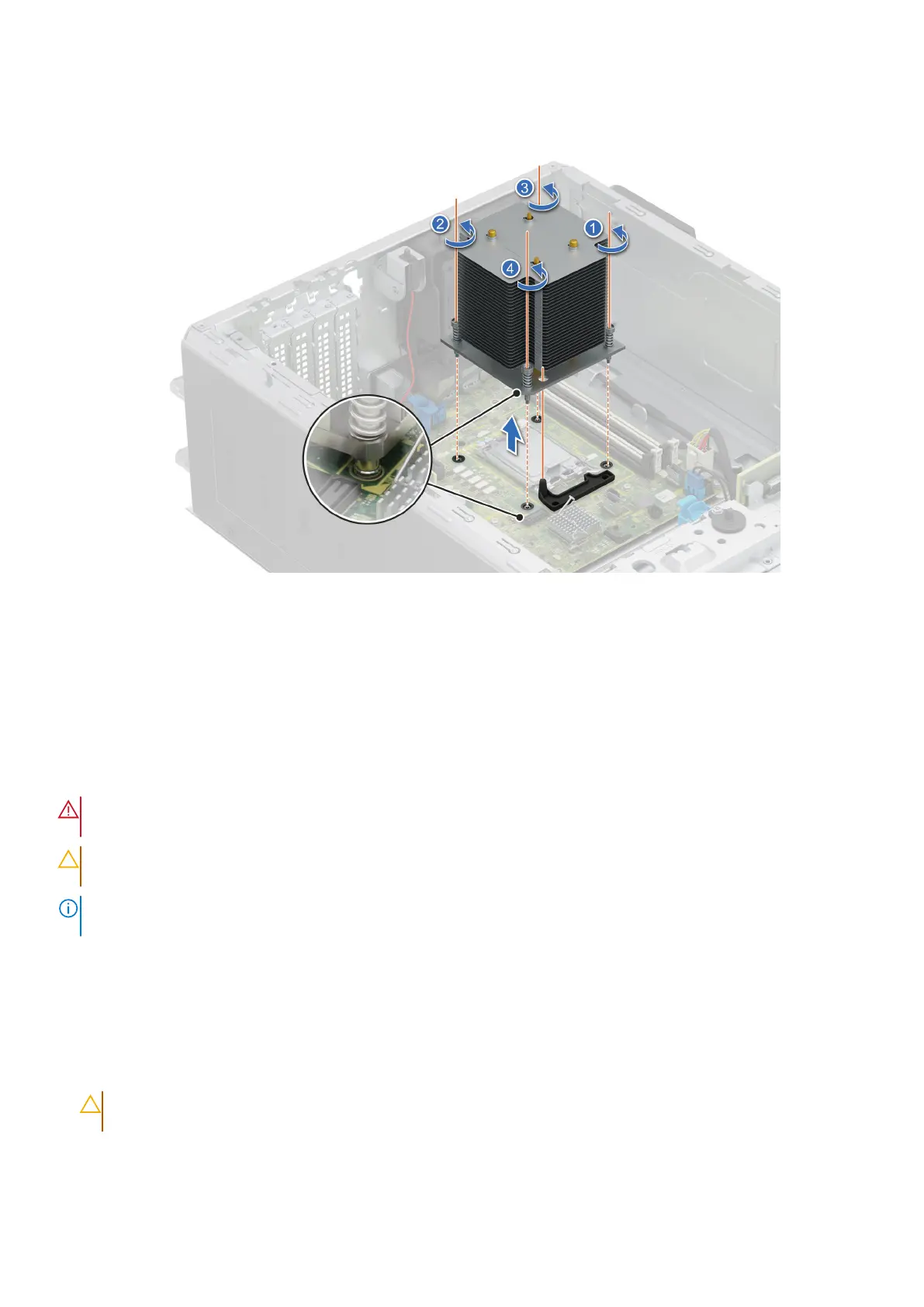
2. Lift the heat sink away from the system.
Figure 52. Removing the heat sink
Next steps
Replace the heat sink.
Removing the processor
Prerequisites
WARNING:
The processor will be hot to touch for some time after the system has been powered down. Allow the
processor to cool before removing it.
CAUTION: The processor is held in its socket under strong pressure. Be aware that the release lever can spring
up suddenly if not firmly held.
NOTE: Only remove the processor if you are replacing the processor or system board. This procedure is not required when
replacing a heat sink module.
1. Follow the safety guidelines listed in the Safety instructions.
2. Follow the procedure listed in Before working inside your system.
3. Remove the heat sink module.
Steps
1. Release the socket lever by pushing the lever down and out from under the tab on the processor shield.
2. Lift the lever upward until the processor shield lifts.
CAUTION:
The processor socket pins are fragile and can be permanently damaged. Be careful not to bend the
pins in the processor socket when removing the processor out of the socket.
3. Lift the processor out of the socket.
90
Installing and removing system components














 To Next Page