Table 64. Configuration : No Riser
Card type Slot priority Maximum number of cards
FOXCONN (GPU) 2 1
FOXCONN (aPERC 11) 2,1 1
FOXCONN (aPERC HBA11) 2,1 1
FOXCONN (External Adapter) 2,1 2
Broadcom (NIC:1Gb) 2,1,4 3
Intel (NIC:10Gb) 2,1,4 3
Broadcom (NIC:10Gb) 2,1,4 3
Intel (NIC:1Gb) 2,1,4 3
FOXCONN (BOSS-N1) INT 1
Removing an expansion card
Prerequisites
1. Follow the safety guidelines listed in Safety instructions.
2. Follow the procedure listed in Before working inside your system.
3. If required, remove the air shroud.
4. Disconnect any cables that are connected to the expansion card.
Steps
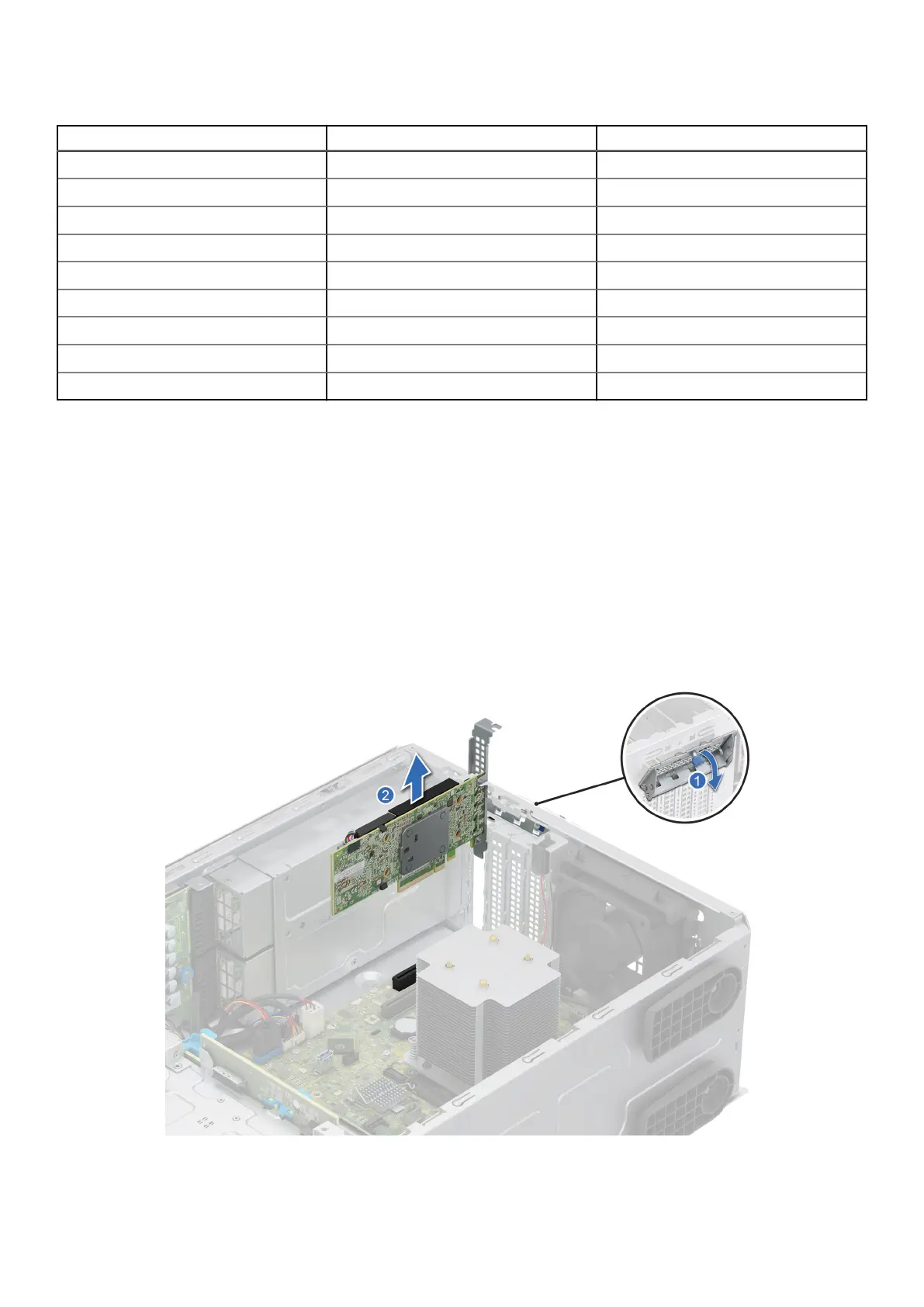
1. Loosen the captive screw and tilt the metal bracket that holds the expansion cards.
2. Hold the expansion card by the edges, and pull the card up to remove it from the expansion card connector on the system
board.
Figure 58. Removing an expansion card
Installing and removing system components
95














 To Next Page