CUBE 30 TOUCH | USER MANUAL
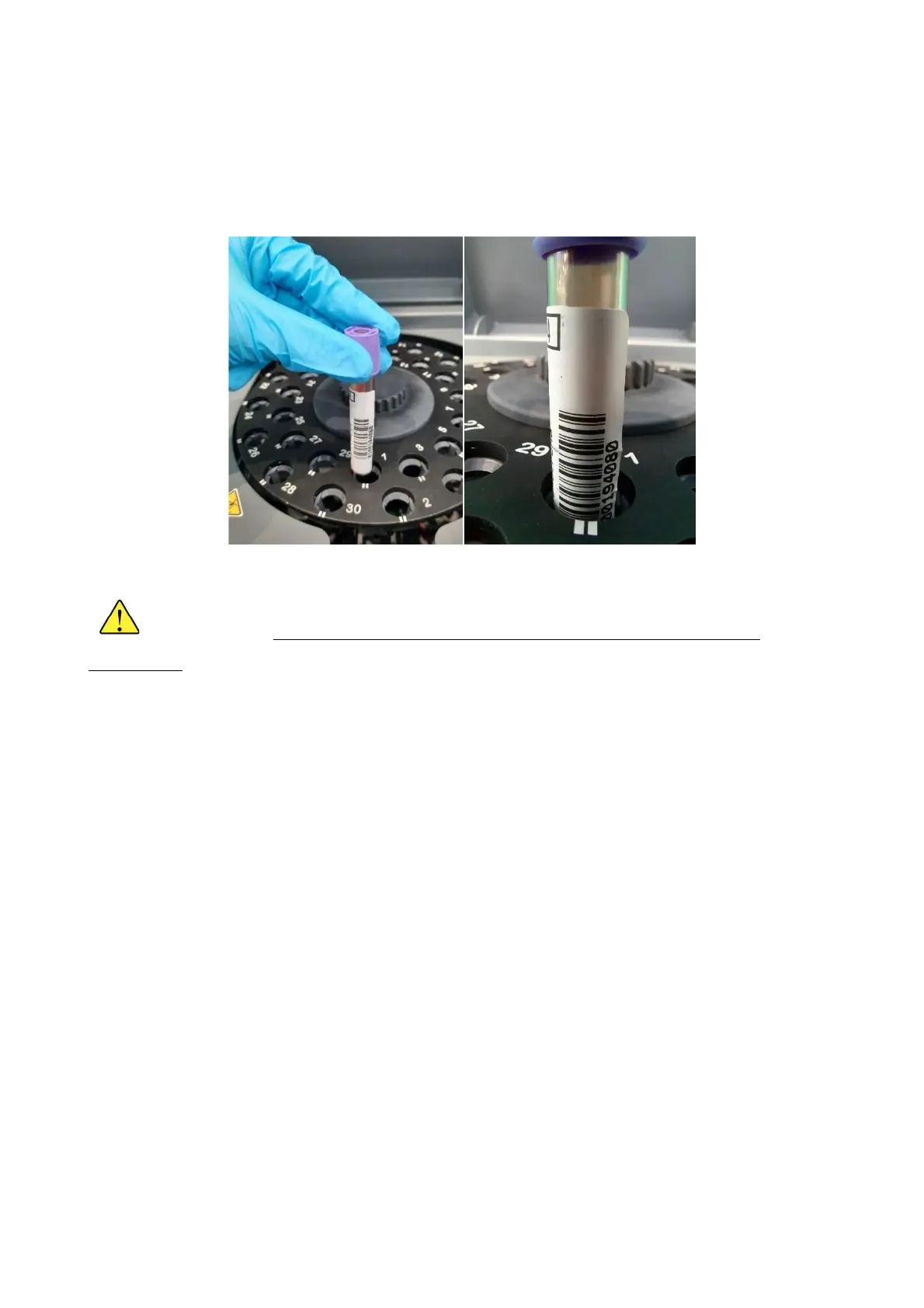
To ensure barcode readability, tubes must be inserted so that the barcode is positioned
toward the mark on the front of each well in the instrument carousel (Figure 24). If a
secondary label is not used, the sample should be inserted so the tube manufacturer’s
label is facing the mark.
Figure 24 Correct insertion of the test tube
If the host connection is active (see chapter 'CONNECTION TO HOST
COMPUTER'), the sample barcodes must have a maximum length of 15
characters.
4.4 Home page
Turn on the CUBE 30 TOUCH with the switch on the left side of the instrument.
When the instrument is turned on, the LEDs around the screen will activate. Initially the
colors will follow each other, then each color will have its own meaning to help the user
to understand the status of the instrument even from a distance.
Yellow indicates that an analysis cycle is in progress.
The green color indicates that the cycle is complete.
The red color is alarm symbol, a problem has been detected.
White indicates the standby condition of the instrument.
If the USER LOGIN function is active, an ID will be requested for the selected user (see
Chapter 6 USER MANAGEMENT). The user can access the home page directly (HOME)
when the USER LOGIN function is not active.



 To Next Page