CUBE 30 TOUCH | USER MANUAL
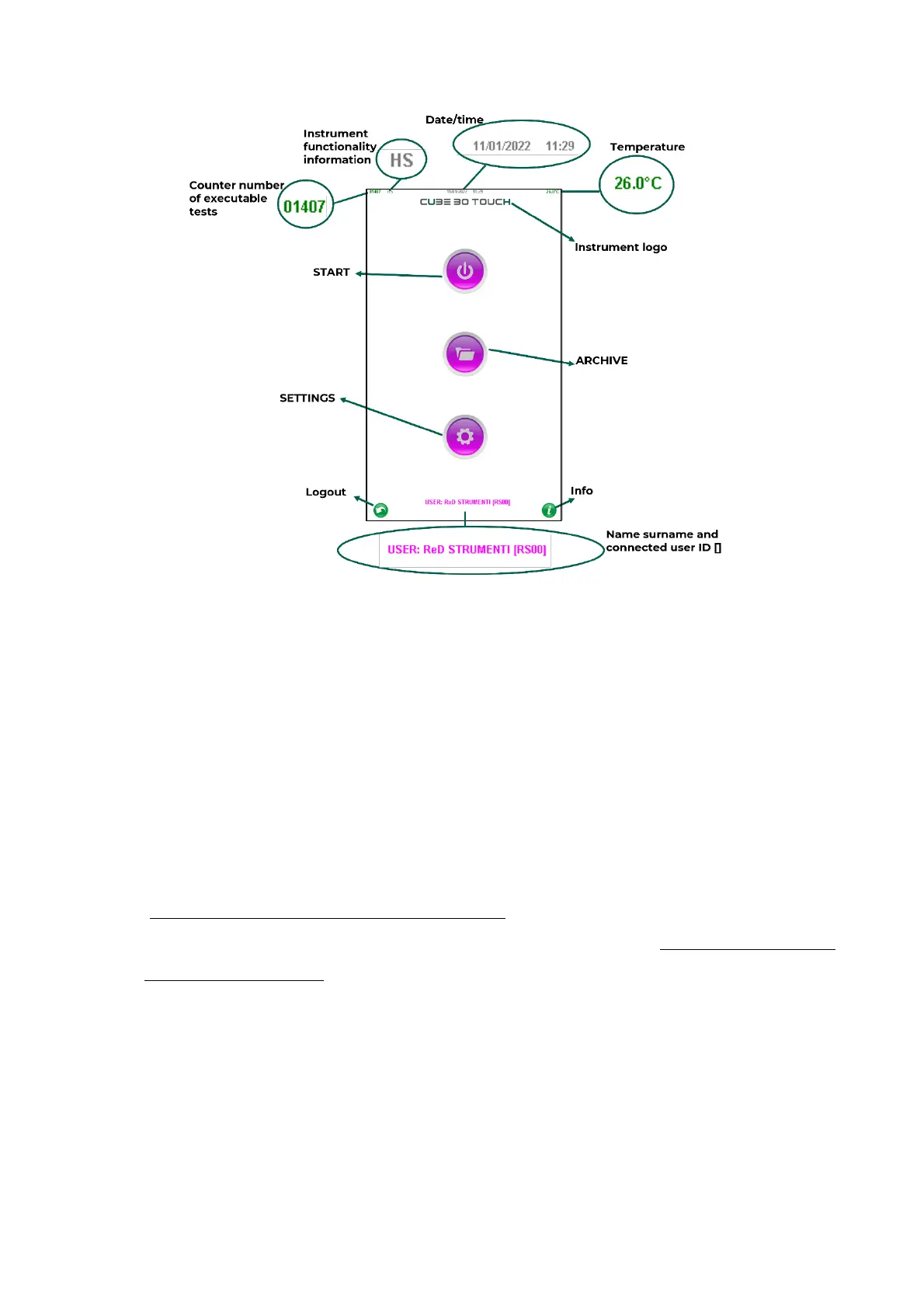
Figure 25 – Home page
The following information is present on the initial screen (Figure 25):
• Counter number of executable tests: it decreases for each result. The counter is
red for the last 50 tests. To perform other tests the user must recharge the counter
with a new Test Device Next (see chapter 6)
• Instrument functionality information: if active some settings relating to the
working mode of the instrument are displayed:
H= host, the connection with the host is active
S= screenshot, the mode for taking screenshots of the instrument is active
(Technical Assistance and Specialist mode)
F= fast, the fast mode is active which allows faster test cycles (Technical Assistance
and Specialist mode)
• Date/Time: indicates the current date and time
• Temperature: indicates the instrument internal temperature in °C or °F. The green
color indicates that the temperature correction is active (default setting). Red
indicates that the temperature correction is not active.
• Instrument logo: presentation of instrument logo identifying the commercial
name



 To Next Page