CUBE 30 TOUCH | USER MANUAL
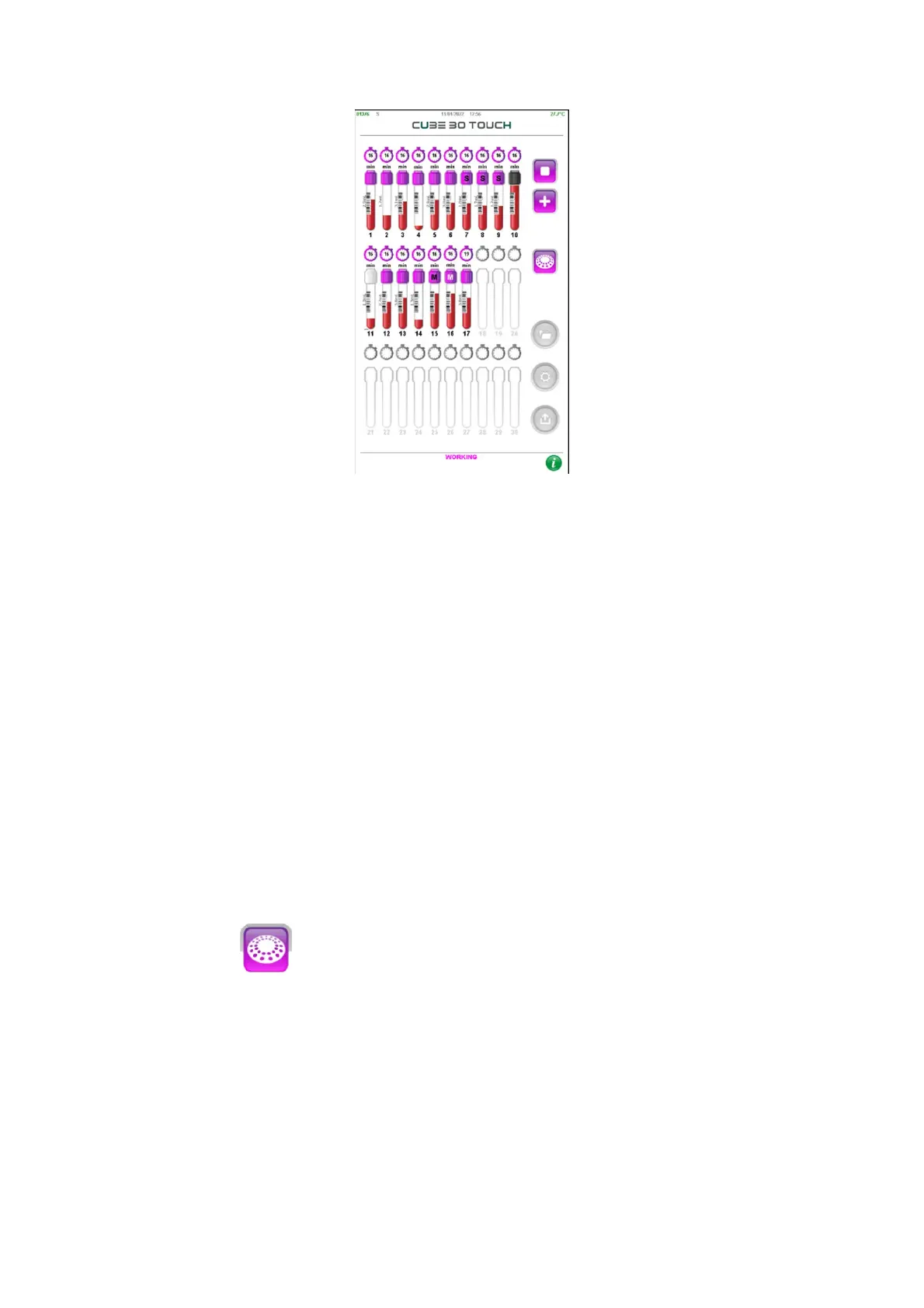
Figure 34 - Tube View
The following information is displayed in the Tube view:
• Number of positions of the carousel
• Label on the tube cap to identify a tube type other than Normal (S for Sarstedt S
tube, M for MAP tube and P for Pediatric tube)
• Blood level in the tube
• Presence of the label on the tubes when the instrument reads the barcode, or the
user enters it
• Value of the blood volume in each tube (Normal and Sarstedt S tube) if the ‘SHOW
volume’ setting is enabled (see paragraph Setting)
• A timer above each tube indicating the time remaining for the end of the analysis
The color of the black or white cap identifies the presence of a QC control sample; black
cap identifies a pathological control. White cap indicates a normal control.
Using the button it is possible to return to the ‘Carousel View’.
4.5.3 Type of tube
The type of tube is automatically identified by the instrument, if the ‘Default tube type’
setting is None.
If the tube identified by the instrument is different from Normal, the initial letter of the
type will be displayed in the circle that identifies the sample in the carousel Figure 35):
S identifies a Sarstedt S type tube (default is Sarstedt type 2,7ml)



 To Next Page