PULSE MX
68
Remote controller configuration
This feature allows you to control by an external DMX device up to 288 manual cues that means you can
have all the cues of all the console banks on your nger tips.
One or two channels can be used to control each manual cue: one channel is used to control manual cue
slider and the other one is used to manage the ash and release commands.
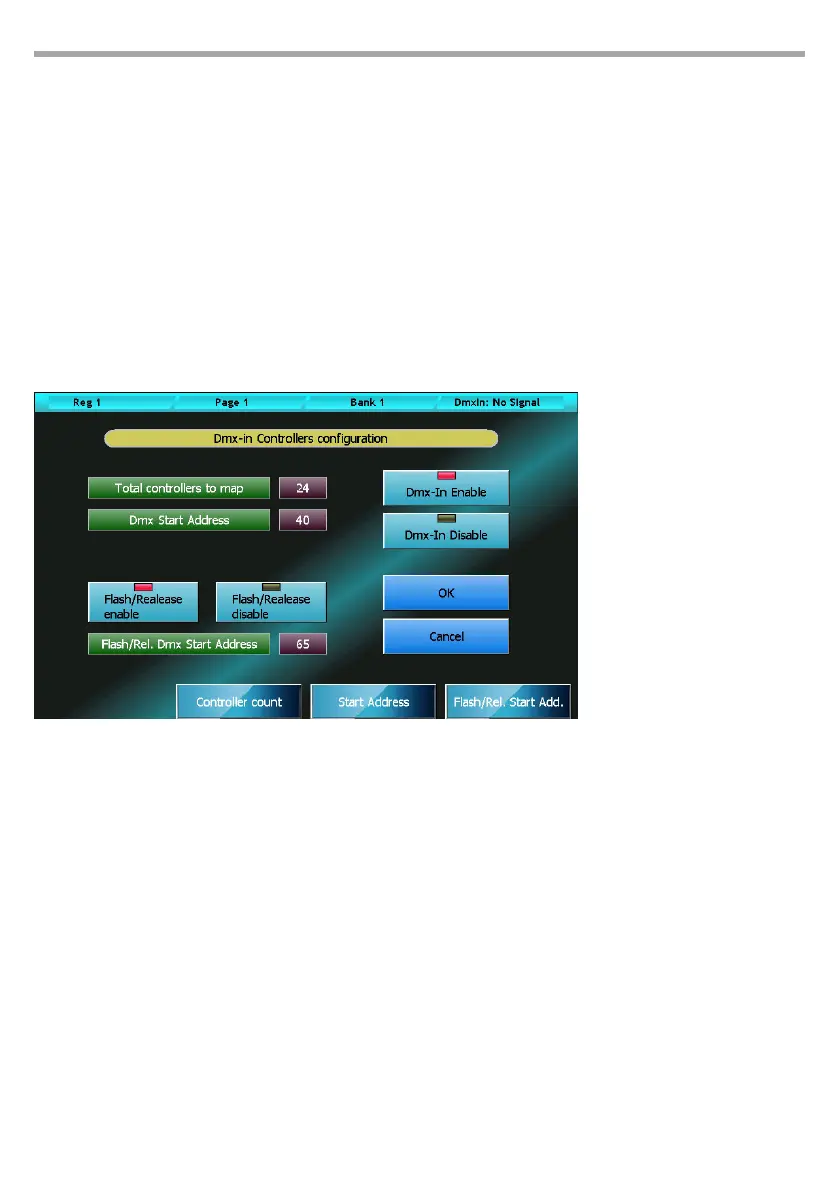
The DMX-In Controllers Conguration window can be opened by pressing the homonymous button
from Setup Menu.
On the status bar, on the top-right corner, you can see the DMX input status: if the DMX input is not con-
nected or no DMX data are transmitted the “DMX-In: no signal” message will be displayed, otherwise
three numbers will be showed that mean: the receiver status (1 stands for receiver on), the number of
received data packets and the number of transmission errors. The last two numbers are reset to zero
every time the conguration window is opened.
You can change all the conguration values by moving the wheels.
Window buttons and fields:
DMX-In Enable
DMX manual cue control global enable
DMX-In Disable
DMX manual cue control global disable. If this button is on, the console will ignore all the rest of the
conguration and the manual cue control by DMX input is inhibited.
Flash/Rel. Enable
Flash and Release receive command enable. Two DMX channels for each DMX controlled manual
cue are used if this button is selected.
Flash/Rel. Disable
Flash and Release receive command disable . Only the slider of manual cue is controlled if this but-
ton is selected
Finestra DMX-In Controllers Conguration
The conguration showed on
the left means that the rst 48
channels of the external DMX
device are used to control only
the sliders of 48 manual cues.
Fig.55



 To Next Page