Digitronic Digital Cam Switch Unit
Automationsanlagen GmbH CamCon DC50/51
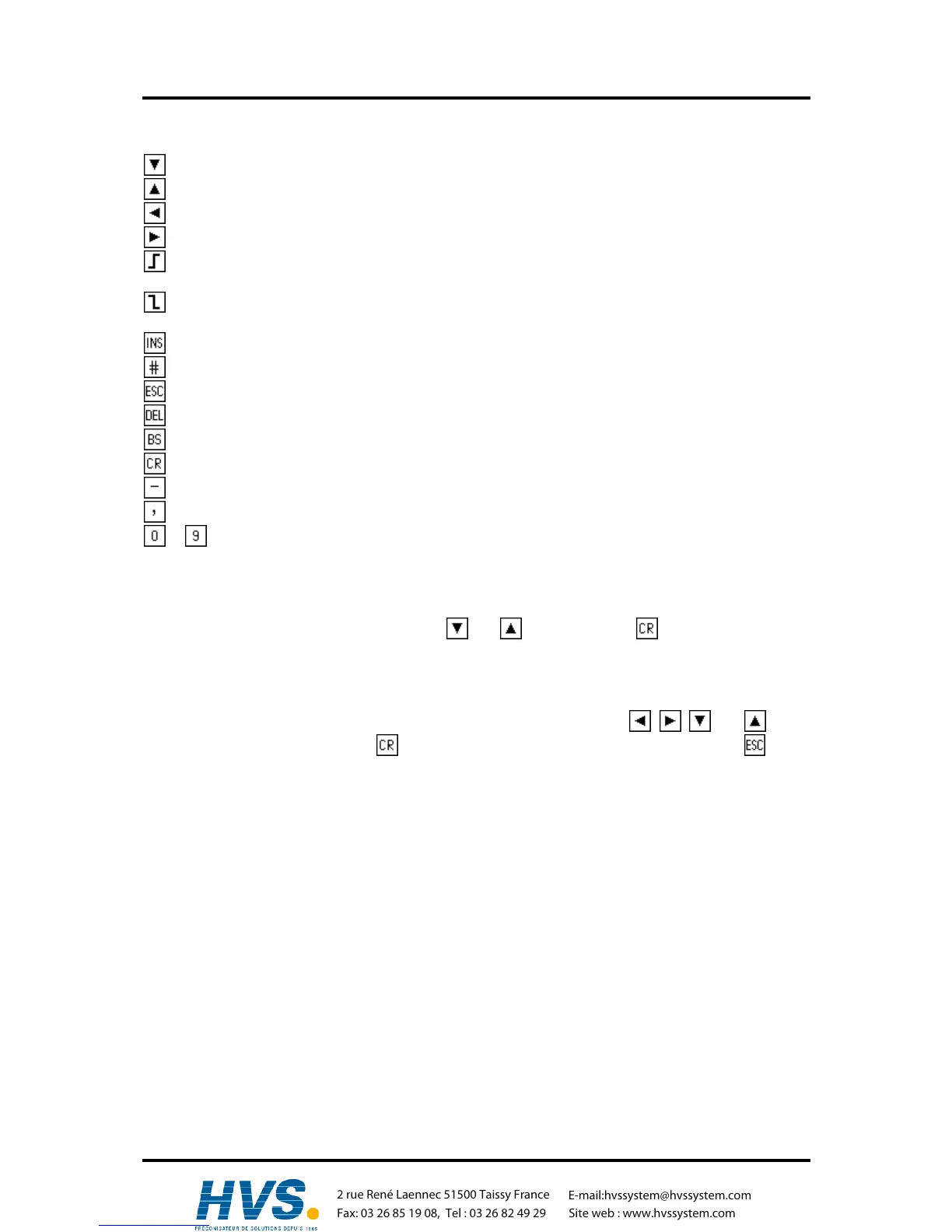
5.5. Outline of key functions
cursor down
cursor up
cursor to the left, shifting cams
cursor to the right, shifting cams
choose cam activation point, character selection during text input,
(or PC 'PageUp' key)
choose cam deactivation point, character selection during text input
(or PC 'PageDown' key)
input of cams, special measuring systems, character during text input
place holder for display formats, reset during error messages, special functions
Escape: leaving the current menu, returning to the next higher menu
deletion of cams, outputs, programs and single characters during text input
deletion of single characters during text input
confirm input and save data
changes the algebraic sign during data input
comma
... numeric keys for data input
5.6. Menu selection
You can select a desired menu by pressing the corresponding numeric key or by moving the cursor
(the black beam) on the menu name with keys and and pressing the key.
5.7. Selection of a menu point
The input in the single menus issubdevided into menu points. These are active (or selected), if the
display is inverted. The selection of these menu points is made with keys , , and and a
confirmation of your choice with the key. You can always cancel an input by pressing the key. If
you pressed a wrong key, the unit shows a hint of the keys you can use in this menu and their
functions.
,Version from: Aug. 04 Page: 26



 To Next Page