Digitronic Digital Cam Switch Unit
Automationsanlagen GmbH CamCon DC50/51
6. Commissioning
Before switching the device on for the first time, please check its wiring (see chapter 4.1. Pin allocation
on page 15).
Attention: With induced loads the outputs have to be switched with a freewheeling
diode. Covers or inductivities very close to the device inside the
switchboard have to be switched with a deletion unit as do those that are
wired to or influence the wiring of the device.
After being switched on the CamCon will generate a short tone. Afterwards it will start the internal
review and the running up of the system (e.g. to generate the proof total of the EEPROM and the
EPROM). This process takes several seconds. After a successful installation of the system, the
standard display (the current program number, the position and the speed, as well as a possible error
message) is displayed. Once the system registers are brought in accord to the measuring system and
it is wired correctly, there should be no further error messages.
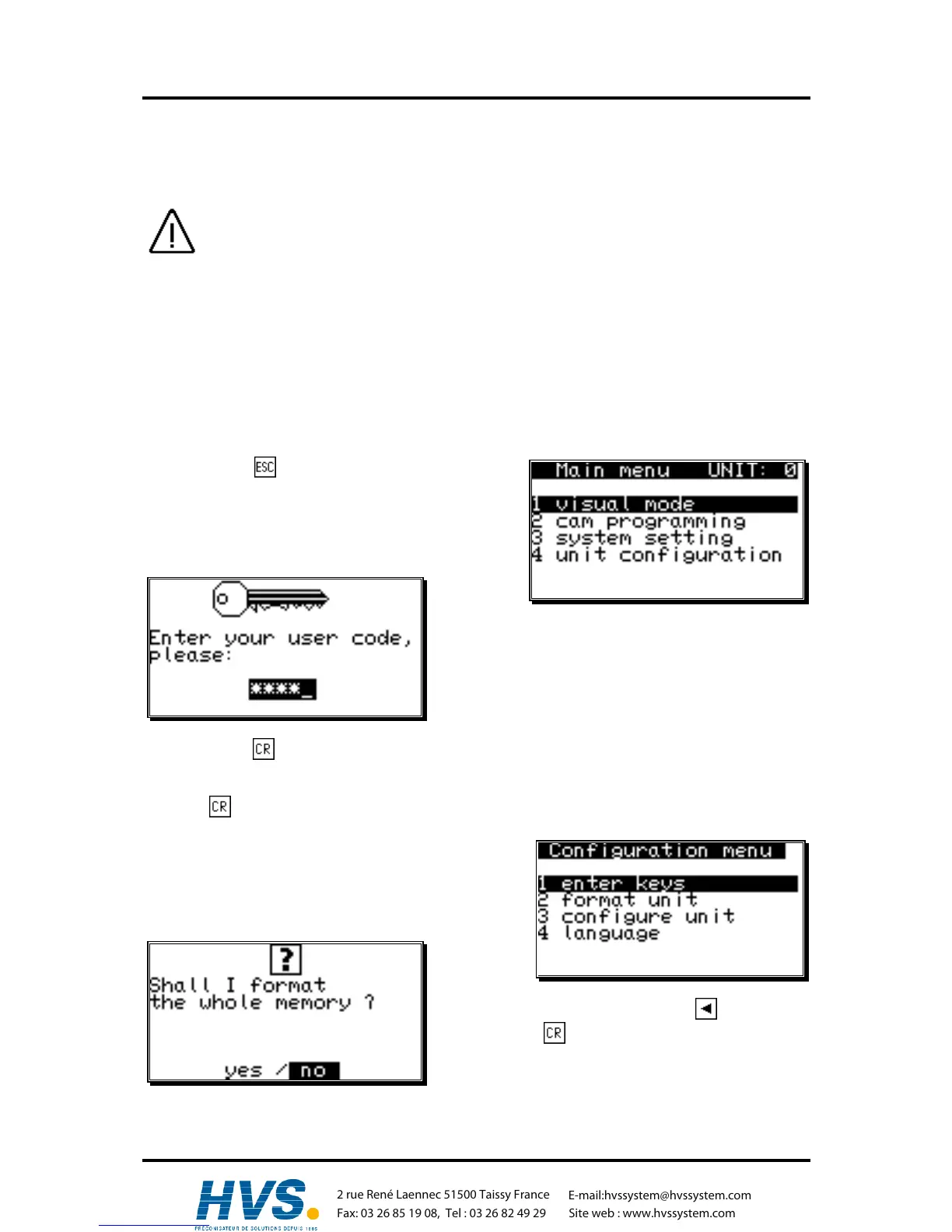
After first activating the supply voltage, the program memory is not in a defined state. So when first
using the CamCon unit you have to put a complete deletion into operation as follows:
1. Press the key, you leave the standard display
and enter the main menu:
2. Select the menu point "Unit configuration" , the
request to enter your user code is displayed on the
LCD:
3. Enter your user code. If you have not programmed
your own key, use the standard key number
"5693"!
4. Press the key to confirm your user code. If a false code is entered, "Wrong user code!" is
shown on the display. In this case, press any key, and reenter the code. The display returns to
the main menu after about 30 sec., if no numbers are entered or the input is not confirmed with
the key.
After the correct user code is entered, the display shows
the configuration menu.
5. Select the menu point "Format unit" , the following
question is displayed:
6. Move the cursor to "yes" with the key.
7. Press the key.
,Version from: Aug. 04 Page: 28



 To Next Page