Digitronic Digital Cam Switch Unit
Automationsanlagen GmbH CamCon DC50/51
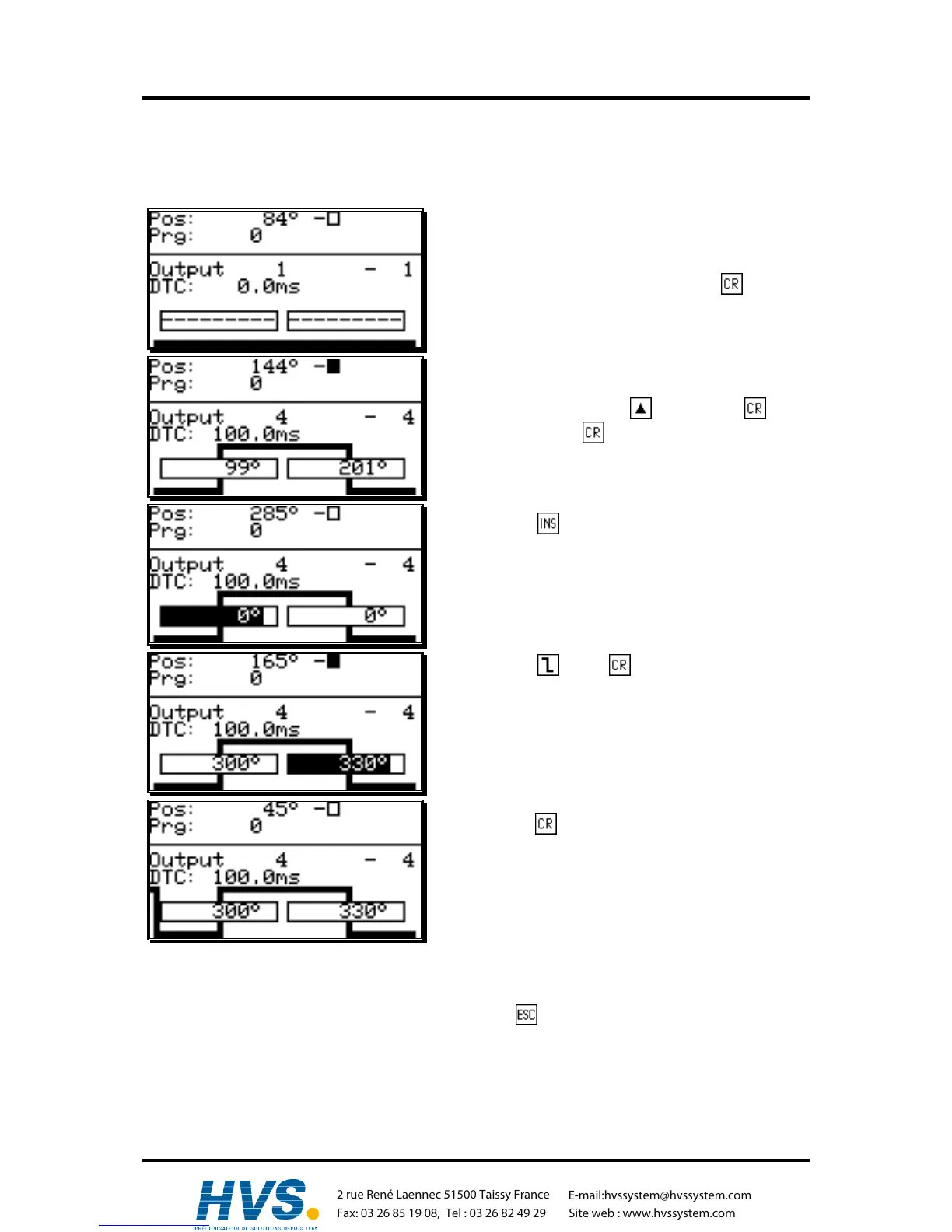
7.3.16.2. Programming additional cams on an output
Task: Program an additional cam from 300° to 330° in program 0, on output 4 with the cam from 100°
to 200°.
Solution
1. Select the menu point "programming" in the main
menu.
2. Enter your user code and press the key. The
programming menu is displayed:
3. Select output 4 with the key or press , enter
"4" and press the key again.
4. Press the key to enter the cam activation point
for an additional cam. The cursor moves to the input
field for the cam activation point; a stylized cam
starts to blink simultaneously.
5. Enter the value "300" for the cam activation point by
using the numeric keys.
6. Press the or the key. The cursor moves to
the input field for the cam deactivation point.
7. Enter the value "330" for the cam deactivation point
by using the numeric keys.
8. Press the key to confirm your input. The second
cam is programmed.
The display shows the newly programmed cam as well as the cam between 100° and 200° as a flank
on the left edge of the display.
9. You can leave this menu at any time by pressing the key.
,Version from: Aug. 04 Page: 41
2 rue René Laennec 51500 Taissy France
Fax: 03 26 85 19 08, Tel : 03 26 82 49 29
E-mail:hvssystem@hvssystem.com
Site web : www.hvssystem.com



 To Next Page