Digitronic Digital Cam Switch Unit
Automationsanlagen GmbH CamCon DC50/51
7.3.16.3. Deletion of a particular cam
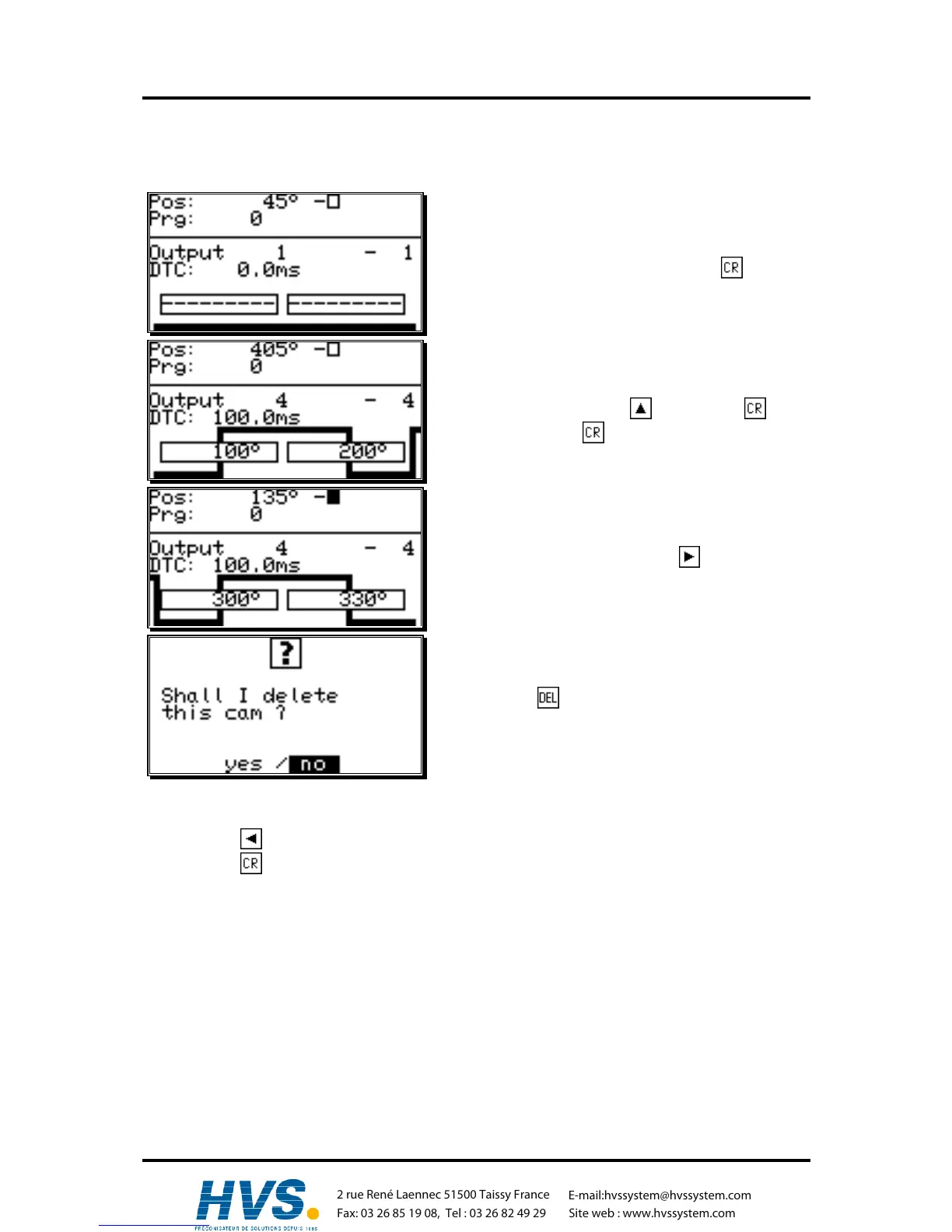
Task: In program 0 the inserted cam between 300° and 330° shall be erased.
Solution:
1. Select the menu point "cam programming" in the
main menu.
2. Enter your user code and press the key. The
programming menu is displayed.
3. Select output 4 with the key or press , enter
"4" and press the key again.
4. Select the inserted cam with the key.
5. Press the key. The display shows the following
question:
6. Using the key, move the cursor to "yes".
7. Press the key to confirm your input. The cam between 300° and 330° is erased.
,Version from: Aug. 04 Page: 42
2 rue René Laennec 51500 Taissy France
Fax: 03 26 85 19 08, Tel : 03 26 82 49 29
E-mail:hvssystem@hvssystem.com
Site web : www.hvssystem.com



 To Next Page