Digitronic Digital Cam Switch Unit
Automationsanlagen GmbH CamCon DC50/51
7.4.1.6.5. PLL measuring system
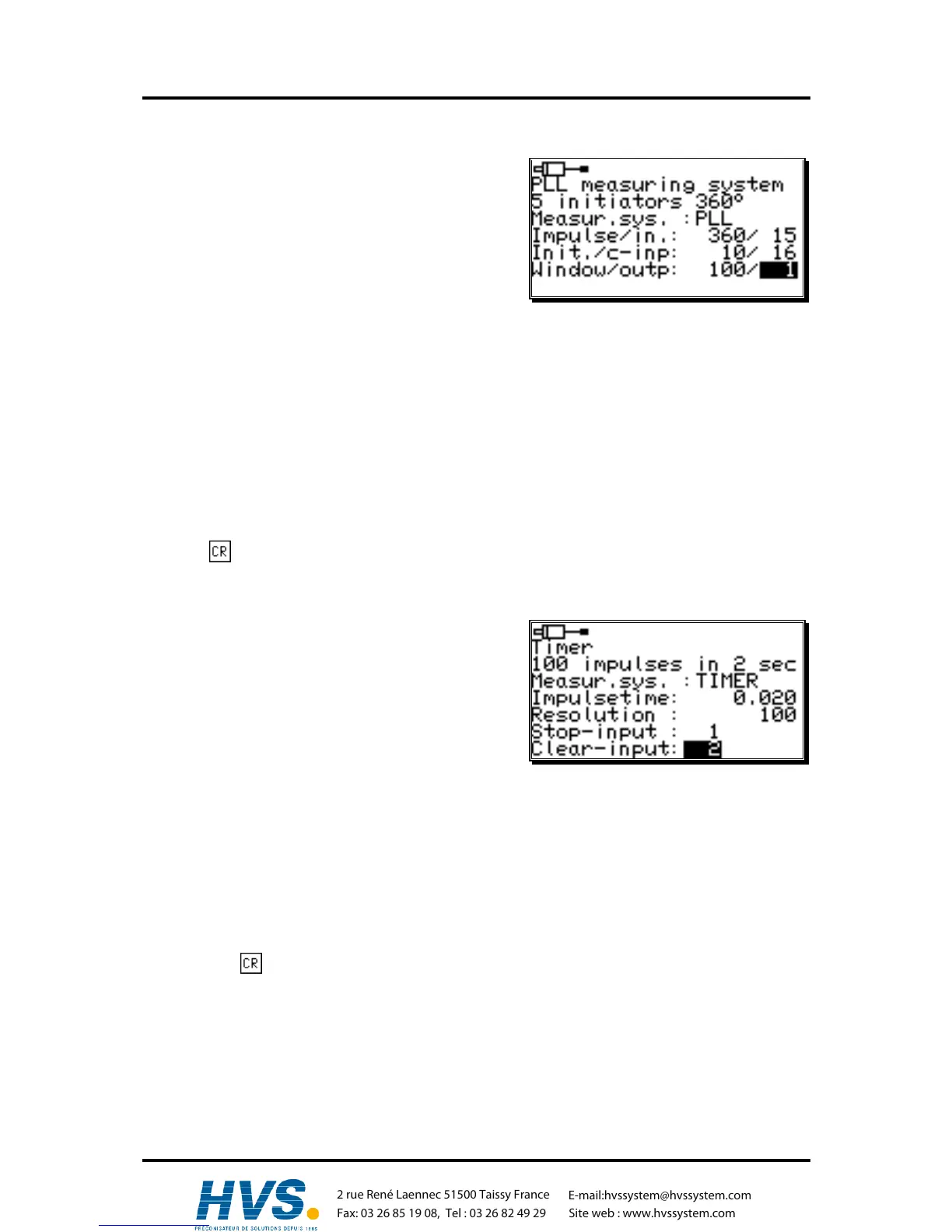
If you selected "PLL" for your special measuring system
in the measuring system input, the following menu is
created:
The PLL measuring system determines the way out of
temporal interpolation of a measuring impulse. If you e.g.
have installed an initiator on a rotation plate and want to
determine the current position at a constant velocity
without having to install another measuring system, the
PLL measuring system is the right choice.
1. Enter the number of steps from initiator impulse to initiator impulse.
2. Now enter the input of the initiator impulse.
3. Now you have to enter the number of initiator impulses per total rotation.
4. Select the input for the clear impulse.
With the PLL measuring system you have the possibility to incase several initiators per total
rotation. To receive a zero point you need a zero initiator that can be hooked up to the selected
input. If you do not want to use a zero initiator, just enter a "0" here.
5. Then you enter the synchronous window.
If a step error is determined that is larger than the set value, the system enters the asynchronous
mode.
6. Now you have to enter the output for the synchronous window that signalizes the synchronous
state. If you do not want such an output, just enter a "0" in this line. This output becomes active
after the PLL measuring system has been in the synchronous mode for 16 cycles.
Press the key to confirm your inputs and exit this menu.
7.4.1.6.6. Timer way simulation (time emitter)
The timer way simulation makes it possible to generate
ways (or time related actual positions) time based and
without the use of a measuring system. The cam switch
unit then behaves similar to the control of a washing
machine. For this option you have to select "TIMER" in
the special measuring system menu and the following
system is set up:
1. First enter the time between the steps. The finest
resolution of the CamCon is 1ms.
In our example we chose 20 ms.
2. Now enter the total number of steps.
We chose 100 steps for our example, so the whole process will be repeated after 2 seconds (20
ms x 100 steps = 2 seconds).
3. After this you have to enter the input for the stop signal.
This will enable the time emitter system. A high signal at this input releases the timer, and the
timer is stopped by a low signal. If you do not want a stop input just enter a "0".
4. Finally you have to enter the input for the clear signal.
With this signal the time emitter system can be reset to 0. A high signal at this output causes the
timer to remain at "0". If you do not want a clear input, just enter a "0" in the corresponding line.
5 Press the key to confirm your inputs and exit this menu.
,Version from: Aug. 04 Page: 51



 To Next Page