Digitronic Digital Cam Switch Unit
Automationsanlagen GmbH CamCon DC50/51
7.5.4. Language
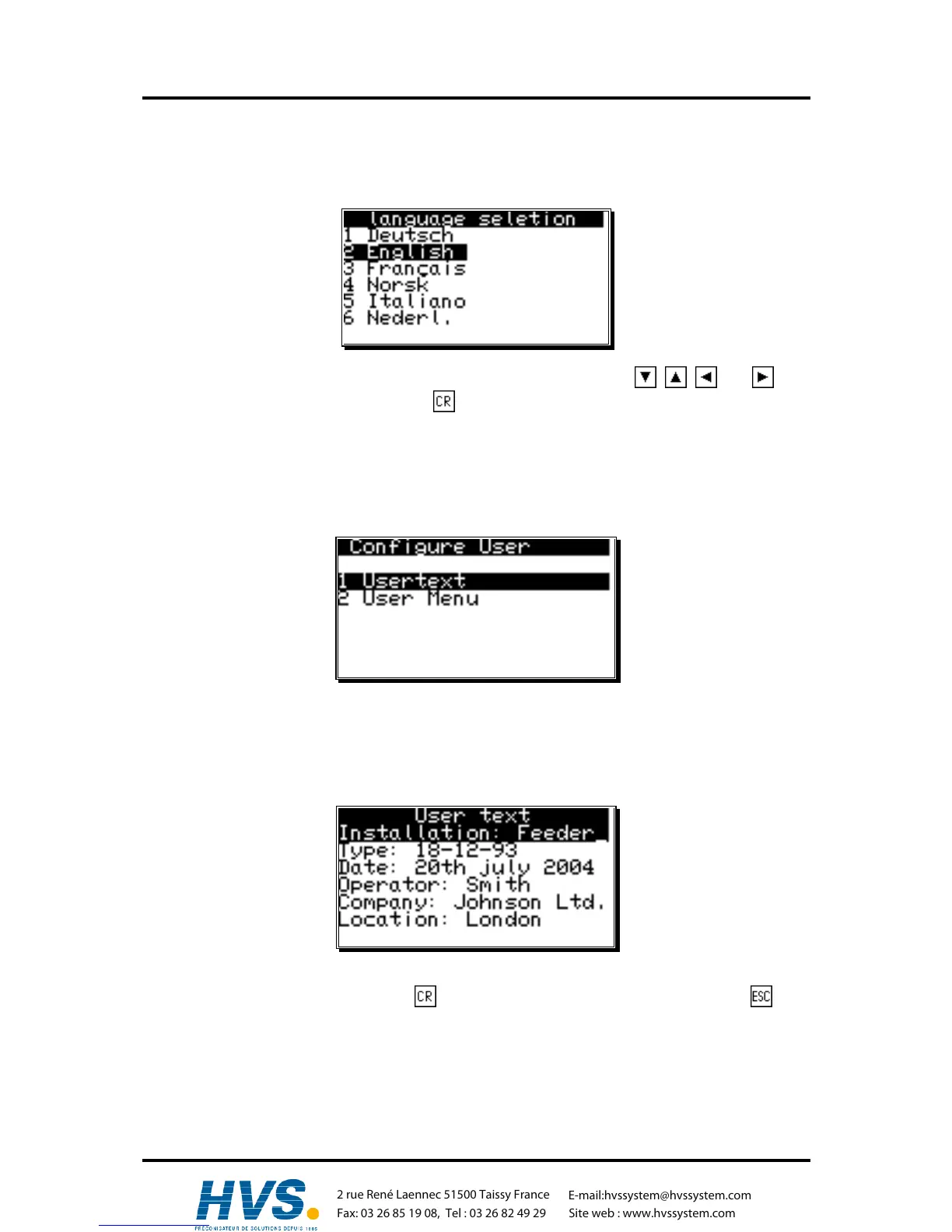
If you selected the menu point "Language" in the "Configuration" menu, the menu for the language
setting appears:
Here you can move the dark field to the desired language using the keys , , and . You
adapt the selected language by pressing the key.
7.5.5. Configure user
If you choose the menu-point "Configure User" in the menu "Unit Configuration", the following menu
appears on your display.
7.5.5.1. User text
If you selected the menu point "User text" in the "Configuration menu", the following menu appears
on the display. Here you can enter general information about e.g. your machine for the CamCon to
display. There are 7 lines available, with 21 characters each.
For the input of the text please see the chapter "5.8. Text input" on page 27. You can store the text and
move on to the next page by pressing the key. You can exit this menu at any time with the key.
,Version from: Aug. 04 Page: 74
2 rue René Laennec 51500 Taissy France
Fax: 03 26 85 19 08, Tel : 03 26 82 49 29
E-mail:hvssystem@hvssystem.com
Site web : www.hvssystem.com



 To Next Page