Copyright @ 2011-2015 Dinstar
Click Reset, and all configuration will be restored to factory defaults.
Note: press the RST button on the back panel of UC2000, only the login username,
password and the Web port can be restored to defaults.
Choose a backup file, and then click Restore.
Choose an upgrade file (which is provided by Shenzhen Dinstar Technologies),
and then click Upgrade.
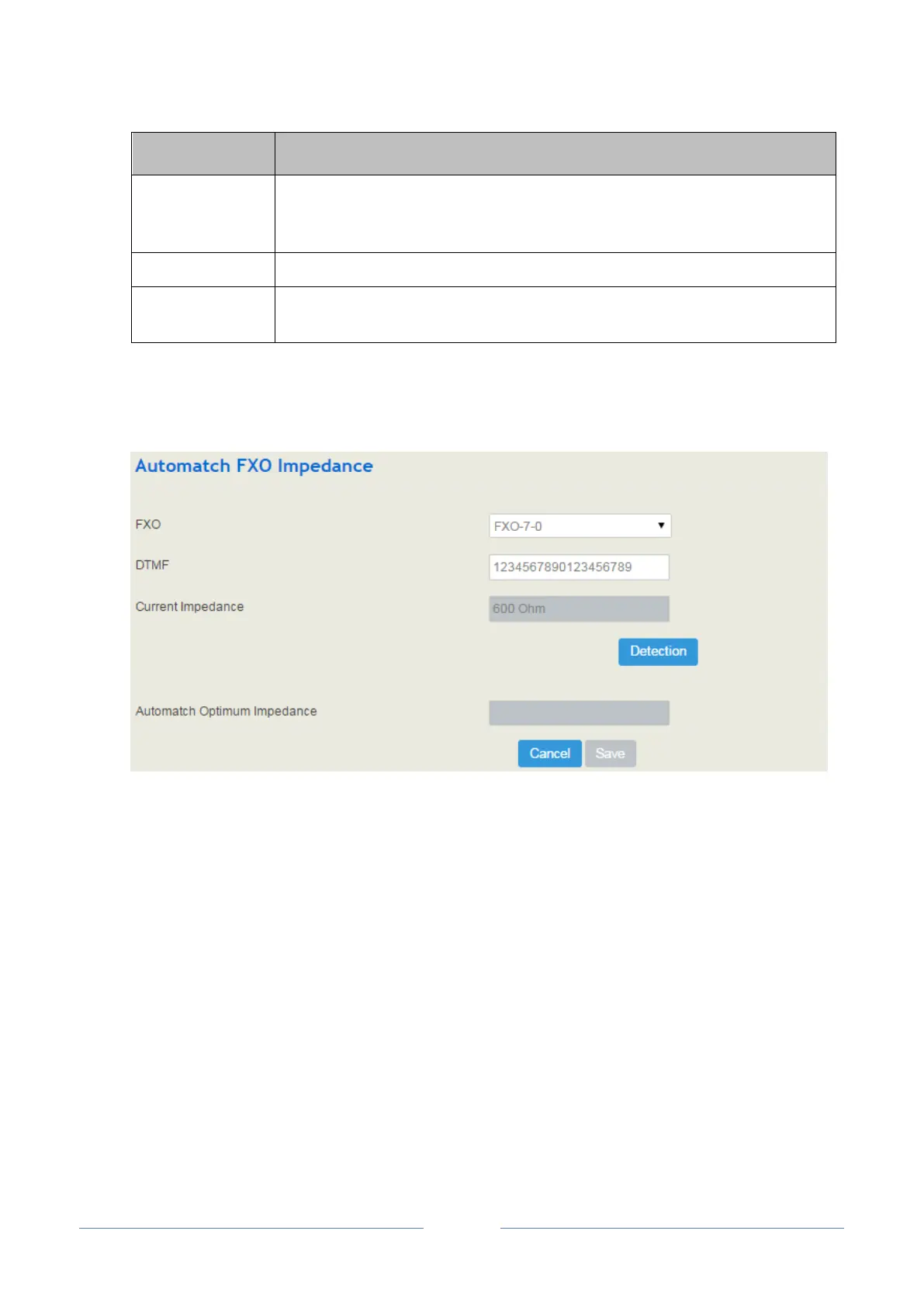
4.4.7 Automatch Impedance
Automatch impedance is used to improve the interoperability of the FXO userboards with other devices.
How to use automatch impedance:
1. Select the to-be-matched FXO port in the drop-down box;
2. Connect a telephone cable to the FXO port and ensure the connection is successful;
3. Click Detection, and the UC2000 device will automatically detect the optimum impedance (It takes a
period of time to carry out the detection).
4. Save the optimum impedance.
Note: You can enter any digits for DTMF number; the default DTMF number 1234567890123456789.
4.4.8 Voice
On the System Voice interface, you can upload an English IVR file or a Chinese IVR file according to
your needs. At present, only those IVR files in wav format are allowed.














 To Next Page