Page 98
Chapter 4
Installation Instructions
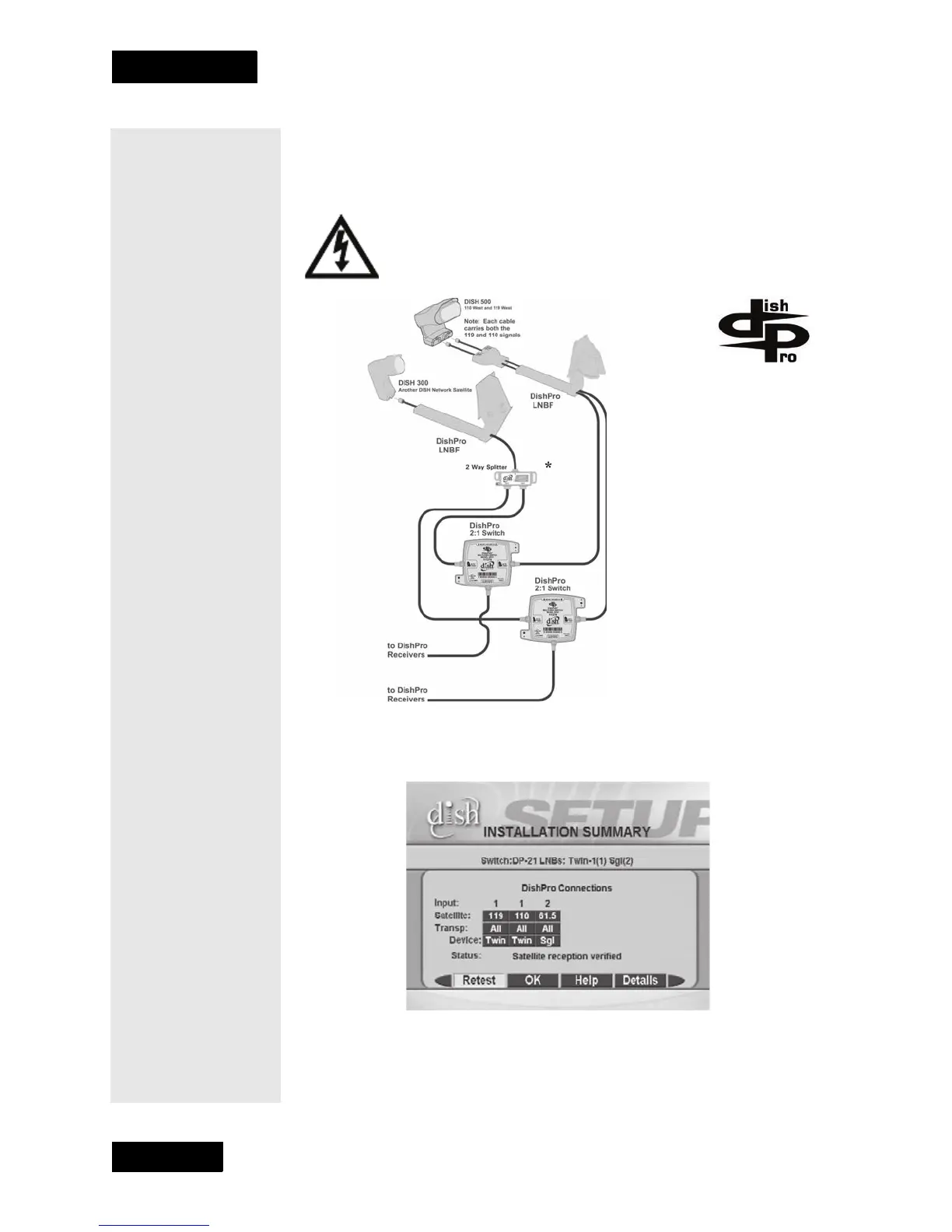
Two Dishes, One DishPro Twin LNBF, One DishPro Single
LNBF, One DishPro Compliant splitter, Two DishPro 21
Switches, Two Receivers
This diagram leaves out grounding to be clear. Make sure you
ground the system per the National Electrical Code (NEC)
and all local electrical codes.
When you set up your system following this diagram and run
Check
Switch
the Installation Summary screen should look similar to the one
shown below.
* When using a DishPro
compliant splitter to split the
signal from a DishPro single
LNBF, the receiver whose DP21
switch is connected to the
passing side of the splitter must
be plugged into a live power
outlet at all times. If not, the
DishPro single LNBF will not
have any power and will not be
able to provide satellite signal to
the other receiver.











 To Next Page