65ECLYPSE Connected Thermostat (ECY-STAT)
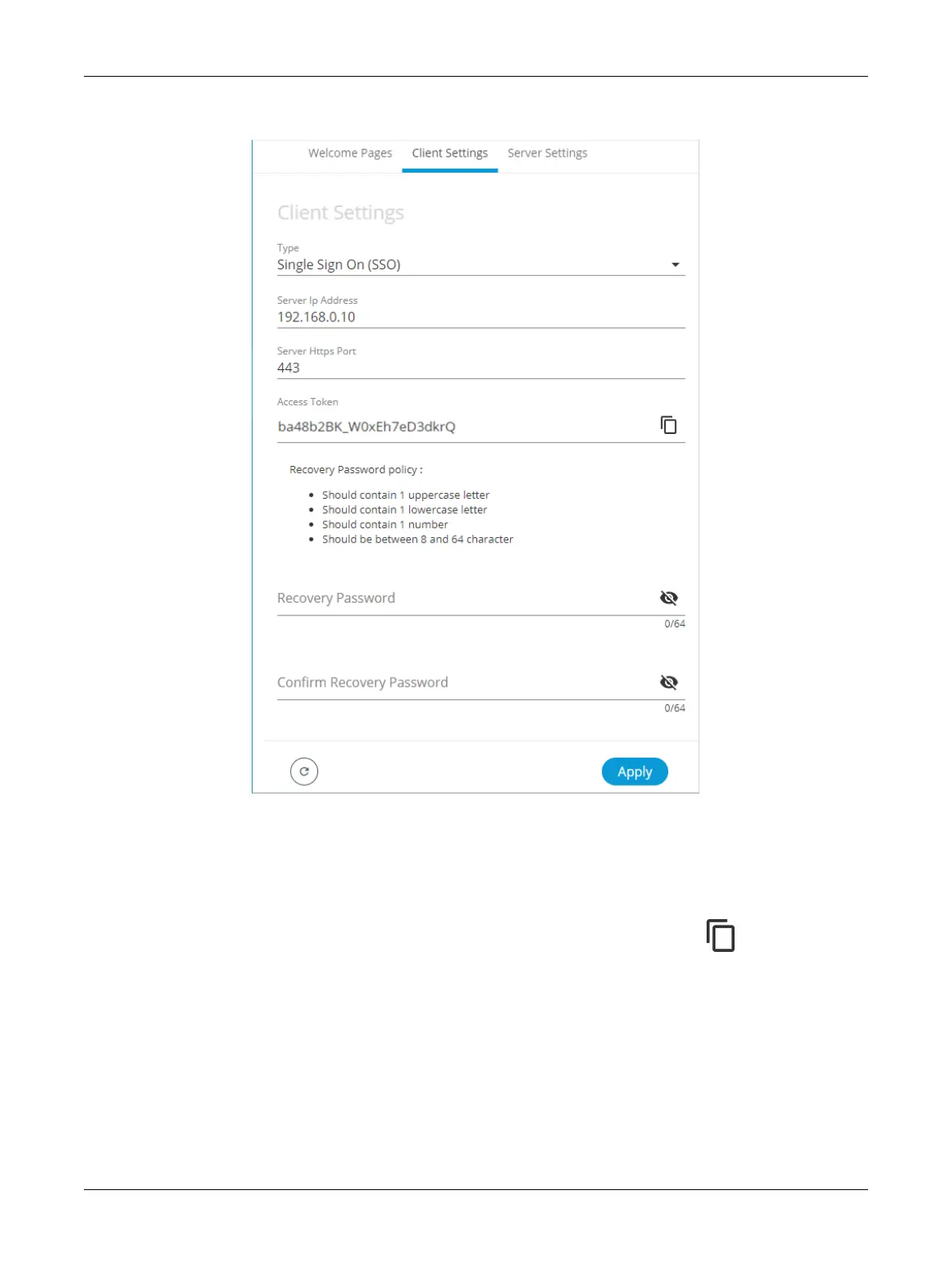
6. In Type, select Single Sign On. Additional fields are displayed.
Figure51: SSO Client Settings
7. In Server IP Address, enter the server IP address of the controller that is configured as the Server
(e.g., 192.168.0.10).
8. In Server Https Port, verify that the port number matches the HTTPS port number of the SSO
server in System > Web Server (e.g., 443).
9. In Access Token, you must enter the access token from the SSO Server. Copy the access to-
ken from the Server Settings (see above procedure Setting up the SSO Server) and paste in this
field.
10. In Recovery Password, enter a recovery password that you will use in a case where the server is
no longer available.
11. In Confirm Recovery Password, enter the password again.
12. Click Apply to apply and save the configuration.
ECLYPSE Web Interface


 To Next Page