Dobot CR Series User Guide
Issue V1.1 (2023-04-27) User Guide Copyright © Yuejiang Technology Co., Ltd.
12
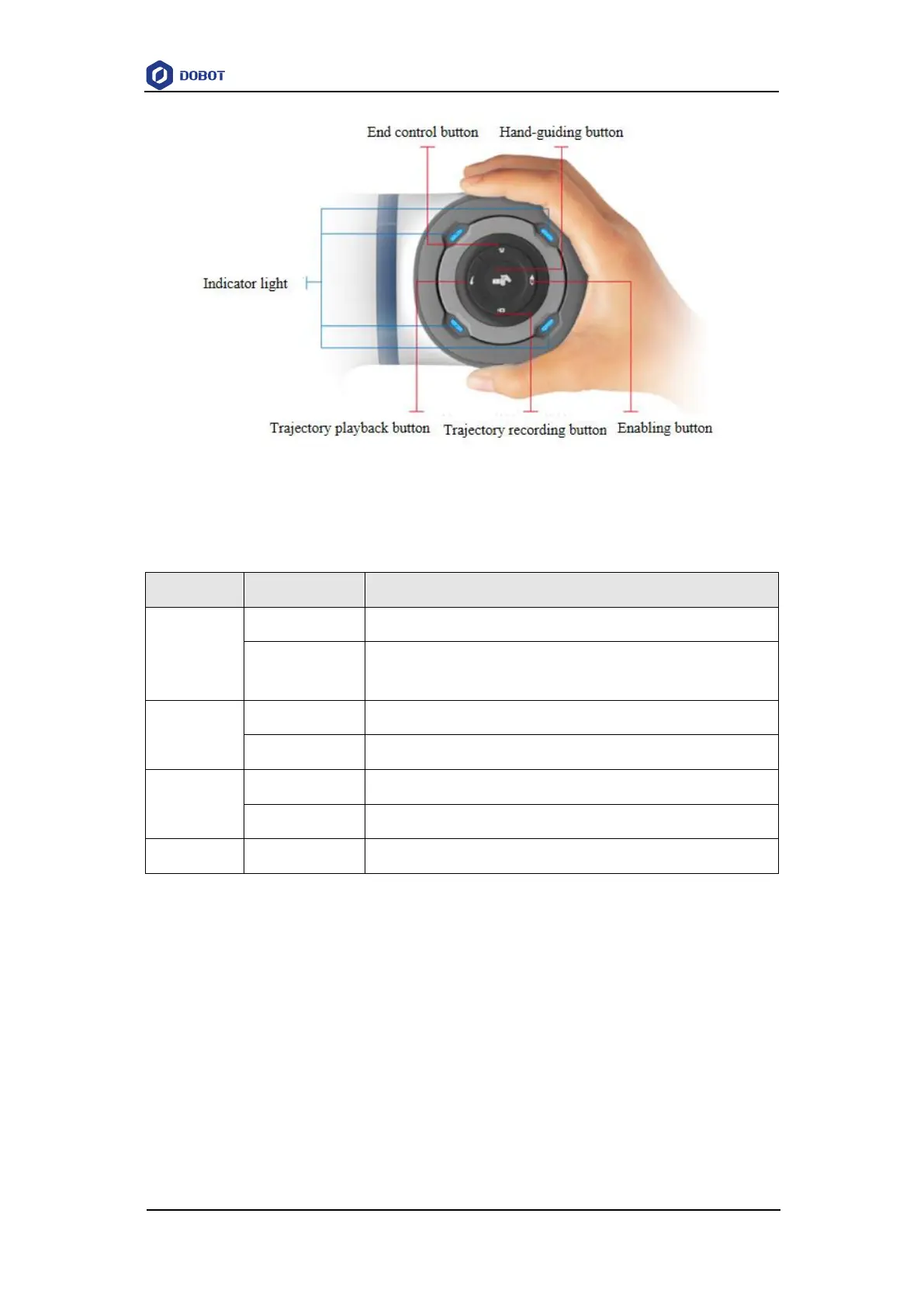
Figure 3.4 End buttons and indicator light
The definition of the indicator light is shown in Table 3.1.
Table 3.1 Definition of indicator lights
Hand-guiding status (or the robot arm is starting/the robot arm and
controller failed to be connected)
The functions of the end button are shown below:
Hand-guiding button: When the robot arm is in the enabled status (the indicator light is
green and steady on), long press the button for 3 seconds and then release it, and the robot
arm will enter the hand-guiding status (the indicator light flashes blue). After dragging the
robot arm to the teaching point, press the end button again for a short time, and the robot
arm will exit the hand-guiding status (the indicator light turns to green and steady on).
End control button: Short-press the button to control the end tool. For specific functions,
you need to configure in “Dobot+” page of the control software.
Enabling button: When the robot arm is powered on and in the disabled status (the
indicator light is blue and steady on), long press the button for 3 seconds and then release
it, and the robot arm will enter the enabled status (the indicator light flashes blue). The



 To Next Page