Dobot CR Series User Guide
Issue V1.1 (2023-04-27) User Guide Copyright © Yuejiang Technology Co., Ltd.
45
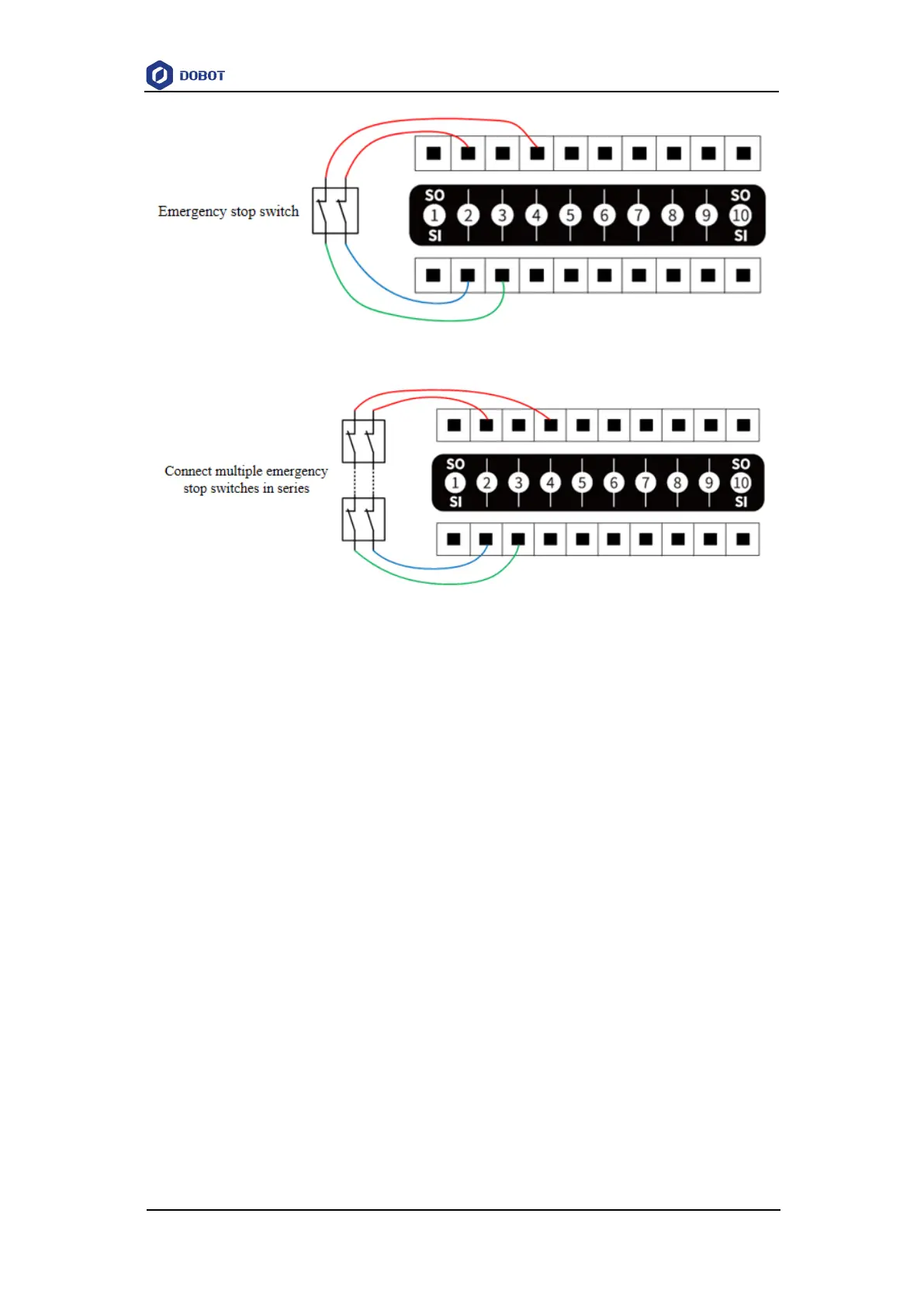
Figure 6.10 SI connected to an emergency stop switch
Figure 6.11 SI connected to multiple emergency stop switches
Protective stop interface
The protective stop interface is used for connecting external protective devices (such as safety
gate, safety light curtains, etc.).
The protective stop input is the normally closed signal input of high power by default. Low
level triggers the robot to enter protective stop state (pause state).
When the protective stop reset interface is configured, the operation of the robot can be
resumed only by restoring the protective stop input signal and triggering the protective
stop reset input.
When the protective stop reset interface is not configured, the operation of the robot can
be resumed by restoring the protective stop input signal.
Protective stop reset interface
The protective stop reset interface is used to reset the protective stop state.
The default protective stop reset input is the normally open signal of high power, and rising
edge triggers to reset the protective stop state.
If you configure SI04 and SI05 as protective stop input and SI10 as protective stop reset input,
the wiring is shown below (SO02, SO04 and SO10 are 24V).



 To Next Page