Issued June 2020
Operation
Copyright 2020, Heil Environmental
Printed in U.S.A.
73
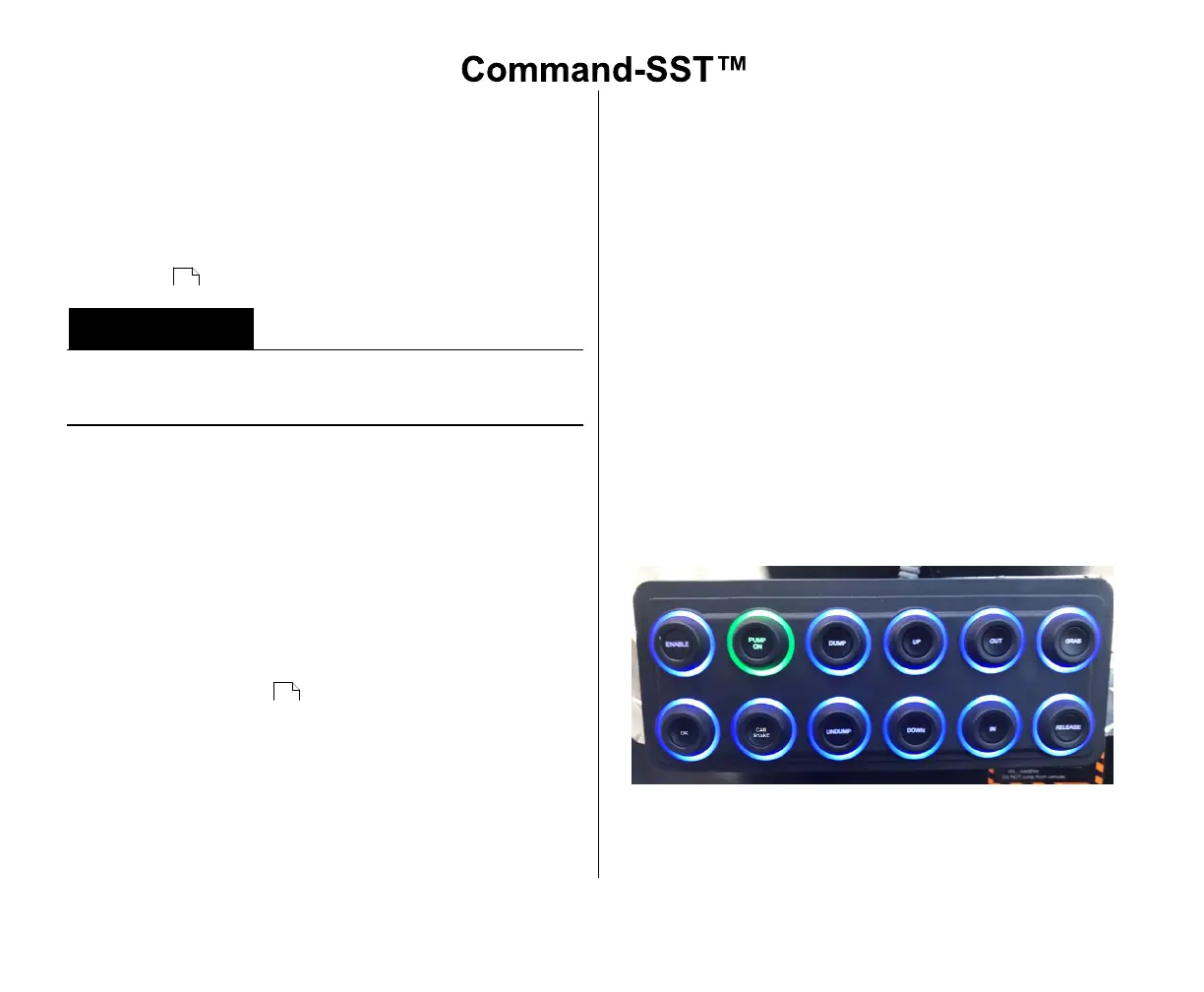
MANUAL CONTROLS PUSH BUTTON
CONTROLS
The Manual Controls Push Button Controls is typically
located in the cab, under the curb side seat and can be
used for calibration purposes. This key pad is water-
resistant with a lighted ring around each button. See Unit
Calibration .
Calibration Mode should only be used by Authorized
Service Personnel when replacing any hydraulic
component in the lift or pack circuits.
A.Push Button Controls Functions
The Manual Controls Push Button Controls can vary with
different models of truck chassis. Individual buttons
have markings that identify each function and its
operations. Make sure you are familiar with the Manual
Control Push Button Controls for your unit prior to
operating the unit.
1. ENABLE - Turns the Manual Control Key Pad ON
(Green) or OFF (Blue). Coordinated Mode must be
OFF (Blue) on the Supporting Functions Push
Button Controls .
2. PUMP ON - Turns the Hot Shift PTO ON (Green) or
OFF (Blue)
3. DUMP - Rotates the Grabber Head in Dump
Position, ON (Green) or OFF (Blue)
4. UNDUMP - Rotates the Grabber Head in Dump
Position, ON (Green) or OFF (Blue)
4. UP - Moves the Lift Arm in the UP direction, ON
(Green) or OFF (Blue)
5. DOWN - Moves the Lift Arm in the DOWN direction,
ON (Green) or OFF (Blue)
6. OUT - Moves the Lift Arm in the OUT direction, ON
(Green) or OFF (Blue)
7. IN - Moves the Lift Arm in the IN direction, ON
(Green) or OFF (Blue)
8. GRAB - Moves the Grabbers in the CLOSED
direction, ON (Green) or OFF (Blue)
10.RELEASE - Moves the Grabbers in the OPEN
direction, ON (Green) or OFF (Blue)
11.OK - Provide OK input for Calibration Process, ON
(Green) or OFF (Blue)
12.CAN SHAKE - Activates the Can Shake function, ON
(Green), OFF (Blue), OFF with ENABLE Active and
COORD MODE ON (Yellow)
Figure 41. Manual Control Push Button Controls
(DISABLE and PUMP OFF buttons shown may not
be found on all units.)
124
72



 To Next Page