84 Instructions for use Babyleo TN500 SW 1.0n
Operation
6.8.7 Setting the advanced skin temperature alarm limits
With the Advanced skin temperature monitoring function the alarm limits for the
difference between the central and the peripheral skin temperature can be defined
additionally.
Prerequisite:
– The 2 skin temperature sensors are connected to the device and attached to the
patient.
Procedure:
1 Touch the System setup... button in the main menu bar.
2 Open the Alarms screen.
3 Enter the password and confirm.
4 Touch the Skin mode tab.
5 Select Advanced skin temperature monitoring > On and confirm.
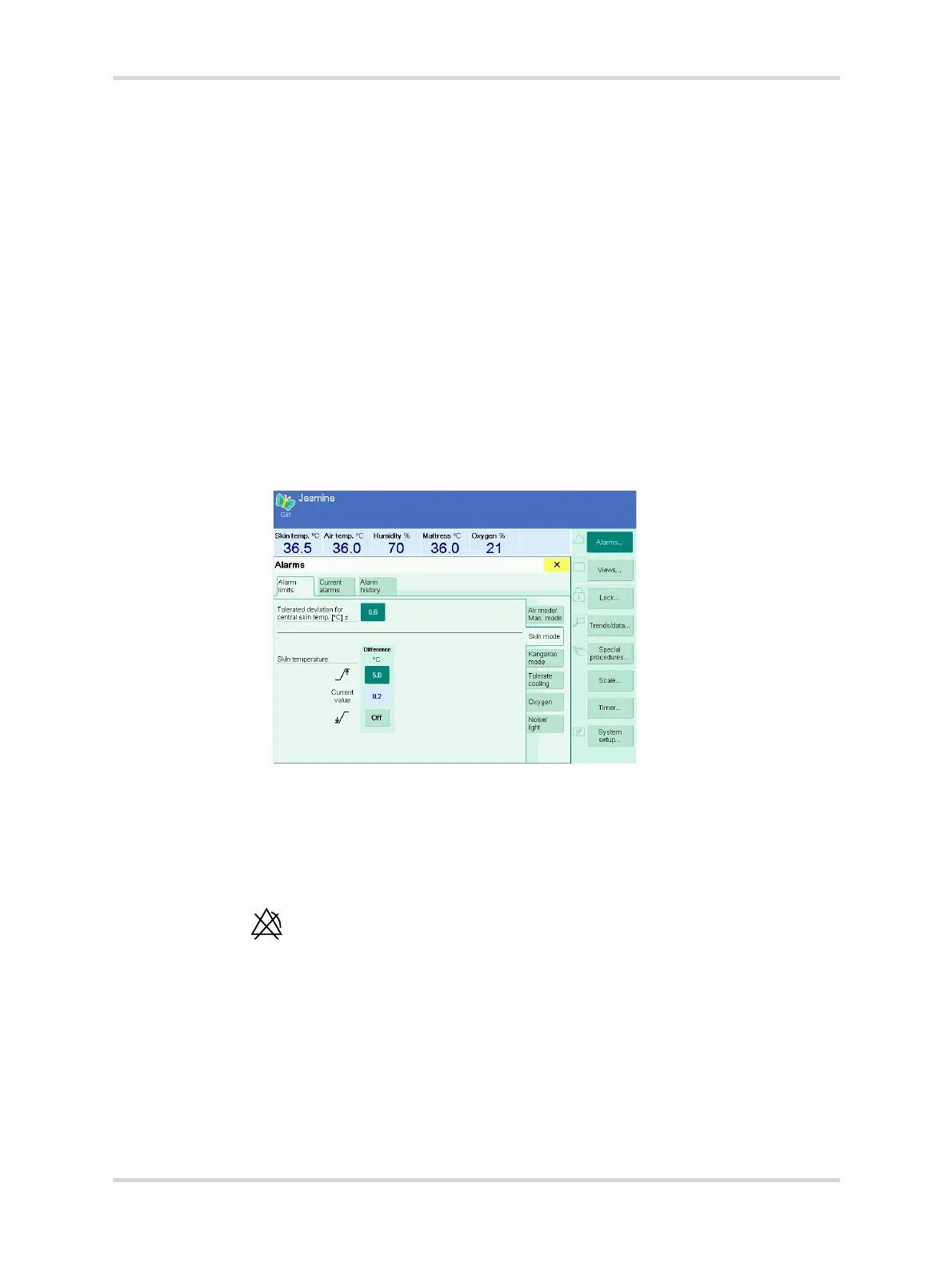
The additional buttons for setting the skin temperature alarm limits are
displayed.
Fig. 43 Additional skin temperature alarm limits
6 Set and confirm the alarm limits for the difference between the central and the
peripheral skin temperature.
✓ The advanced skin temperature alarm limits are set.
If one of the advanced skin temperature alarm limits is switched off, the following
symbol is displayed on the main screen:
The same symbol is displayed if skin temperature monitoring is deactivated.
28483



 To Next Page