32 Instructions for use Babyleo TN500 SW 1.0n
Product description
3.2 Screen views
This chapter describes the structure of the main screen and the basic control
options.
The actual screen views may differ in appearance or configuration. The screen
views in these instructions for use show the maximum range of functions of the
device. The set values shown in the screen views are for illustration purposes
only. For further information, see the following chapter: ''Range of
functions'' (page 41)
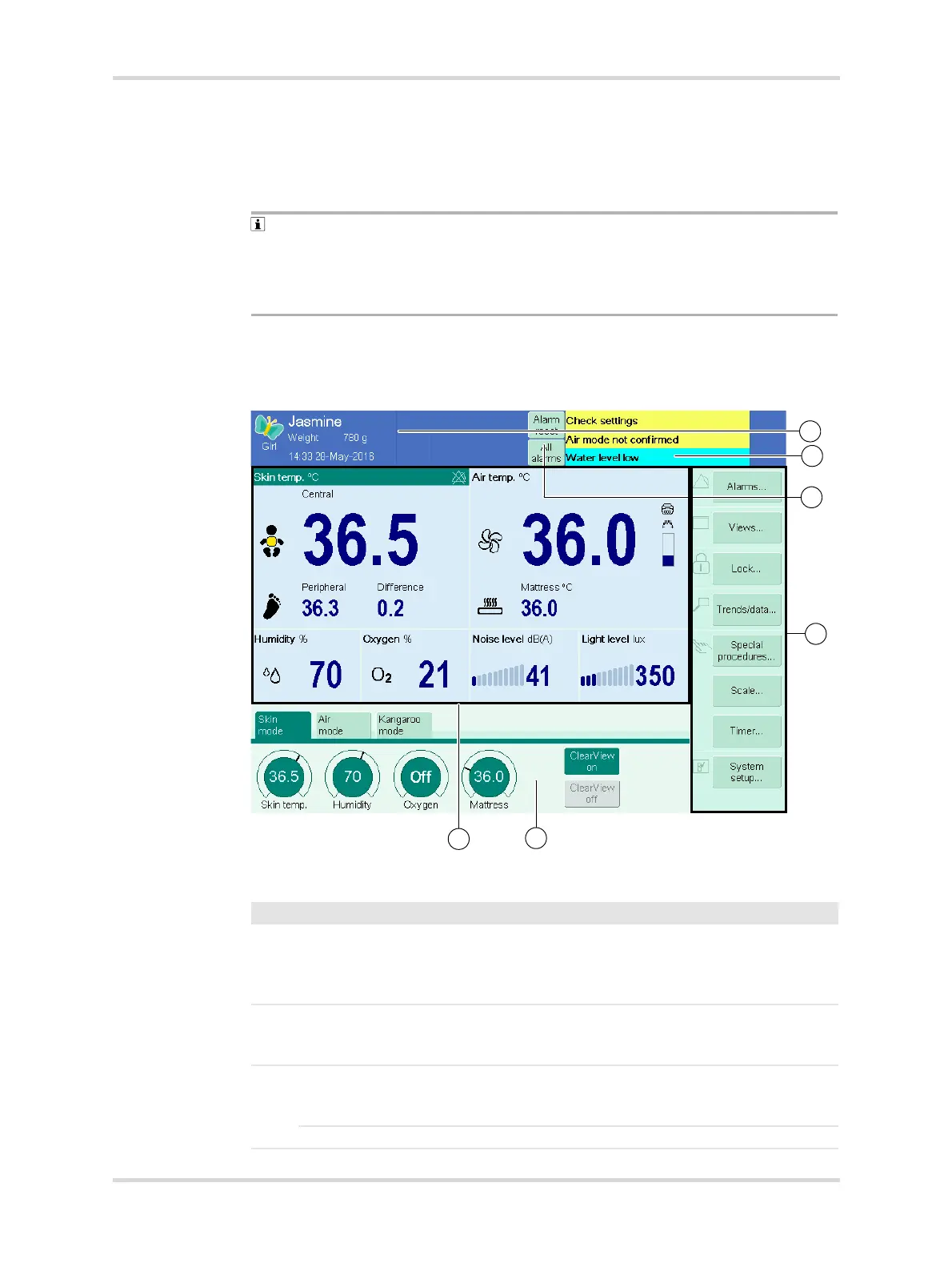
3.2.1 Main screen
The main screen shows the most important warming therapy information.
Fig. 10 Structure of the main screen
28500
No. Designation Description
1 Header bar Shows active alarms, patient data, the stop-
watch, and the APGAR timer. In the header
bar, the symbol and the remaining alarm
silence time are displayed.
2 Alarm message field Shows up to 3 active alarms at the same time.
Alarm priority is indicated by different back-
ground colors.
3 All alarms Shows that there are more than 3 active
alarms. Touch the button to display all current
alarms.
Alarm reset Indicates that the current alarms can be reset.














 To Next Page