15 | Examples of settings
160
D-ISC 100 x xx2
D‑ISC100 menu path:
Standard display (e.g. S1.1) User mode (menu1) Login/
Logout (menu5)
Login (menu 5.1)
=Login MENU 5.1.1 Name
Login
Status: S1.3:Normal measurement
Menu: 5.1.1
\\
Name User
PIN-Code
E
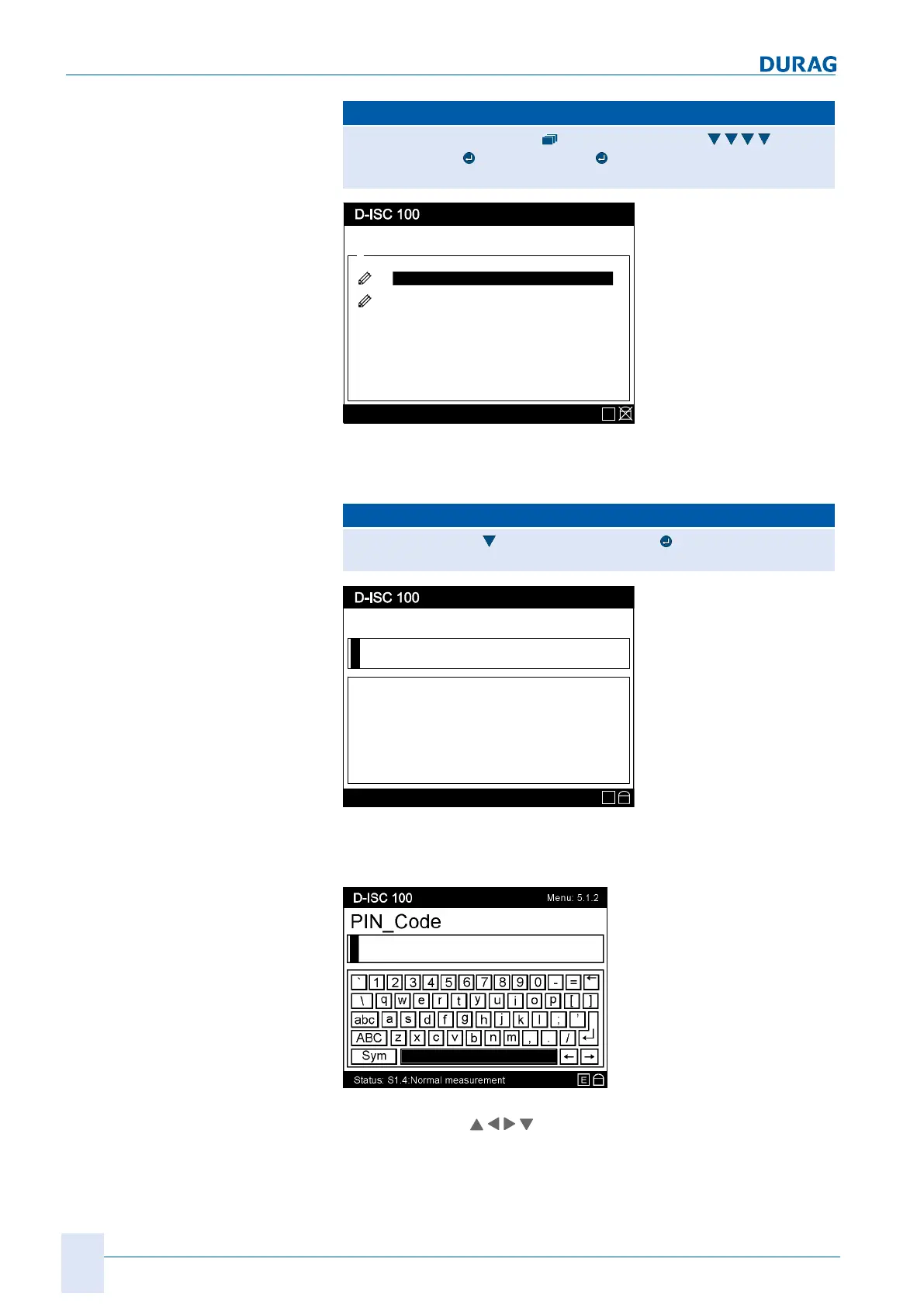
Fig.15.4: Login menu 5.1.1
Check the name in this display. For PIN code input, it must be
set to "
User
".
D‑ISC100 menu path (continued):
Name (menu5.1.1) PIN code (menu5.1.2)
= Login MENU 5.1.2 PIN code
PIN-Code
Status: S1.4:Normal measurement
Menu: 5.1.2
E
Fig.15.5: PIN code menu 5.1.2
Enter the value PIN code here. If must consist of 4 digits in the
value range 0-9.
PIN input:
Fig.15.6: Menu 5.1.2 with the virtual on-screen keyboard I
The arrow keys (
) on the keypad [}203] (on the device
housing) can be used to select the characters on the on-screen
keyboard [}204] (display). The current character is shown
against a black background (
in this example the space bar
).


 To Next Page
 Loading...