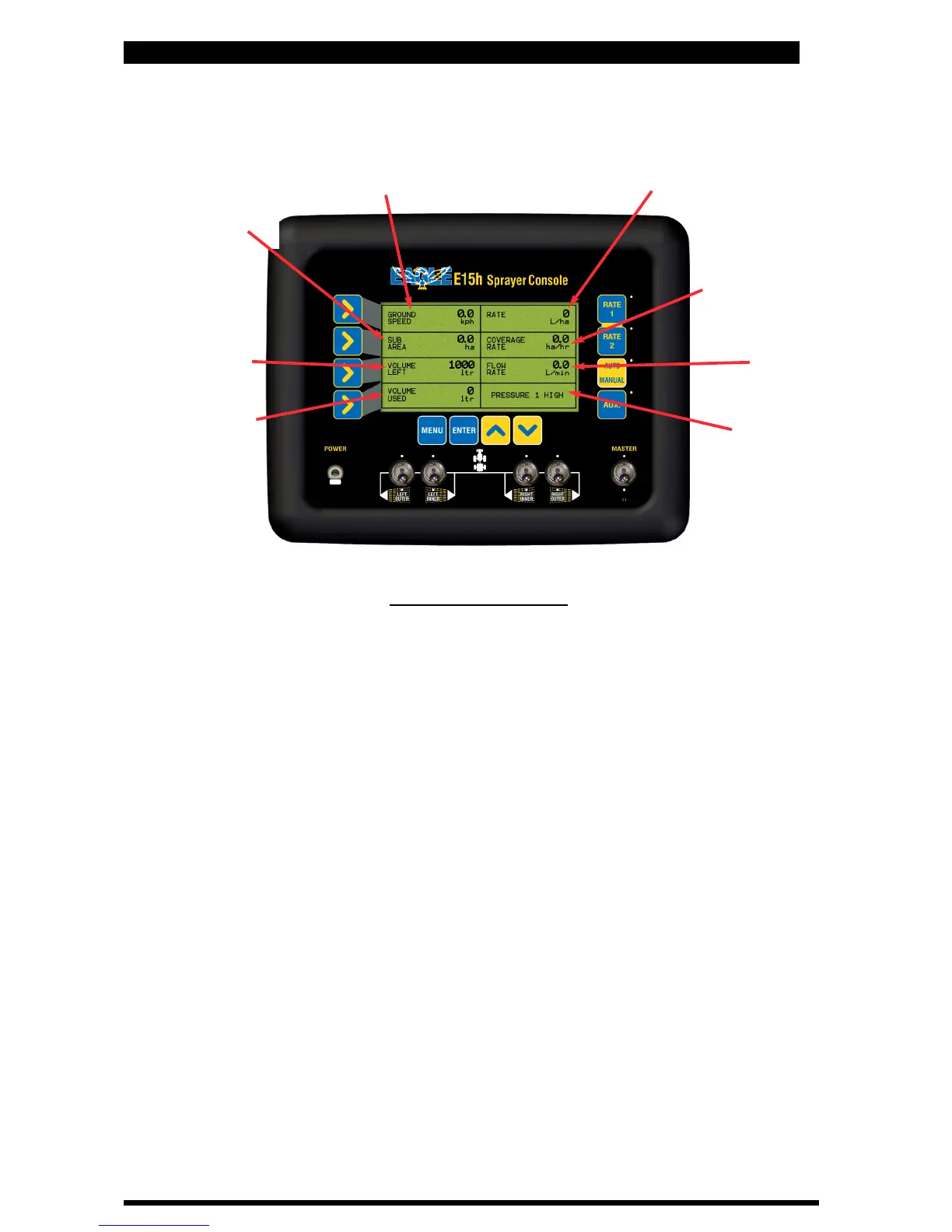
E15h SPRAYER- Console Overview
2.0 CONSOLE OVERVIEW
2.1 WORKING SCREEN DISPLAY
Volume
(Flow Rate)
Coverage
Rate
Application Rate
Ground Speed
Volume Left
Alarm Window
Volume Used
Working Screen
12
The above “Working Screen” is what is displayed when the console is first switched ON.
The “Working Screen” is the screen displayed when spraying.
Below is a brief description of what is displayed in each window. The functions listed below
are the default settings, for each window.
Some windows can display more than one function, these are explained on the next page.
Ground Speed- Displays the ‘live’ ground speed from the wheel sensor on the sprayer.
Rate- Displays the ‘live‘ spray rate.
Sub Area- Displays area covered for the active sub area.
The Sub Area window can be selected to display the “Sub Area Number”
and “Total Area”.
Coverage Rate- Displays the working rate of the sprayer in units/hr.
Volume Left-Displays the volume left in the spray tank.
Flow rate-Displays the ‘live’ flow rate in units/minute
Volume Used-Displays the volume used.
Alarm Window-Displays all alarms, actions or warnings in this window.
Sub Area
or Sub Area Number
or Total Area
V 1.0 11/05



 To Next Page