Major Topic Heading
V 1.2
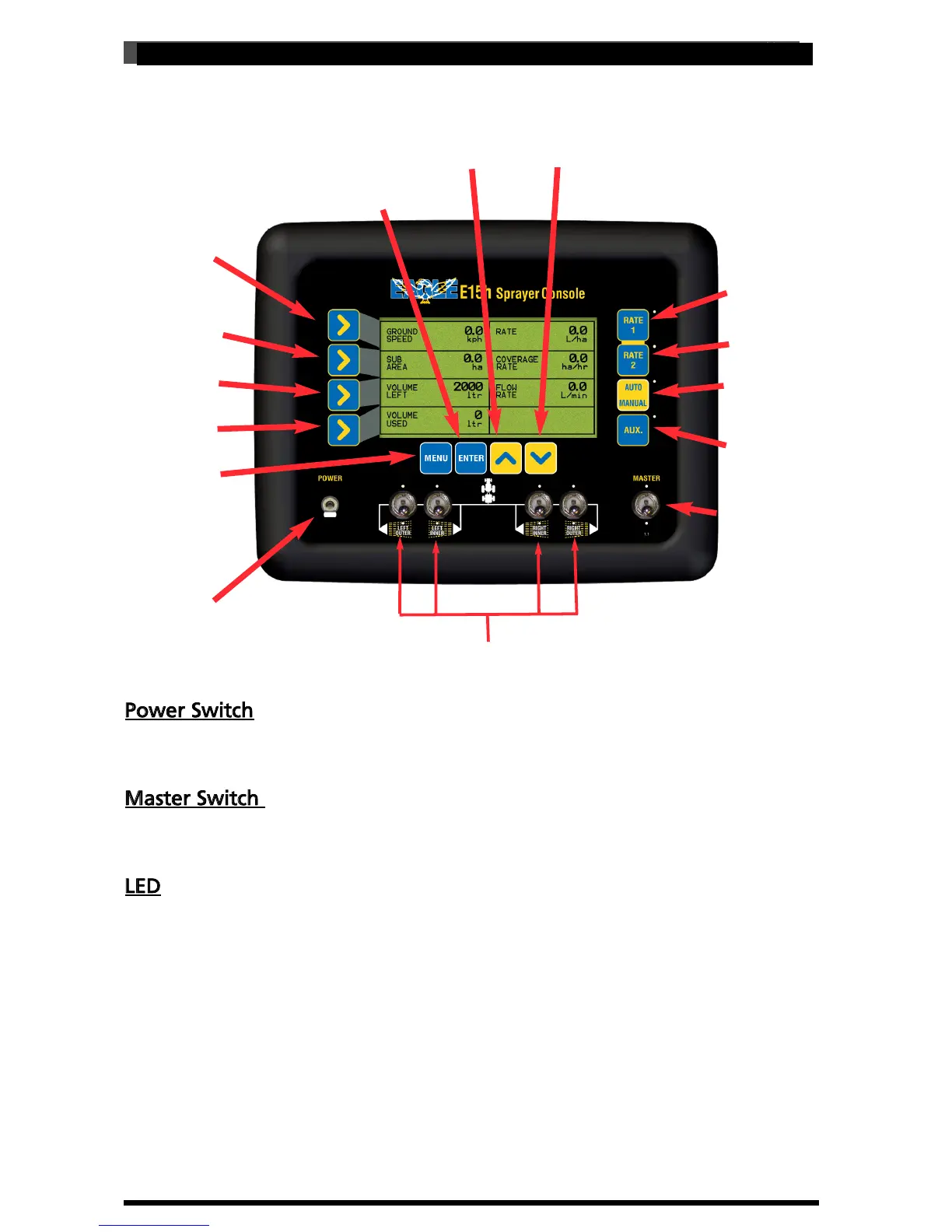
E15h SPRAYER-Console Overview
Line 1 Button
Line 3 Button
Line 2 Button
Power Switch
Auxiliary
Rate 2
Rate 1
Line 4 Button
Auto/Manual
Master Switch
Menu Button:
Gateway to set up
Section Switches
2.2 WORKING SCREEN BUTTON FUNCTIONS
INC Button (Up Arrow)
DEC Button (Down Arrow)
Enter
Power Switch
The Eagle console is switched ON and OFF by this switch on the front panel. By
default down is ON.
Master Switch
The MASTER switch turns all sections selected for operation, ON or OFF. By default
down is ON
LED
Light Emitting Diode (LED). The LED’s aligned above (front boom) the section
switches and below (back boom) the section switches indicate the status of the
sections.
The LED’s for the MASTER switch indicates the status of the switch ON or OFF.
The LED’s near the RATE 1 and RATE 2 button indicate which preset spraying RATE
has been selected.
The LED’s near the AUTO/MANUAL button indicates the status whether in AUTO
(LED light is ON) or MANUAL (LED light is OFF).
14
V 1.0 11/05



 To Next Page