111
14.1 Real Time Clock
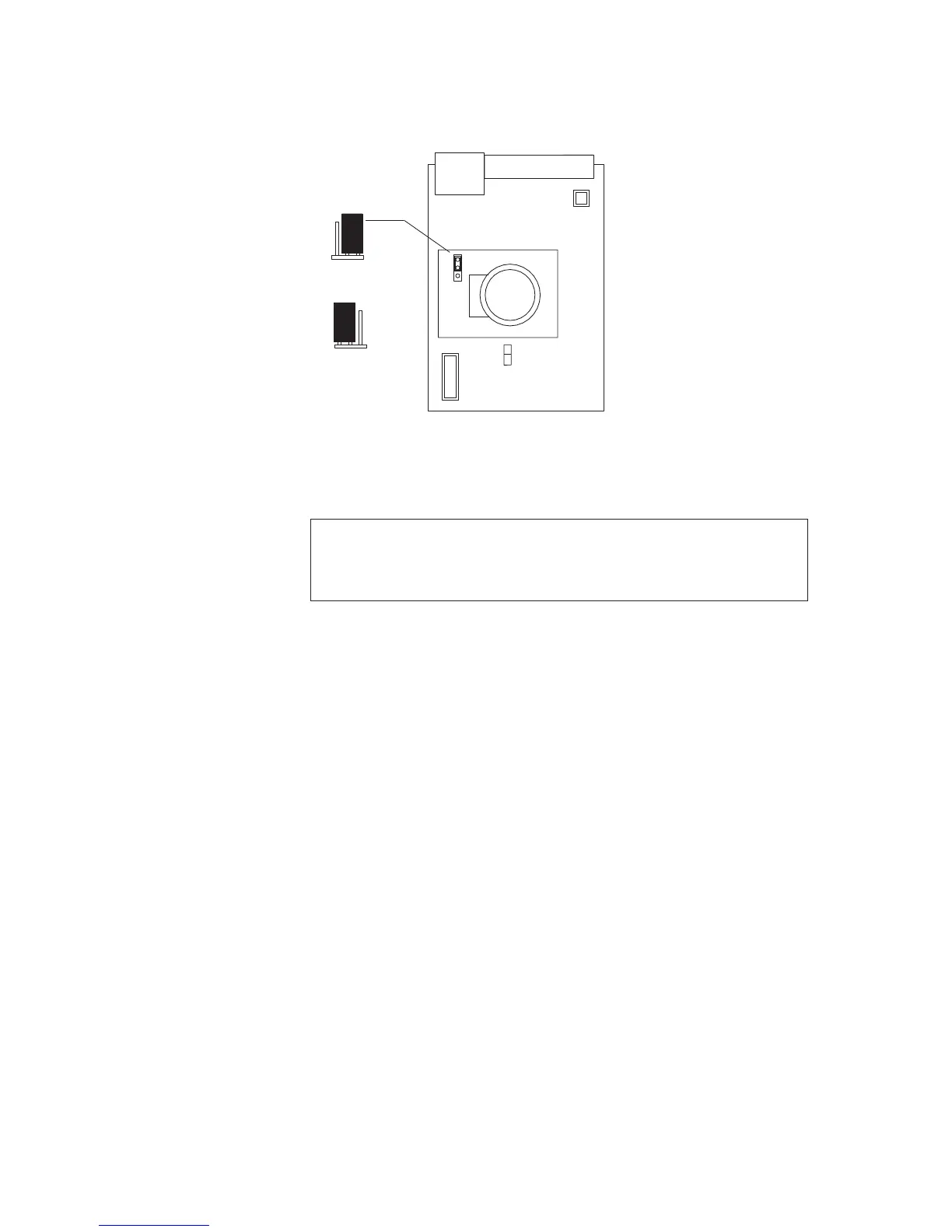
The comm’s card comes with a battery backed RTC which keeps running even if power is lost
to the unit. The Battery also powers the SRAM which is used to store the buffers on power
loss. The Battery is only drained while no power is present on the unit. The clock can be set in
the configuration software using the synchronise time tool.
Note:
Units will be shipped with the jumper link set in the N/C position to stop the Battery
from going flat before installation. Before applying power this link should be set to the
BAT position.
Event Buffers
Each port has its own buffer which can hold up to 500 events. There is also a sort buffer that
can also hold 760 events if the port buffer become full. If the sort buffer becomes full then the
events will back up on the alarm cards.
Each alarm card can hold 900 events. On power loss the buffers will remain as long as the
battery is functioning.
To delete the buffers either remove the battery power (This will only clear the comm’s card
buffer not the Alarm card buffers) or use the Clear buffer tool in the configuration software.
OR
BATTERY
CONNECTION


 To Next Page