13
1.21 Signal Input Contact Status
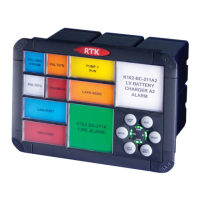
During commissioning or fault finding the user can easily determine the current status of all of the
plant inputs connected to the alarm annunciator by placing the unit into CAL mode.
Once in this mode each window on the RTK 725B indicates the dynamic status of the associated
plant input.
• If the alarm window is OFF the associated plant input is OPEN
• If the alarm window is ON the associated plant input is CLOSED
Please note: The OPEN and CLOSED indication refers to the customer’s field contact and is not
related to the non alarm state set in the annunciator. (N/O or N/C)
1.22 Configuring Alarm Inputs for use with N/O or N/C field contacts
The non alarm state of each alarm channel can be configured in software to allow the channel to
operate from either a N/O or N/C contact as described later in this manual.
As an alternative the integral pushbutton module can be used to set this function by sliding the
CAL switch down to the ON position.
When in CAL mode the function of the integral pushbuttons changes to allow the user to navigate
between channels, select the function and set the function as detailed below.
Pushbutton Abbreviation Function in CAL Mode
Lamp Test CHDN Channel Down
Ack FDN Function Down
Mute SET Set
Reset SET Set
System Test CHUP Channel Up
First Reset FUP Function Up
The alternative function of each pushbutton is indicated on the inside face of the pushbutton
assembly but it is the pushbutton on the front of the assembly that is used to physically activate
the function.


 To Next Page