Scanning
36 EchoNous Bladder & Vein User Guide
• Tap Ultrasound Imaging to perform a general ultrasound examination. Choose the appropriate scan preset
from the list. This option is only available when connected to a bladder probe.
• Tap Vascular Access to perform a vascular access scan. This option is only available when connected to an
EchoNous Vein probe.
• Tap Training Video Library to view a series of instructional videos.
• Tap Scan Review to review locally stored examinations. This option is not available if Local Storage is disabled
in Settings
.
Bladder scanning
Measuring bladder volume
1. To start a exam, from the Home screen, tap Bladder Volume.
2. Select the appropriate patient type (Normal, Pediatric, Deep, or Pregnant):
— Normal: BMI less than 30
— Deep: BMI greater than or equal to 30 or scar tissue present
— Pediatric: Weight under 27 kg
— Pregnant: Active pregnancy
3. Lay the patient as flat as can be tolerated.
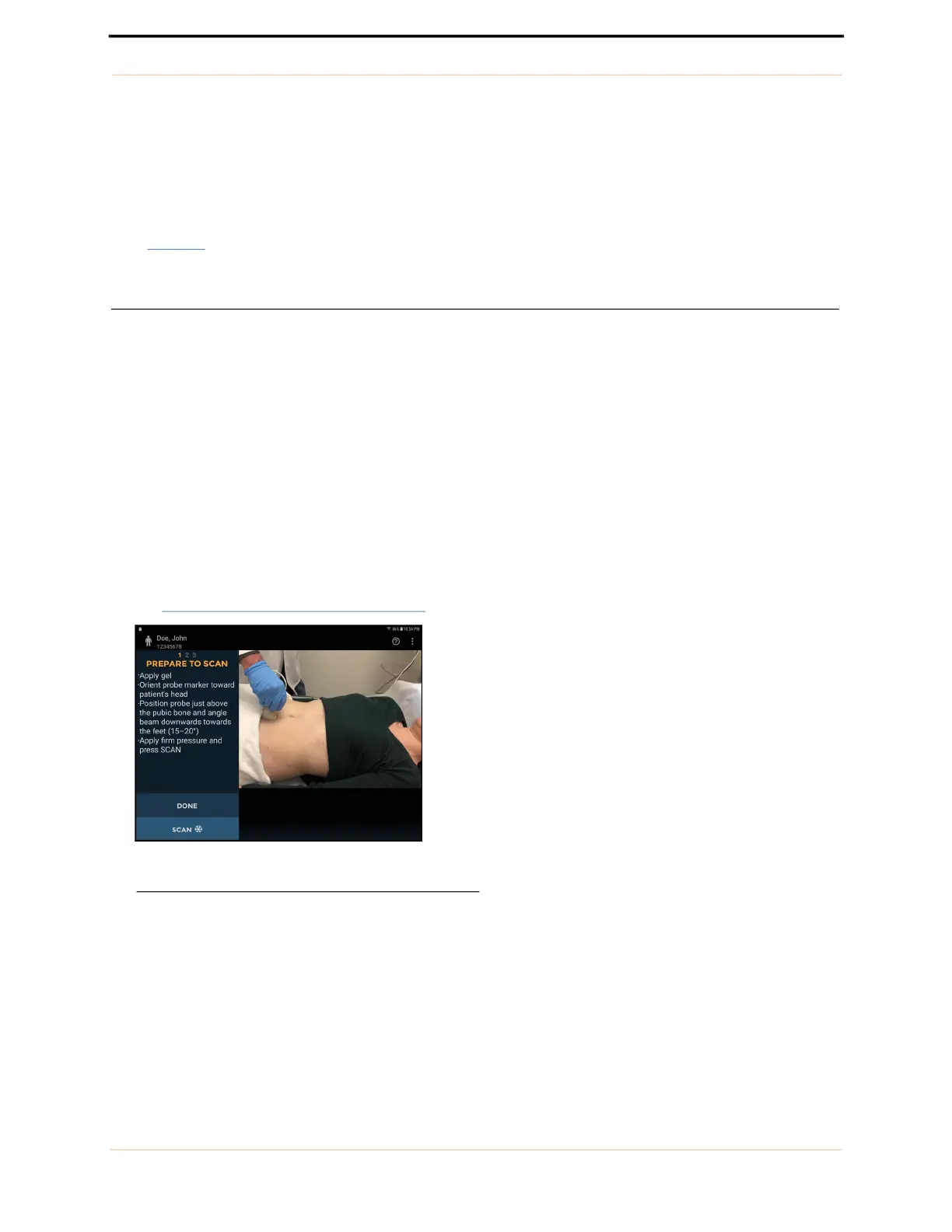
4. If necessary, palpate the patient’s pubic bone, and place a generous volume of gel just above (about 1 inch or
2.5 cm) the pubic bone
(see FIGURE 16.
Place transducer and start).
FIGURE 16. Place transducer and start



 To Next Page