EasyManua.ls Logo

Eclipse CD3200 - Page 113

Eclipse CD3200
177 pages
Print Icon
To Next Page IconTo Next Page
To Previous Page IconTo Previous Page
Loading...
How
to
operate
the
AUDIO
CONTROL
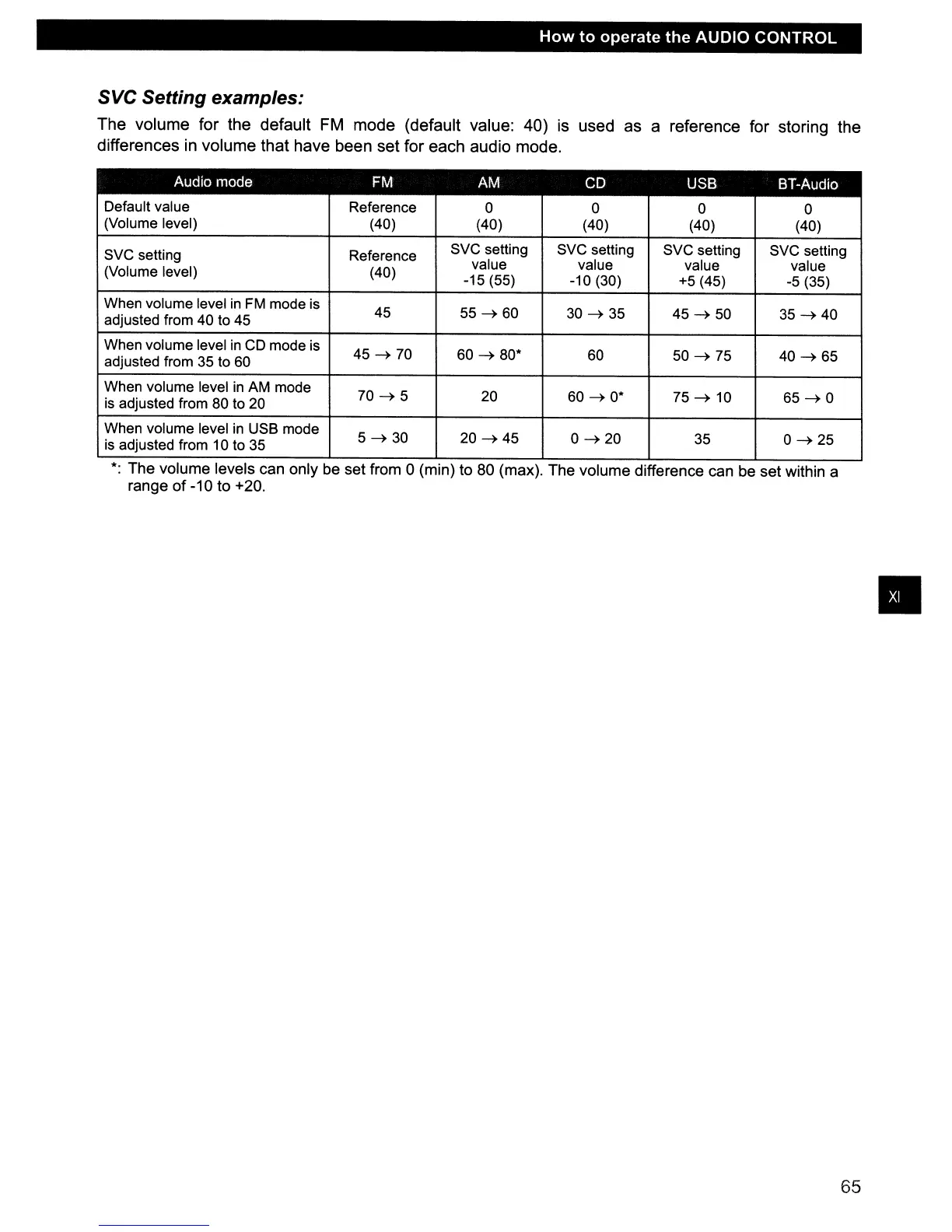
SVC Setting examples:
The
volume
for
the
default
FM
mode
(default
value:
40) is
used
as
a
reference
for
storing
the
differences
in
volume
that
have
been
set
for
each
audio
mode.
Audio mode
FM
AM
CD
USB BT-Audio
Default value
Reference
0 0 0
0
(Volume level) (40) (40)
(40) (40) (40)
SVC setting Reference
SVC setting
SVC setting SVC setting SVC setting
value value value
value
(Volume level) (40)
-15(55) -10(30) +5 (45)
-5
(35)
When volume level
in
FM
mode
is
45
55
~60
30
~
35
45~
50
35~40
adjusted from 40 to 45
When volume level
in
CD
mode
is
45~
70
60
~
80*
60
50
~
75
40
~
65
adjusted from
35
to
60
When volume level
in
AM
mode
70~5
20
60
~
0*
75
~
10
65~0
is
adjusted from
80
to
20
When volume level
in
USB mode
5~30
20~45
0~20
35
0~25
is
adjusted from 10 to
35
*:
The volume levels can only be set from 0 (min) to 80 (max). The volume difference can be set within a
range
of
-10 to +20.
65

Table of Contents

Other manuals for Eclipse CD3200

Related product manuals