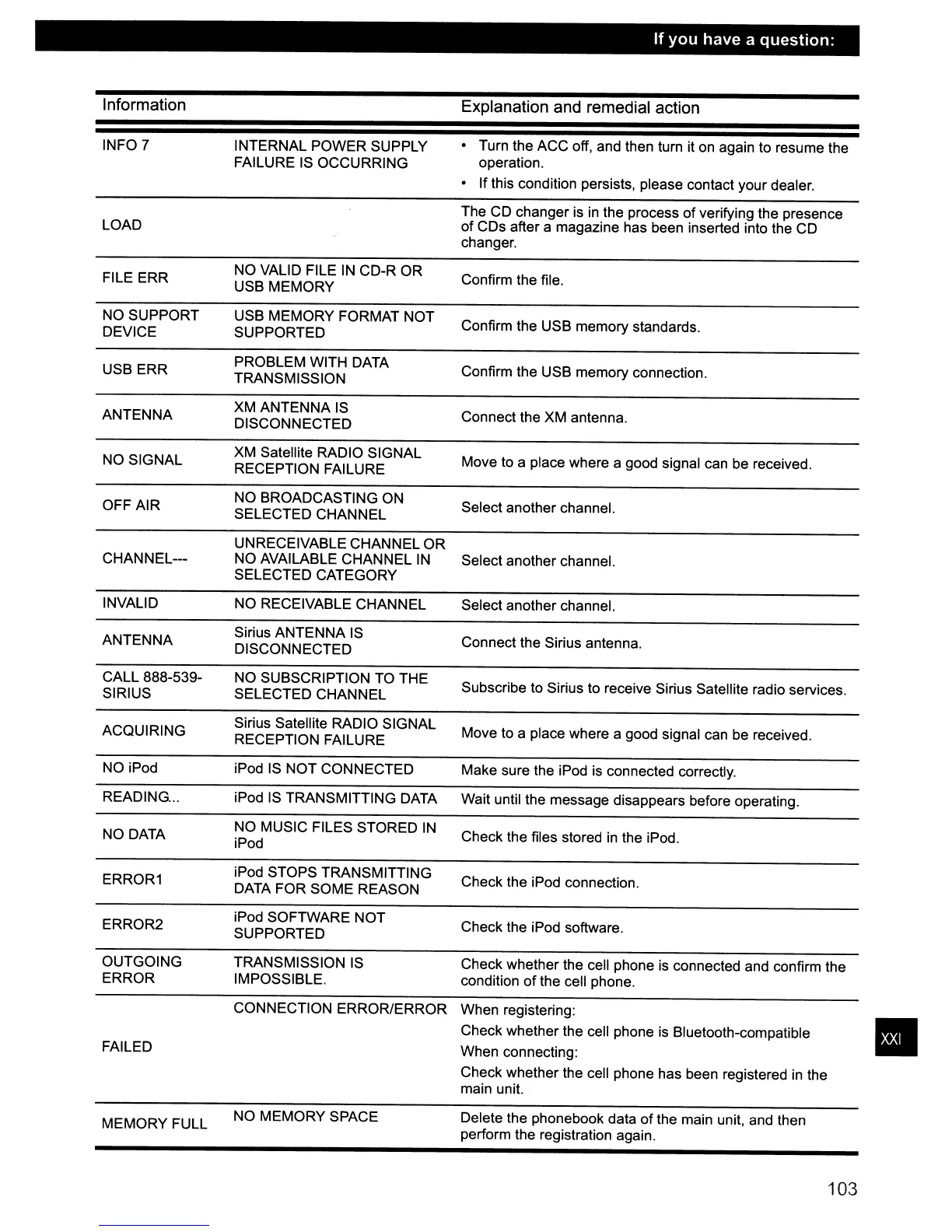
Information
If
you
have
a
question:
Explanation and remedial action
CONNECTION ERROR/ERROR When registering:
Check whether the cell phone is Bluetooth-compatible
When connecting:
Check whether the cell phone has been registered
in
the
main unit.
INFO 7
LOAD
FILE ERR
NO SUPPORT
DEVICE
USB ERR
ANTENNA
NO SIGNAL
OFF AIR
CHANNEL---
INVALID
ANTENNA
CALL 888-539-
SIRIUS
ACQUIRING
NO iPod
READING.
..
NO DATA
ERROR1
ERROR2
OUTGOING
ERROR
FAILED
MEMORY FULL
INTERNAL POWER SUPPLY
FAILURE IS OCCURRING
NO VALID FILE
IN
CD-R OR
USB MEMORY
USB MEMORY FORMAT NOT
SUPPORTED
PROBLEM WITH DATA
TRANSMISSION
XM ANTENNA
IS
DISCONNECTED
XM Satellite RADIO SIGNAL
RECEPTION FAILURE
NO BROADCASTING ON
SELECTED CHANNEL
UN
RECEIVABLE CHANNEL OR
NO AVAILABLE CHANNEL
IN
SELECTED CATEGORY
NO RECEIVABLE CHANNEL
Sirius ANTENNA
IS
DISCONNECTED
NO SUBSCRIPTION TO THE
SELECTED CHANNEL
Sirius Satellite RADIO SIGNAL
RECEPTION FAILURE
iPod
IS
NOT CONNECTED
iPod
IS
TRANSMITTING DATA
NO MUSIC FILES STORED
IN
iPod
iPod STOPS TRANSMITTING
DATA FOR SOME REASON
iPod SOFTWARE NOT
SUPPORTED
TRANSMISSION
IS
IMPOSSIBLE.
NO MEMORY SPACE
• Turn the ACC off, and then turn it
on
again to resume the
operation.
• If this condition persists, please contact your dealer.
The CD changer is
in
the process
of
verifying the presence
of CDs after a magazine has been inserted into the CD
changer.
Confirm the file.
Confirm the USB memory standards.
Confirm the USB memory connection.
Connect the XM antenna.
Move to a place where a good signal can be received.
Select another channel.
Select another channel.
Select another channel.
Connect the Sirius antenna.
Subscribe to Sirius to receive Sirius Satellite radio services.
Move to a place where a good signal can be received.
Make sure the iPod is connected correctly.
Wait until the message disappears before operating.
Check the files stored
in
the iPod.
Check the iPod connection.
Check the iPod software.
Check whether the cell phone is connected and confirm the
condition
of
the cell phone.
Delete the phonebook data
of
the main unit, and then
perform the registration again.
103
•



 To Next Page