If
you
have
a
question:
Refer
Mode
Problems
Causes
Remedial action to
page
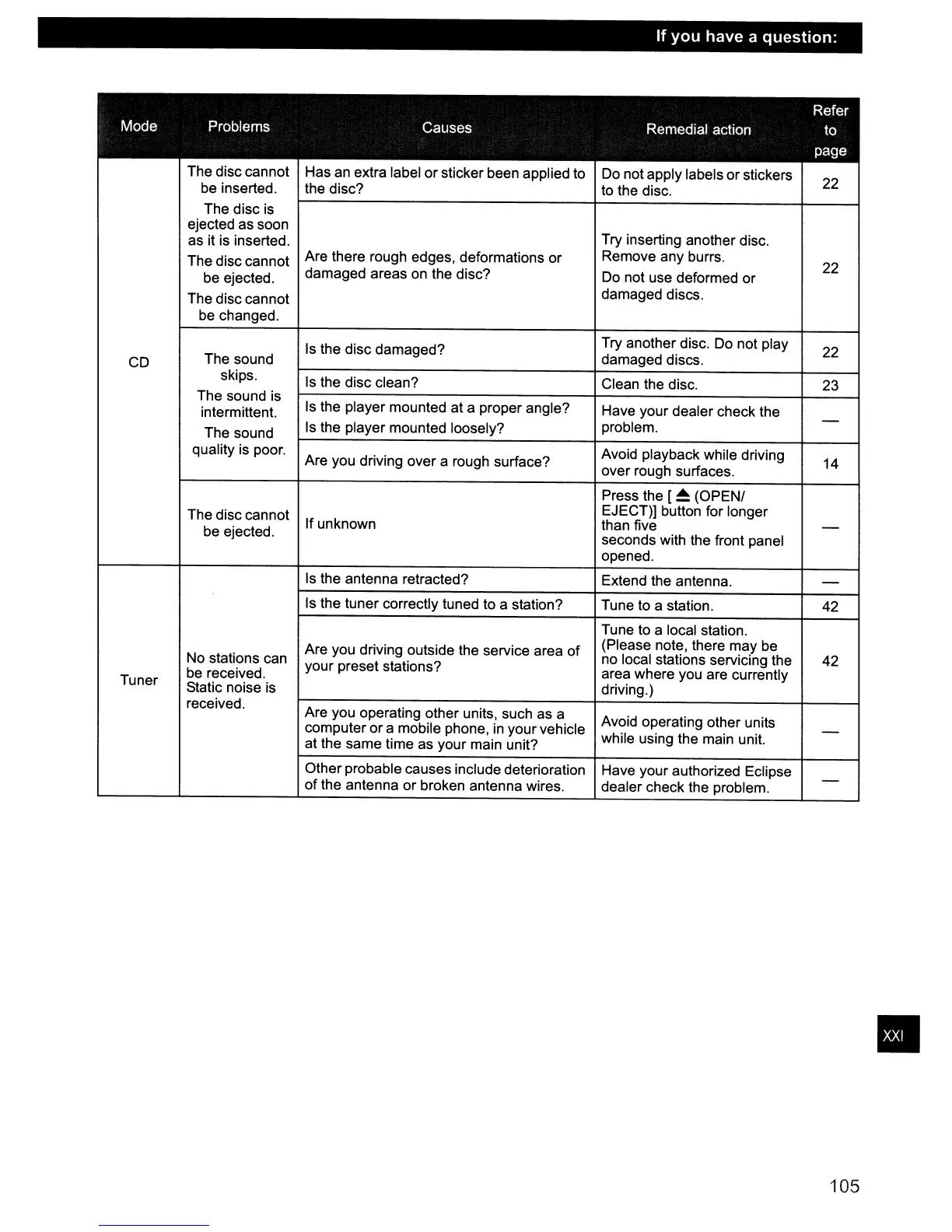
The disc cannot
Has
an
extra label
or
sticker been applied to
Do not apply labels
or
stickers
22
be inserted.
the disc?
to the disc.
The disc is
ejected as soon
Try inserting another disc.
as it is inserted.
The disc cannot
Are there rough edges, deformations or
Remove any burrs.
22
be ejected.
damaged areas on the disc?
Do
not use deformed or
The disc cannot
damaged discs.
be changed.
Is
the disc damaged?
Try another disc. Do not play
22
CD
The sound
damaged discs.
skips.
Is
the disc clean?
Clean the disc.
23
The sound is
Is
the player mounted at a proper angle?
intermittent.
Have your dealer check the
-
The sound
Is
the player mounted loosely?
problem.
quality is poor.
Are you driving over a rough surface?
Avoid playback while driving
14
over rough surfaces.
Press the [
~
(OPENI
The disc cannot
EJECT)] button for longer
be ejected.
If unknown
than five
-
seconds with the front panel
opened.
Is
the antenna retracted?
Extend the antenna.
-
Is the tuner correctly tuned to a station?
Tune to a station.
42
Tune to a local station.
Are you driving outside the service area
of
(Please note, there may be
No stations can
your preset stations?
no local stations servicing the
42
be
received.
area where you are currently
Tuner
Static noise
is
driving.)
received.
Are you operating other units, such as a
computer or a mobile phone,
in
your vehicle
Avoid operating other units
-
at the same time as your main unit?
while using the main unit.
Other probable causes include deterioration
Have your authorized Eclipse
-
of
the antenna or broken antenna wires.
dealer check the problem.
105
•



 To Next Page