EasyManua.ls Logo

Eclipse CD3200 - Button Functions and Disc Slot Explanation

Eclipse CD3200
177 pages
Print Icon
To Next Page IconTo Next Page
To Previous Page IconTo Previous Page
Loading...
Reglster
a
Bluetoo~
W1re'ess
technology
compahble
cellular
phone
I
Enreg1slrer
un
lelephooe
cellulalle
compatrble
Bluelootn%
a
lechnologle
a
commande
sans
fill
Registrar
un
telefono
m6vil
compatible
coo
tecnologla
lOalambnca
Bluetoolh®
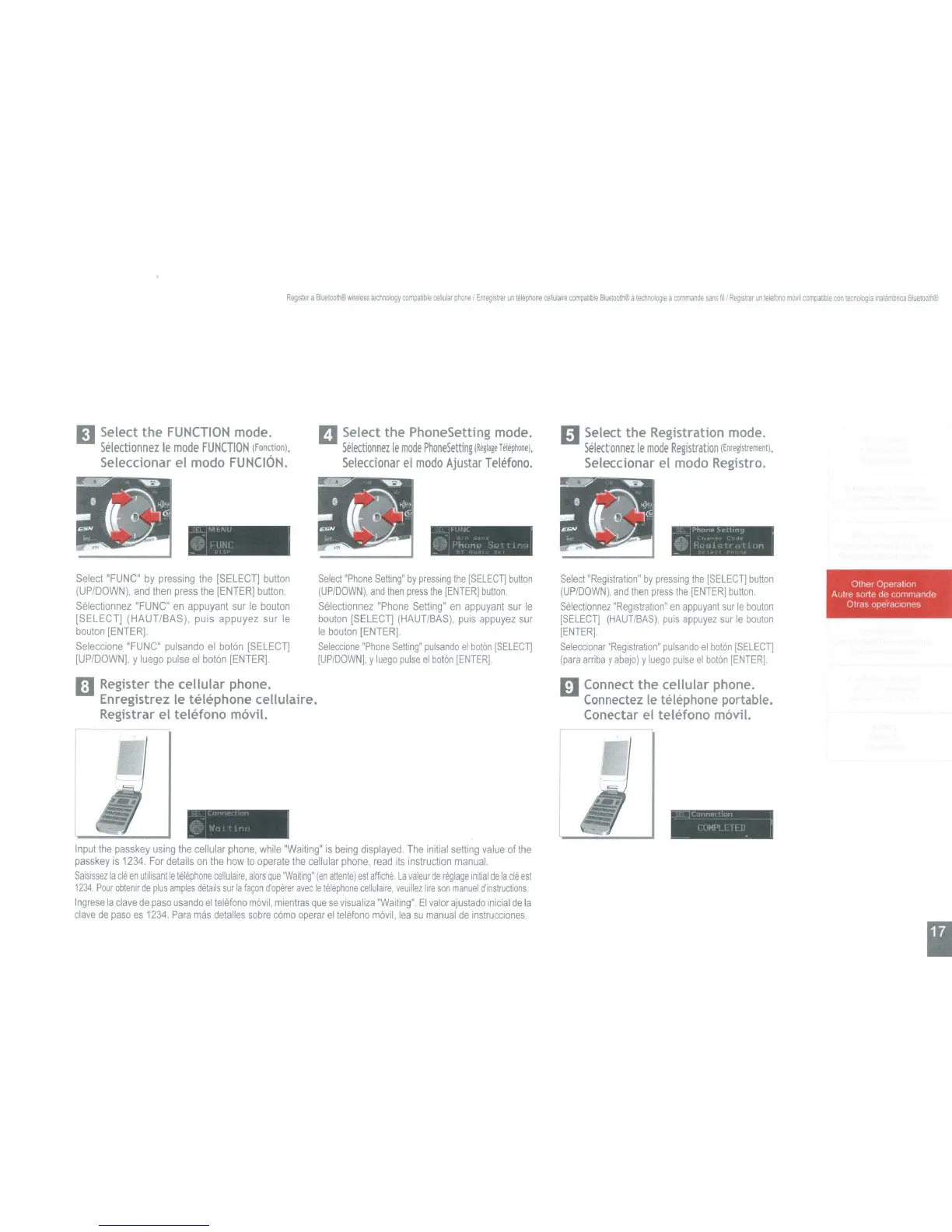
mSelect
the
FUNCTION
mode.
Selectionnez
Ie
mode
FUNCTION
(fonction).
Seleccionar el modo
FUNCION.
II
Select
the
PhoneSetting mode.
Selectionnez
Ie
mode
PhoneSetting
IR'lI.!'
T.liphoo'l.
Seleccionar
el
modo
Ajustar
Telefono.
1:1
Select
the
Registration mode.
Selectionnez
Ie
mode
Registration
IEnre~strem.ntJ.
Seleccionar el modo Registro.
I
'Ylfcf\',J
:"0
1
tl~.1
_ '
__
r>ho"E' :<>"'ltIn9 ,
@I!'''JI
ll"l-"n
Select
"FUNC"
by
pressing
the
(SELECT]
button
(UP/DOWN).
and
then
press
the
[ENTER]
button.
Selectionnez
"FUNC"
en
appuyant
sur
Ie
bouton
[SELECT] (HAUT/BAS), puis appuyez sur
Ie
bouton
[ENTER].
Seleccione
"FUNC"
pulsando
el
boton
ISELECT]
[UPIDOWN].
y
luego
pulse
el
boton
[ENTER].
III Register
the
cellular
phone.
Enregistrez Ie telephone cellulaire.
Registrar el
teletono
mavil.
Select
"Phone
Setting"
by
pressing
the
[SELECT]
button
(UP/DOWN),
and
then
press
the
[ENTER]
button.
Selectionnez
"Phone
Setting"
en
appuyant
sur
Ie
bouton
ISELECT]
(HAUT/BAS),
puis
appuyez
sur
Ie
bouton
[ENTER].
SeleCCIone
"Phone
Setting"
pulsando
el
boton
[SELECT]
[UP/DOWN],
Y
luego
pulse
el
boton
[ENTER]
Select
"Registration"
by
pressing
the
[SELECT]
button
(UP/DOWN).
and
Ihen
press
the
[ENTERI
button.
Selectionnez
"Registration"
en
appuyant
sur
Ie
bouton
[SELECT]
(HAUTlBAS),
puis
appuyez
sur
Ie
bouton
[ENTER].
Seleccionar
"Registration"
pulsando
el
boton
[SELECT]
(para
arriba
y
abaJo)
y
luego
pulse
el
boton
[ENTER].
III Connect
the
cellular
phone.
Connectez
Ie
telephone portable.
Conectar el
telefono
mavi!.
I Other Operatlon
Autre sorte de commande
Otras operaclones
,
.'
I'
{~.
\J,', "
Input
the
passkey
using
the
cellular
phone.
while
"Waiting"
is
being
displayed.
The
inrtial
setting
value
of
the
passkey
is
1234.
For
details
on
the
how
to
operate
the
cellular
phone,
read
its
Instruction
manual.
Saislssez
la
cle
en
utilisant
Ie
lelephone
cellulalre,
alars
que
"Waiting"
(en
attentel
est
affiche.
La
valeur
de
reglage
Initial
de
la
cle
est
1234
Pour
obtenir
de
plus
amples
details
sur
la
(a~n
d'operer
avec
Ie
telephone
cellulalre.
veuiliez
lire
son
manuel
d'instructions
Ingrese
la
clave
de
paso
usando
el
telefono
movil,
mientras
que
se
vlsualiza
"Waiting".
EI
valor
ajustado
Inicial
de
la
clave
de
paso
es
1234.
Para
mas
detalles
sobre
como
operar
el
telefono
movil.
lea
su
manual
de
instruCCIones.
l'
In
..,
0'
I MI' I
1\
I I
I

Table of Contents

Other manuals for Eclipse CD3200

Related product manuals