151
Technical Publication Document NO: SYSTEM-007-ENG (Ver.1.1)
HF-525Plus Installation, Operation and Service Manual
6.6.2 Selection of capacity of generator
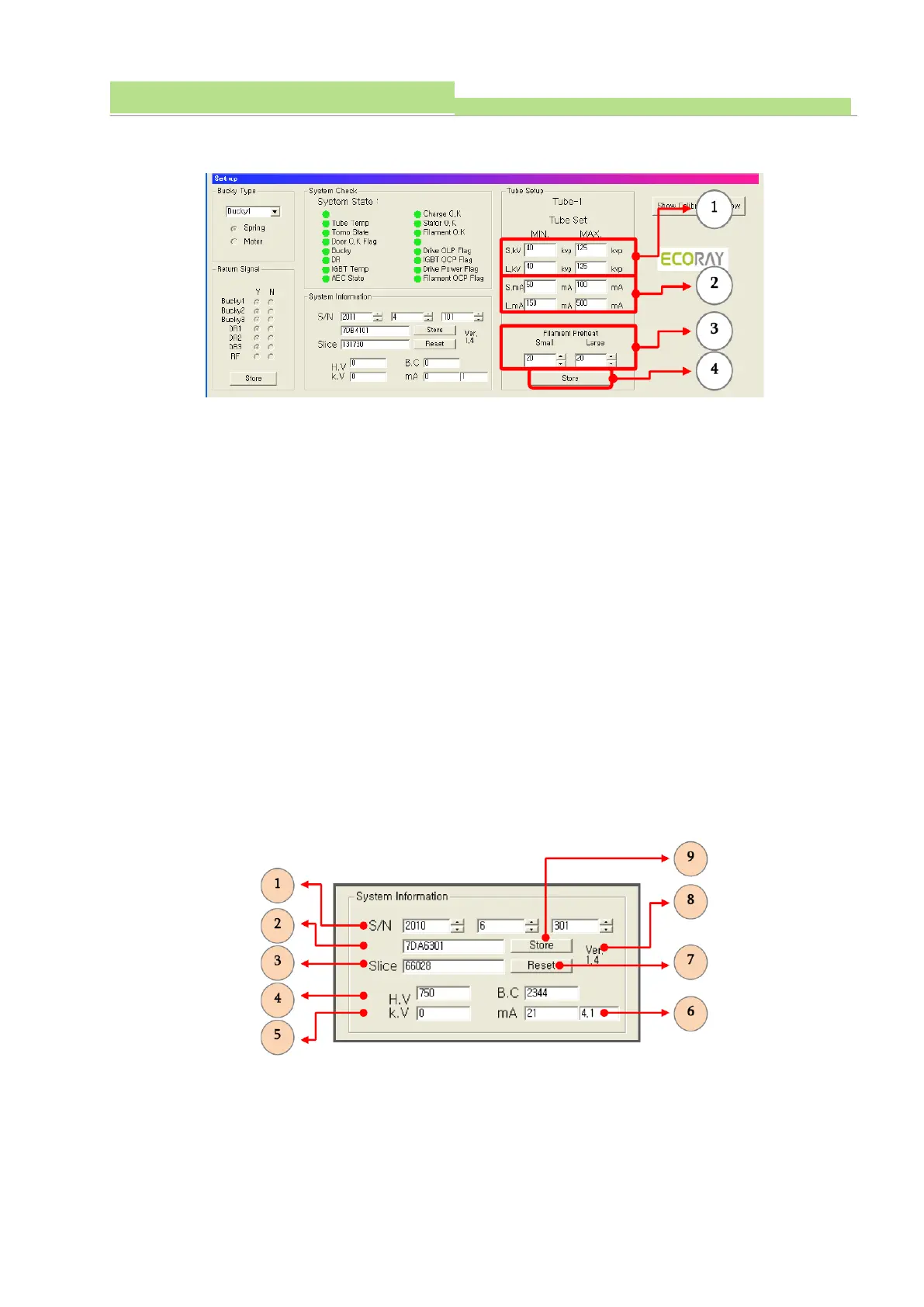
● Select min. and max. kV on the “Small Focal (S.kV)” (see No 1of the above fig).
● Select min. and max. kV on the “Large Focal (L.KV)” (see No 1of the above fig).
● Select min. and max. mA on the “Small Focal (S.mA)” (see No 2of the above fig).
● Select min. and max. mA on the “Large Focal (L.mA)” (see No 2of the above fig).
● Select filament preheat voltage for small and large focal spot (see No 3of the above fig).
NOTE▶
It is recommended that the filament preheat voltage selected by the manufacture does not change.
● Click “Store” for saving input data (see No 4of the above fig).
NOTE▶
Using the stored data of MiO Board (Main Input & Output Board) of generator, it can execute
“Calibration Window Part” directly on “Show Calibration Window” without any selection of capacity of
generator.
6.6.3 Indication of calibration Data
● The “S/N” indicates year, month and identification for calibration data(see No 1of the above fig). The
identification is assigned in regular sequence.



 To Next Page