154
Technical Publication Document NO: SYSTEM-007-ENG (Ver.1.1)
HF-525Plus Installation, Operation and Service Manual
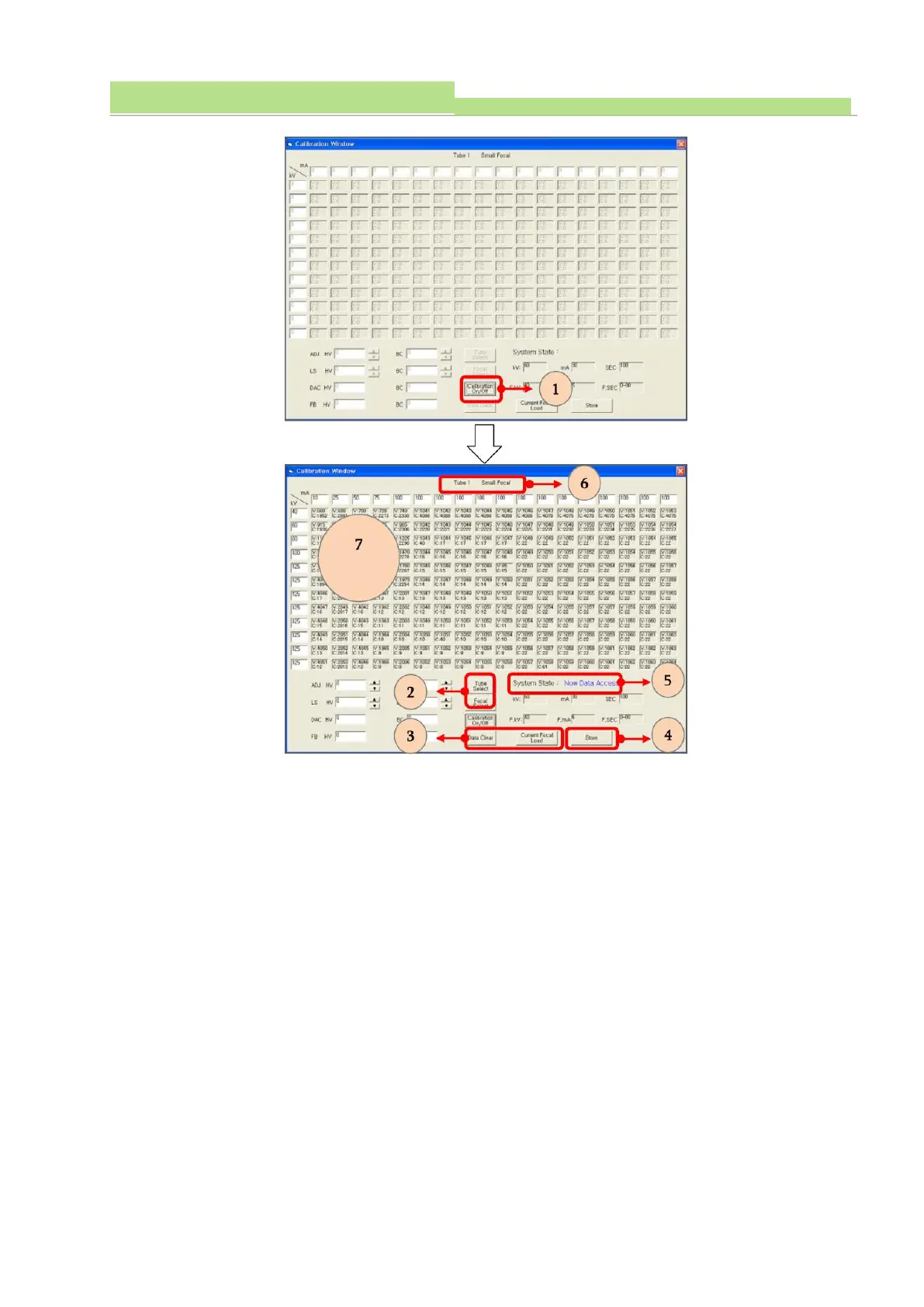
● Click “Calibration On/Off”(see No 1of the above fig).
● The “System State” indicates “Now Data Access” (see No 5 of the above fig).
● When it indicates“Now Data Access”, the calibration data of MiO board move to a calibration program
of PC automatically (see No 5of the above fig).
● Note: MiO board means a “Main Input & Output Board” of generator
● When this calibration data has been moved, data table indicates the calibration data (see No 7of the
above fig).
● Select a suitable X-ray tube and focal spot (see No 2of the above fig).
● Check the selected X-ray tube and focal spot (see No 6of the above fig).
● The ““Data Clear” and “Current Focal Load” are only used in the manufacturing process (see No 3 of
the above fig).
● Click “Store” for saving input data (see No 4 of the above fig).



 To Next Page