SE-1201 Electrocardiograph User Manual System Setup
- 89 -
10.4 Record Info Setup
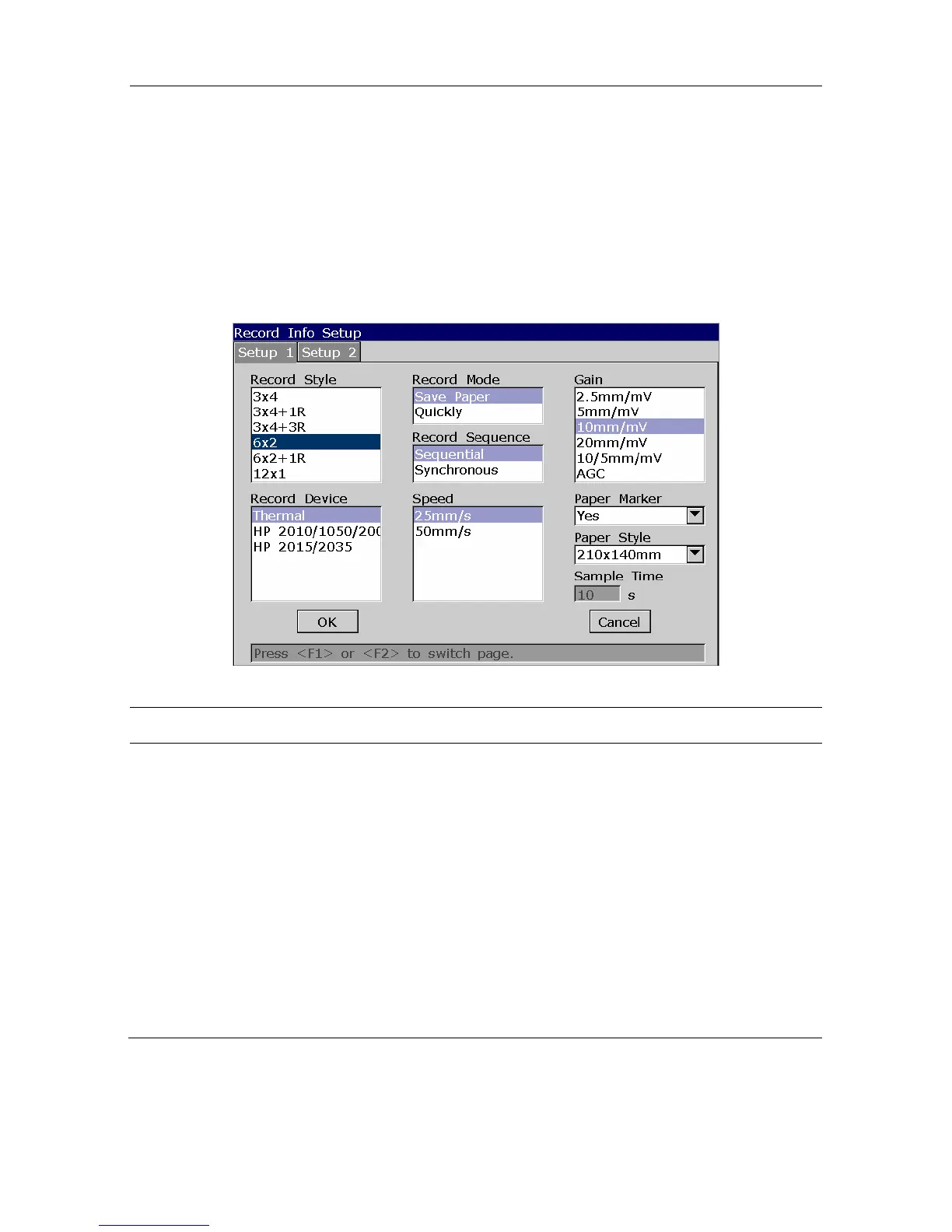
Select Record Info on the System Setup screen, and then press Enter to open the Record Info
Setup window.
10.4.1 Setup 1
Press F1 to switch to the Setup 1 window.
Figure 10-4 Record Info Setup1
Item Description
Record Style
Choose from: 3×4, 3×4+1R, 3×4+3R, 6×2, 6×2+1R or 12×1
Select 3×4 to print ECG waves of 12 leads in 4 groups of 3.
Select 3×4+1R to print ECG waves of 12 leads in 4 groups of 3, with the
ECG wave of one rhythm lead on the bottom of the ECG reports.
Select 3×4+3R to print ECG waves of 12 leads in 4 groups of 3, with the
ECG waves of three rhythm leads on the bottom of the ECG reports.
Select o 6×2 to print ECG waves of 12 leads in 2 groups of 6.
Select 6×2+1R to print ECG waves of 12 leads in 2 groups of 6, with the
ECG wave of one rhythm lead on the bottom of the ECG reports.
Select 12×1 to print ECG waves of 12 leads simultaneously.



 To Next Page