110 1019567 REV. 03
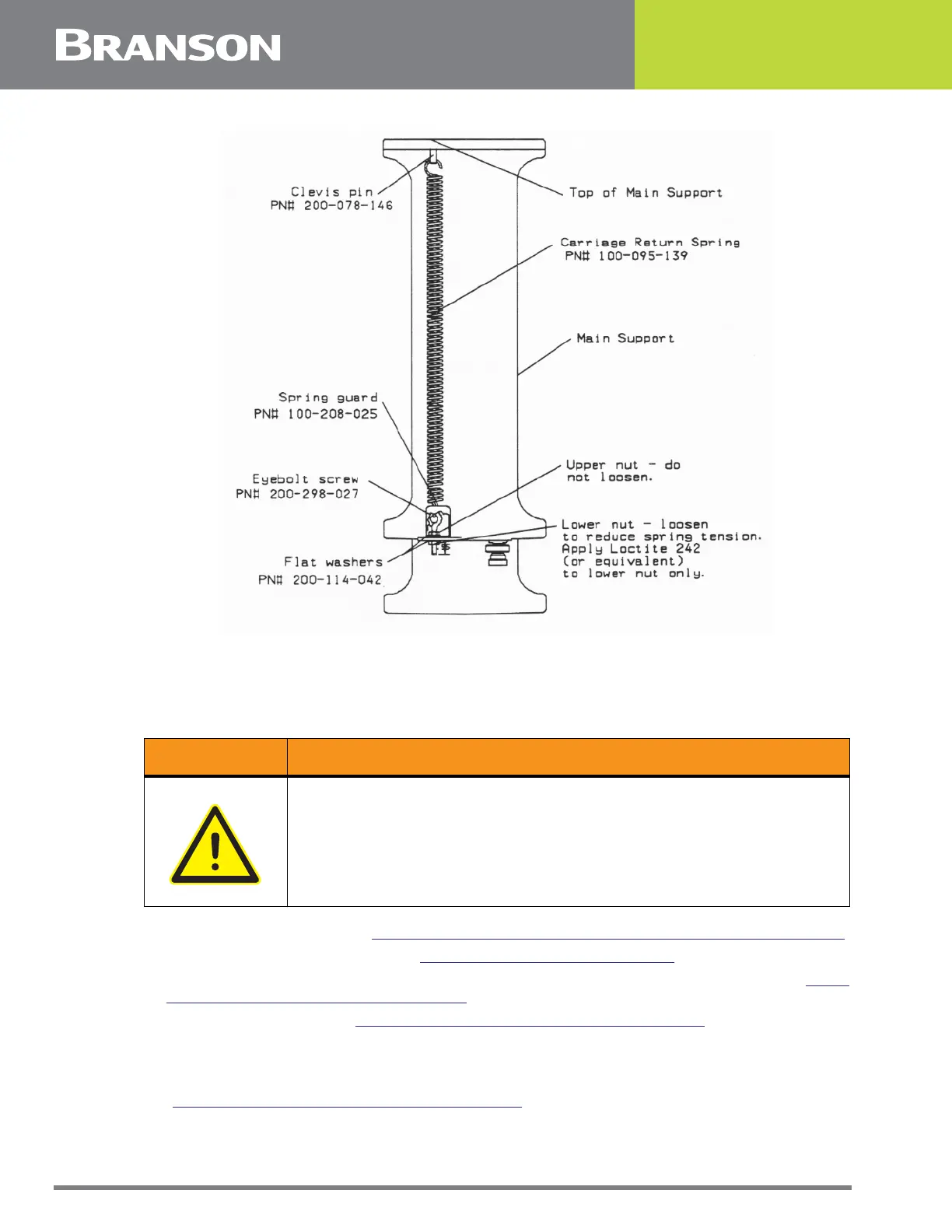
Figure 5.30 Removing the Carriage Return Spring
5.5.12.4 Removing the Carriage Return Spring
1. Turn off the welder and unplug main power.
2. Turn air pressure to zero, then disconnect main air supply.
3. Open the left side cover. See
5.3 Opening and Removing the Left Side Cover (EDP 100-032-338).
4. Remove the Trigger Guard (Section
5.5.9.1 Removing the Trigger Guard).
5. Use a 3/8 in. nutdriver to loosen - but not remove - the nut on the bottom of the eyebolt (
Figure
5.30 Removing the Carriage Return Spring).
6. Remove the spring guard (
Figure 5.30 Removing the Carriage Return Spring). (If you need more
room to free the spring guard, lower the carriage.
7. Grasp the middle of the spring and pull down on it while unhooking the spring from the eyebolt.
8. Unhook the top of the spring from the Clevis pin coming through the top of the main support
(
Figure 5.30 Removing the Carriage Return Spring).
WARNING General Warning
Turn air pressure to zero and disconnect the main air supply. Failure
to do this leave the welder under potentially dangerous air pressure.



 To Next Page