46
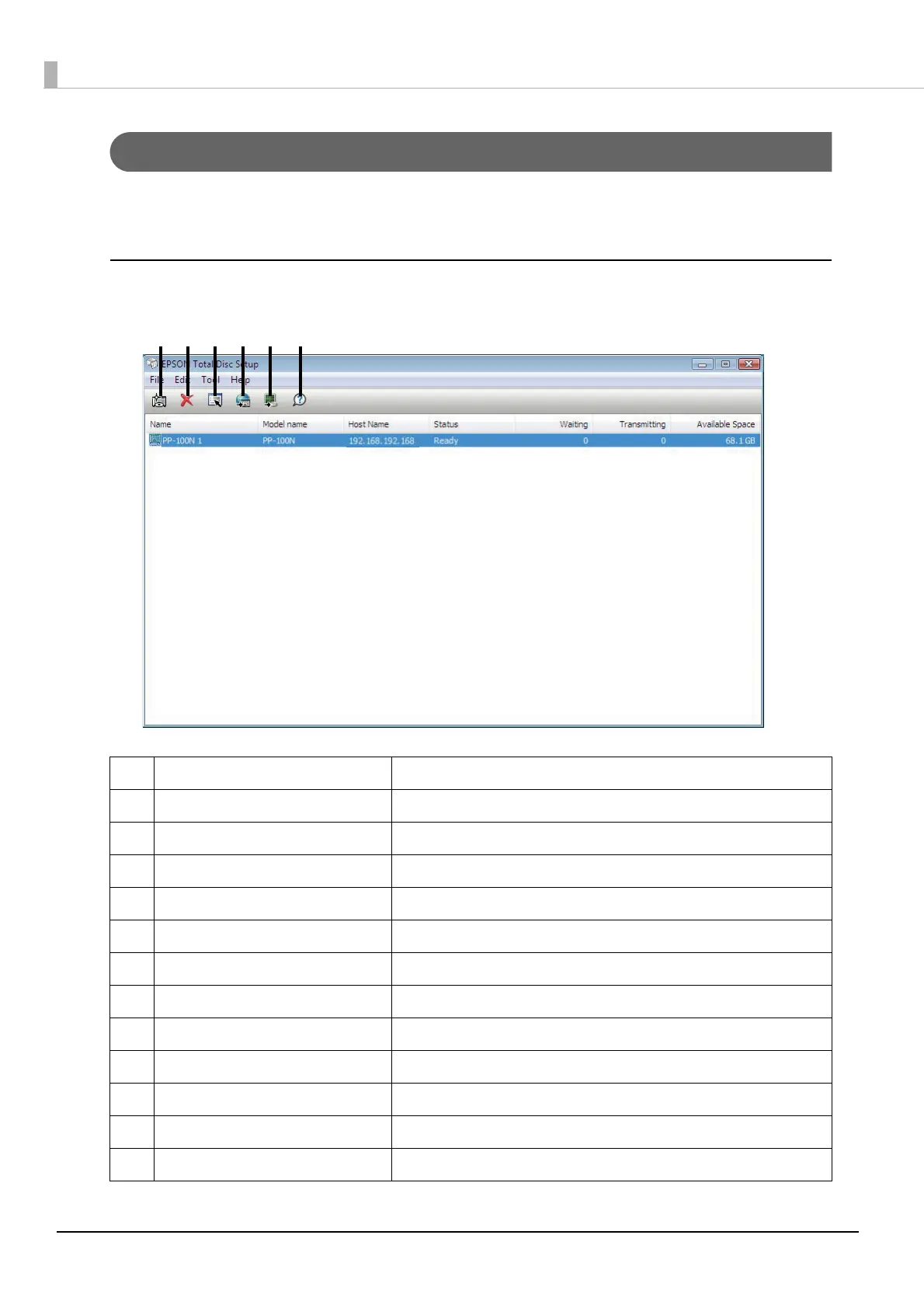
Screen configuration of EPSON Total Disc Setup
This section describes the screen configuration of EPSON Total Disc Maker.
See Help of EPSON Total Disc Setup for details on use.
Setup screen
(1) Add Registers this product.
(2) Remove Deletes the registration for the selected product.
(3) Properties Displays the [Properties] screen for the selected product.
(4) Start Total Disc Net Administrator Starts EPSON Total Disc Net Administrator.
(5) Start Total Disc Monitor Starts EPSON Total Disc Monitor.
(6) Help Displays Help.
- Name Displays the name of the product.
- Model Name Displays the model name of the product (PP-100N).
- Host Name Displays the host name or IP address of the product.
- Status Displays the product status.
- Waiting Displays the number of unfinished jobs.
- Transmitting Displays the number of jobs being transmitted.
- Available Space Displays the available space on the product’s internal HDD.
(5)(4)(1) (2) (3) (6)



 To Next Page
 Loading...








