29
Actuation Configurations for ICC 350 • 8
Actuation Configuration 4 for ICC 350
ICC Software V. 1.07 only
APC handle for APC and ARGON CUT, instrument for BIPOLAR COAG and
BIPOLAR CUT
i
In this configuration, BIPOLAR CUT
can be actuated using the foot switch.
BIPOLAR COAG can be actuated with
the foot switch and AUTO START.
APC can be actuated with foot and
finger switches. ARGON CUT can
only be actuated with finger switch.
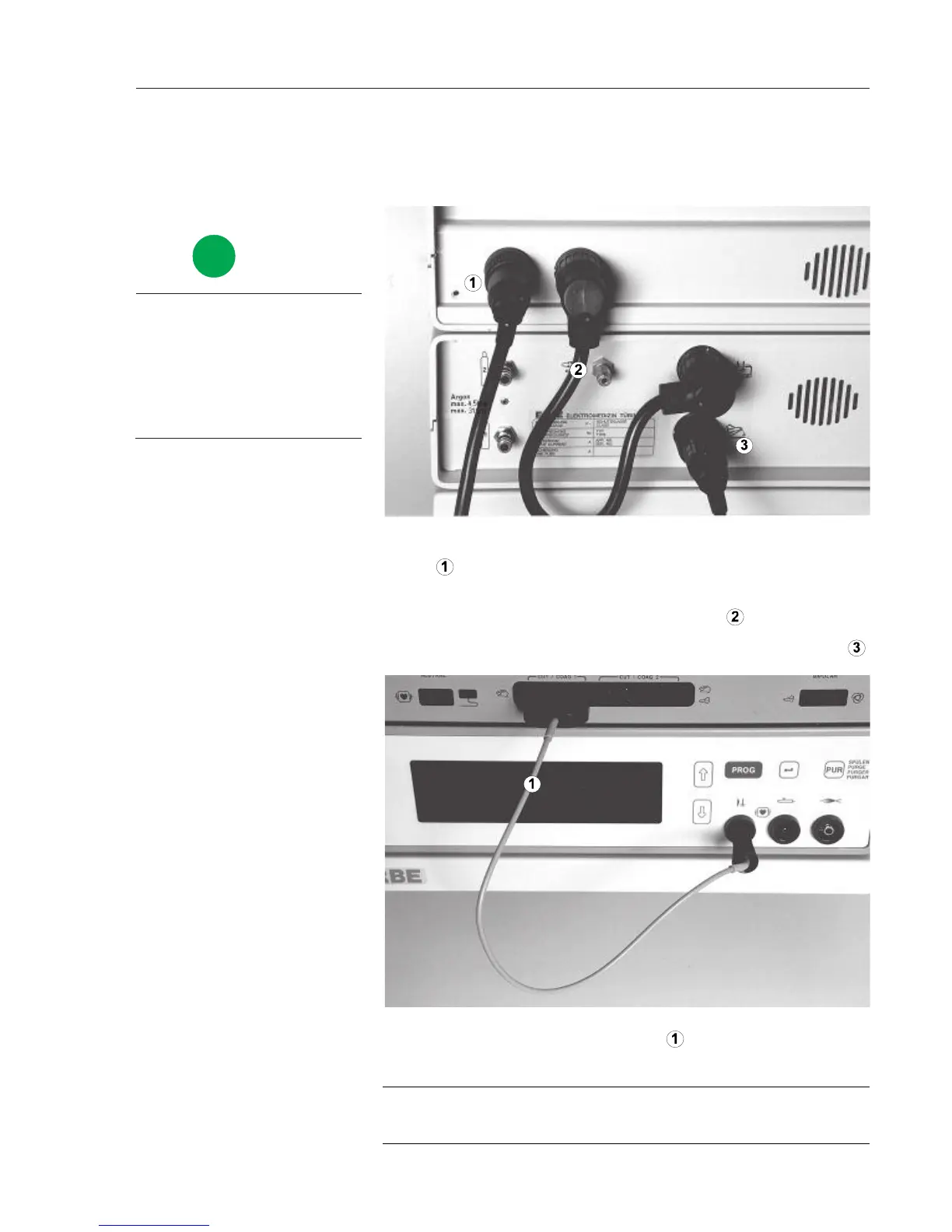
1. Connect two-pedal foot switch to the ICC 350 4-pin foot switch so-
cket
.
2. Plug connection cable 20132-063 into the APC 300's actuation signals
output and into the ICC's 7-pin foot switch socket
.
3. Connect single-pedal foot switch to the APC 300's foot switch socket
.
.
1. Connect foot switch,
connection cable with
4- and 7-pin plugs
Plug HF cable 20192-082 or 20192-126 into HF input of the APC
300 and into the CUT / COAG 1 socket of the ICC.
If an instrument, rather than the HF cable, is connected to the CUT /
COAG socket, you can actuate this instrument using the foot switch!
2. Connect HF cable
WARNING!



 To Next Page