63 / 84
7 • Maintenance and servicing
80116-938_V24392
2023-03
Test setup
• The test specimen is connected to the power supply via the power
cord.
Test procedure
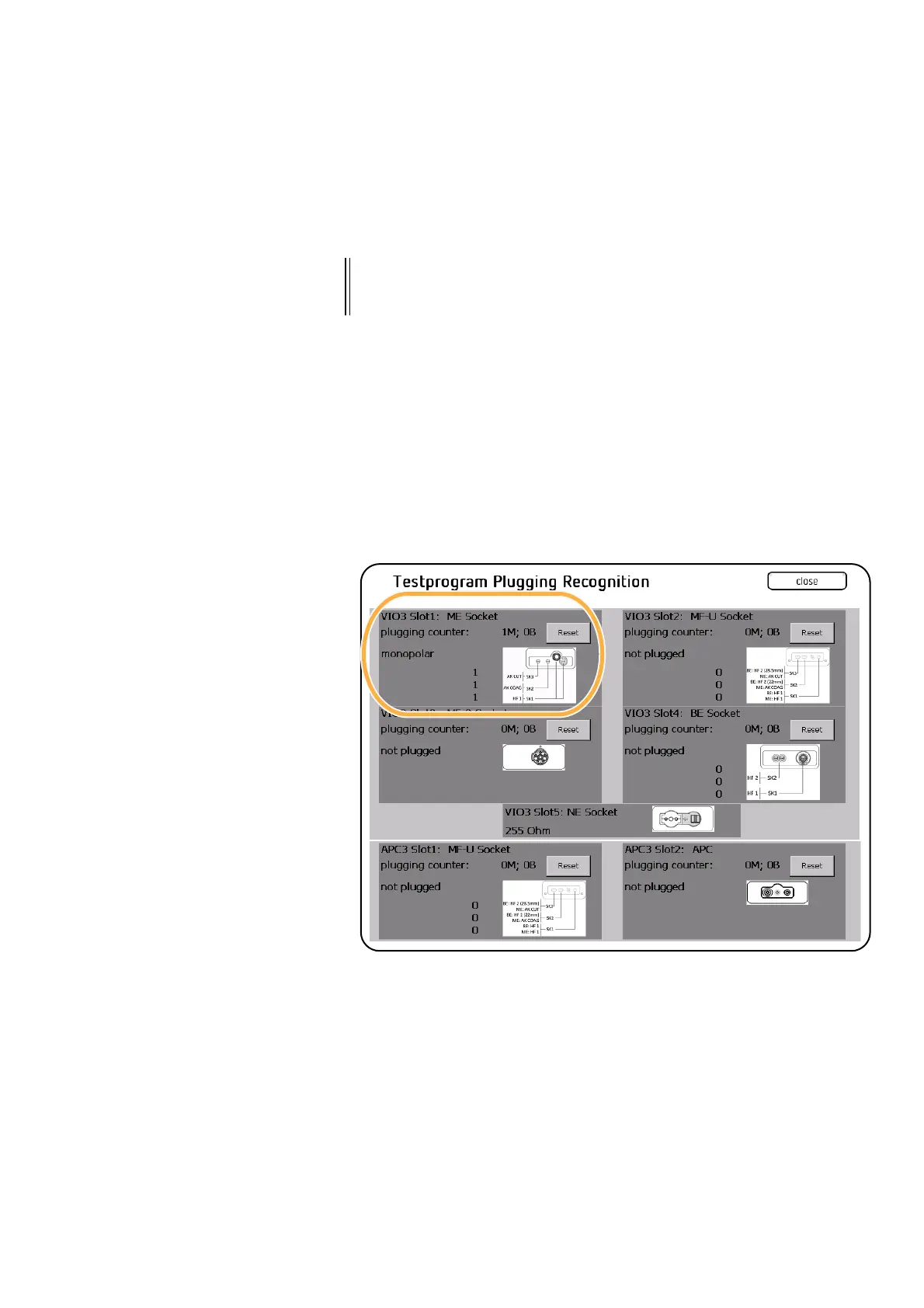
1. Call up <Test Program Plugging recognition>.
2. Plug a suitable cable into the first test socket. The test program must
perform the following actions at the appropriate slot:
– Connector type is detected: Display "not plugged" switches to
monopolar or bipolar display
– Plugging counter is increased by one: XM (=monopolar connector),
XB (=bipolar connector). The plugging counter can be reset using
"Reset"
– Slot counting in test program: From top to bottom (VIO 3: 1, 2, 3, 4
and 5, APC 3: 1 and 2)
3. Unplug cable.
4. Repeat testing at the socket using all appropriate test cables.
5. Then repeat testing for each additional MF-U, BI and MO socket using
all appropriate test cables.
6. Terminate the test program with <Close>.
7. Exit the Service settings.
IMPORTANT! At least two and a maximum of three different cables are tested for
each socket. This ensures that all relevant plugging contacts are
detected.



 To Next Page