Page 51 of 66 0455-0323 Rev A
Speed Dial: The user can directly dial the set number. This feature is
convenient for customers to dial frequent numbers.
Intercom: This feature allows the operator or secretary to quickly
connect to the phone, widely used in office environments
The user can select a function key as the shortcut to trigger an event
Handfree:One-click to open the hands-free
Audio play:play music stored locally
OK:Confirm key
Volume Up:Increase the volume
Volume Down:Decrease the volume
Redial: redial out the last number dialed
Release: Hang up the call
Call Back: dial back the last call
Press during a call to send the set DTMF
Configure the multicast address and voice encoding. User can initiate
multicast by pressing this key
The user can use a specific URL to make basic calls to the device,
open the door, etc.
In standby, press the function key, if the RTP of the multicast is
detected, the device will monitor the multicast
:
Intercom:Press to start an intercom call.
Multicast:Press to initiate a multicast.
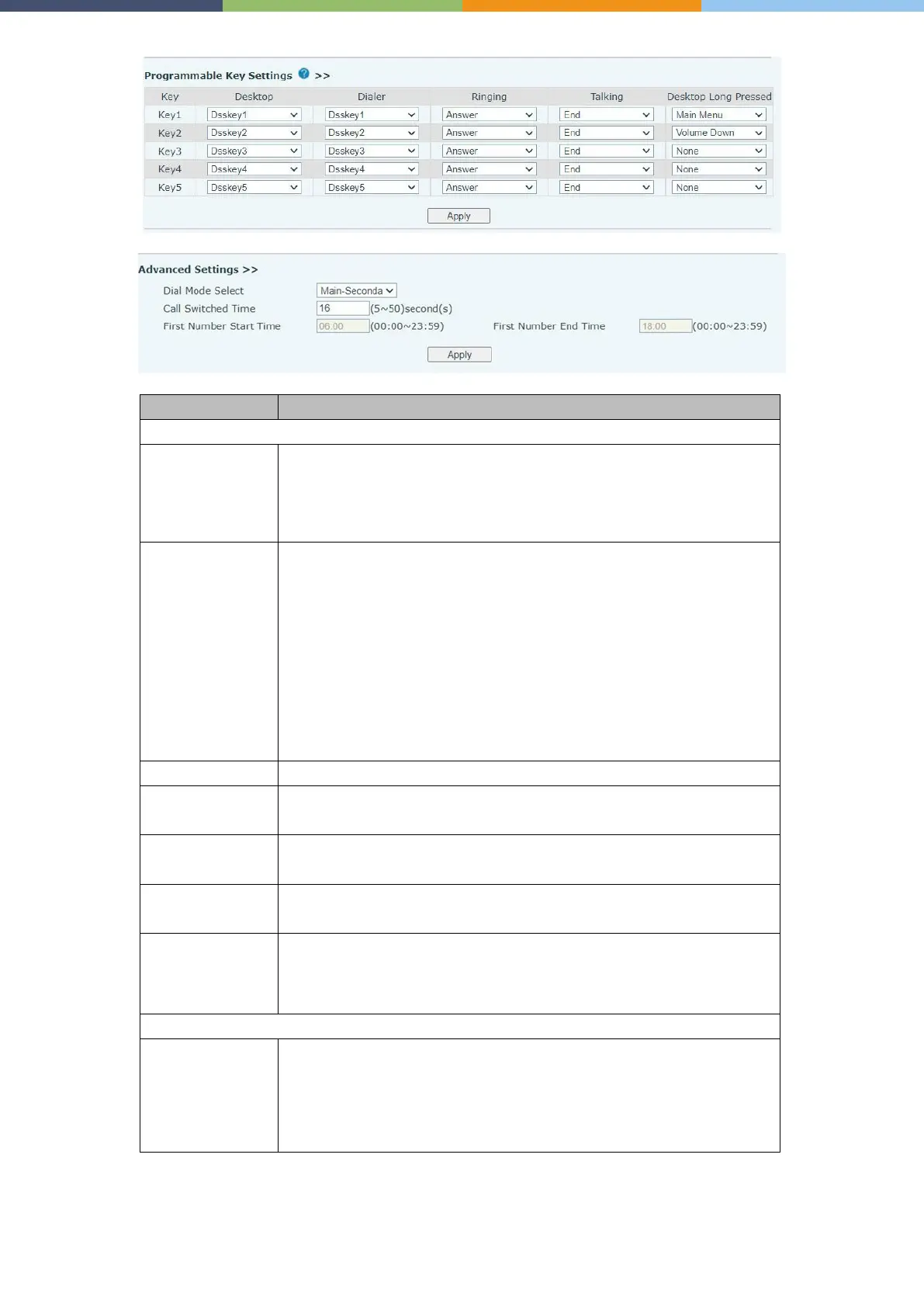
Programmable Key Settings
:
Nothing happens when you press the speed dial Dsskey1
:
When it is set to dsskey1, follow the settings of dsskey1 to make call,
answer, etc.
Dsskey2 : When it is set to dsskey2, perform operations such as
calling and answering according to the setting of dsskey2



 To Next Page