Operating elements and operating unit
100
27891EN-900-02 / Edition 02/2017
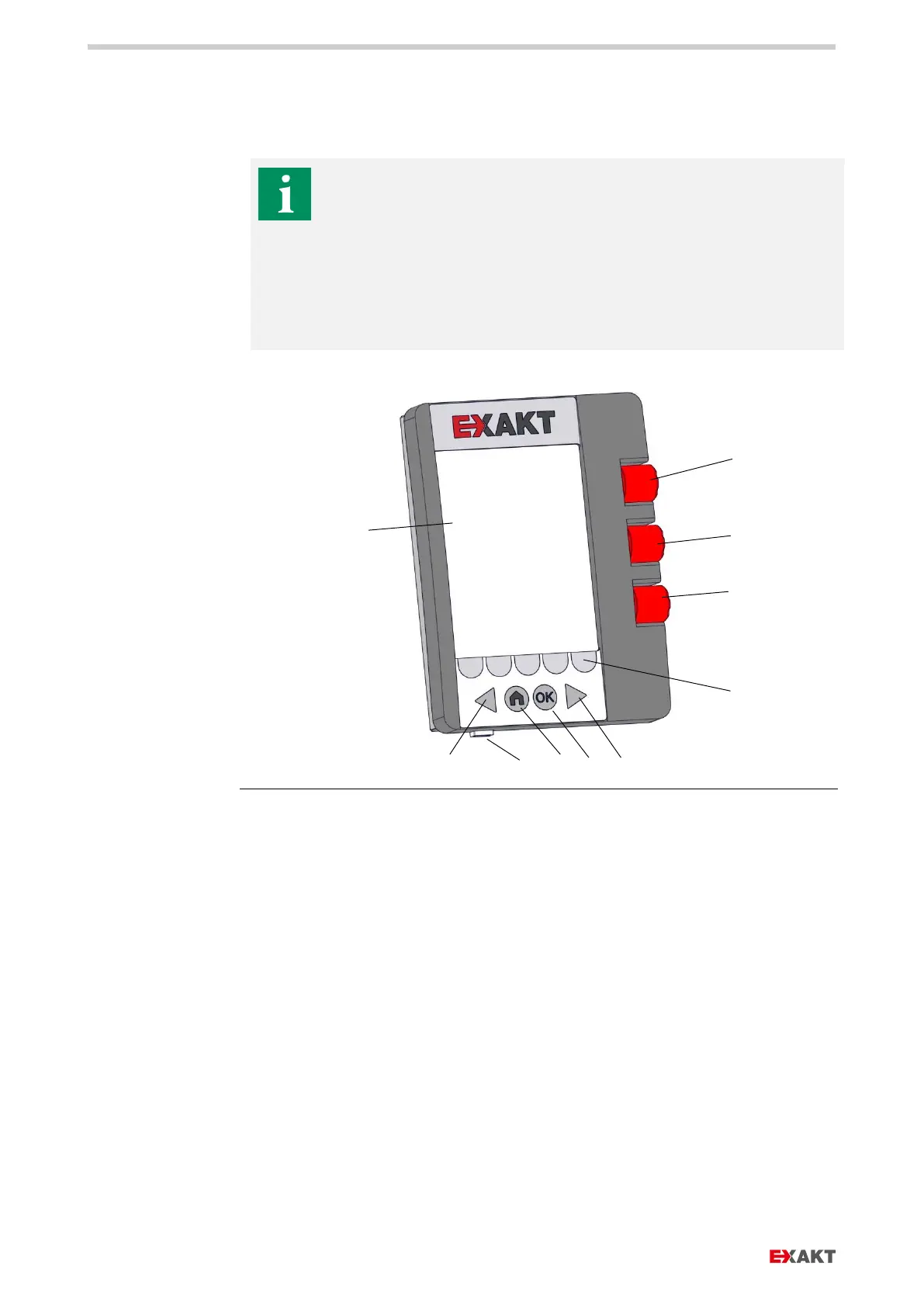
11.4. OPERATING UNIT
The operating unit takes over all functions to control the machine
during operation:
› Cleaning mode.
› Routine operations with setting of the operating parameters such
as rotational speed, gap or force mode.
› Programming program sequences such as mixing, programs with
up to 9 passes with different operating parameters.
Fig.
: Operating unit
a Control dial gap 1 with
pushbutton
b Control dial gap 2 with
pushbutton
c Control dial roller speed with
pushbutton
d Display
e Control keys
(5 pieces) to select various
functions
f Arrow right, e.g. to display
other screens to the right
g Arrow left, e.g. to display other
screens to the left
h OK button, to confirm an
action like entering a
password or in the main menu
i Home button, back to main
menu
j USB interface, for data
transfer


 To Next Page