Fanvil Technology Co., Ltd
HQ Add: Level 3, Block A, Gaoxinqi Building, Anhua Industrial Park, Qianjin 1 Road, 35th District, Bao'An, Shenzhen, 518101 P.R. China
Tel: +86-755-2640-2199 Fax: +86-755-2640-2618 Email: fanvil@fanvil.com www.fanvil.com Beijing Tel:+86-10-5753-6809
Suzhou Tel: +86-512-6592-0605 SEA Tel: +60-3-203-50737
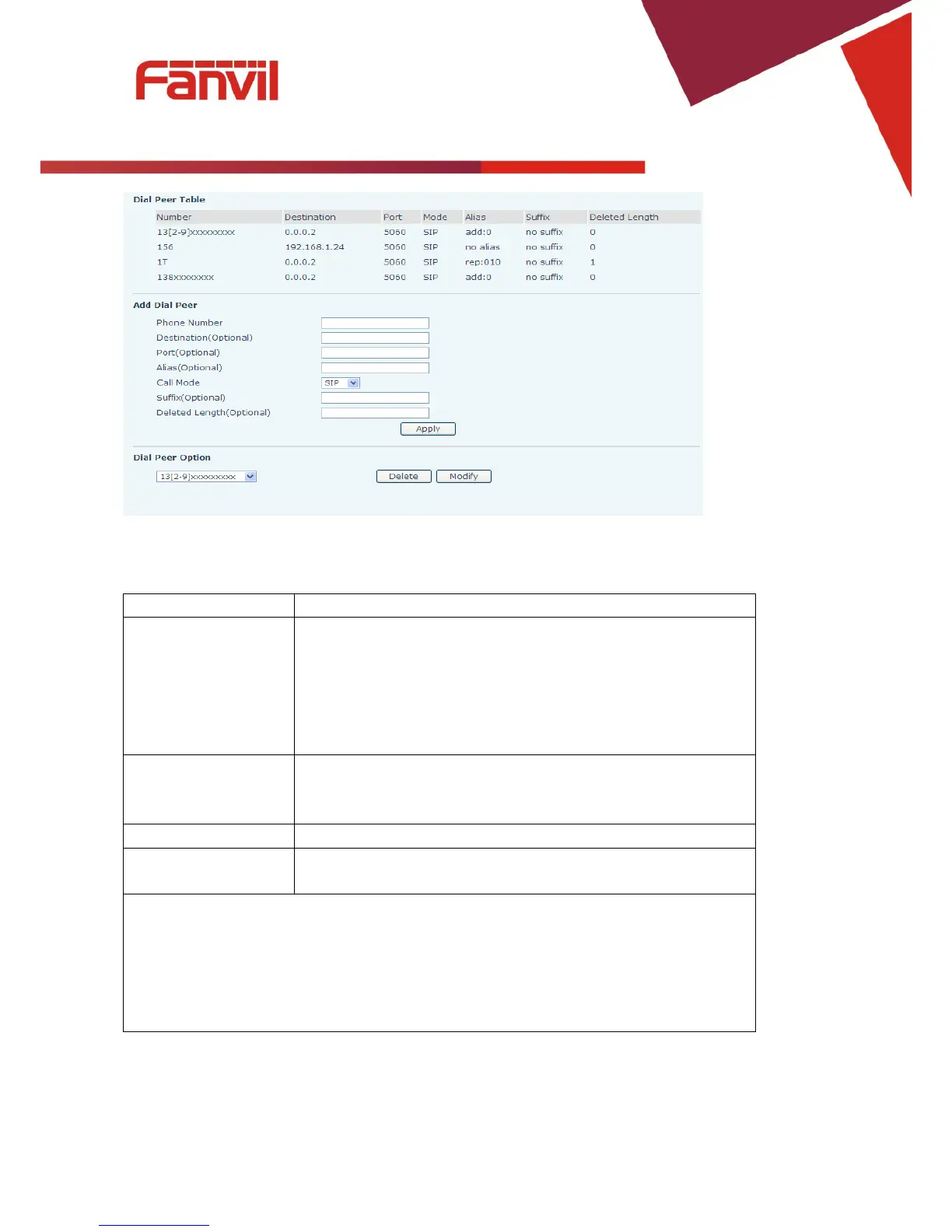
There are two types of matching: Full Matching or Prefix Matching.
In Full matching, the entire phone number is entered and then
mapped per the Dial Peer rules.
In prefix matching, only part of the number is entered followed by
T. The mapping with then take place whenever these digits are
dialed. Prefix mode supports a maximum of 30 digits.
Set Destination address. This is optional. For a peer to peer call,
enter the destination IP address or domain name. To use a dial rule
on the SIP2 line, enter 0.0.0.2.
Port Set the Signaling port, the default is 5060.
Alias Set the Alias. This is the text to be added, replaced, or deleted. It is
Note: There are four types of aliases.
1) Add: xxx – xxx will be dialed before any phone number.
2) All: xxx – xxx will replace the phone number.
3) Del: The characters will be deleted from the phone number.
4) Rep: xxx – xxx will be substituted for the specified characters.



 To Next Page