The user can select which messages are assigned to each port at the Output messages
module inside the "Configuration → I/O" panel of the web interface, as shown in Fig-
ure 5.12. In this example, the ports UART1 and TCP0 stream out the FP_A-ODOMETRY
message, and the TCP1 port outputs the NOV_B-INSPVAX message. Please refer to
Chapter 7 for available output message formats.
In the advanced view, each available message shows its output rate. Zero (0) means the
message is disabled and is not output. One (1) means the message is enabled, and its
output frequency is 1 Hz. Values greater than one indicate that one of every n-th message
is output (e.g., Five (5) means only one of every five messages is output).
While values other than 0 or 1 may not make sense for most messages or scenarios,
there are use cases for these values. For example, we can configure the Fusion output
to 50 Hz and enable the FP_A-ODOMETRY output on TCP0. Enabling this message
implies a rate of 1 by default; thus, its output is also at 50 Hz. This high output rate would
not be possible on a low-bandwidth port, such as UART. However, the user can select a
rate of 10, meaning the sensor would output only every tenth message (i.e., 5 Hz), for
which the bandwidth is sufficient.
Note that there is no guarantee for output rates greater than one to be aligned to the top
of the second. For example, for a message generated at 10 Hz, with a rate of 5, the
sensor cannot guarantee the time stamps to end in x.0 and x.5, as a slight delay could
change the timings to x.1 and x.6 or x.4 and x.9.
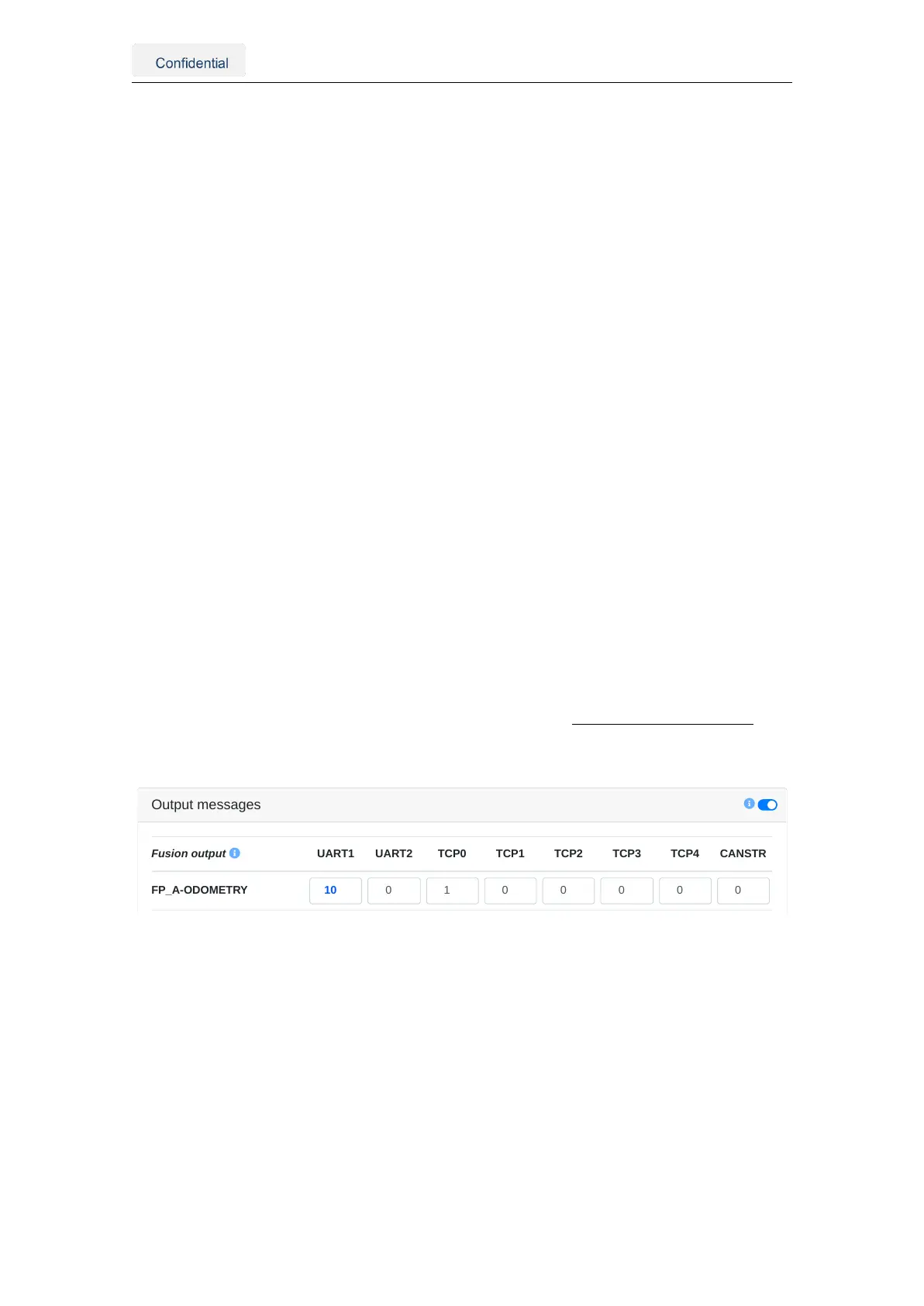
In Figure 5.13, the output rate is 10 for the FP_A-ODOMETRY message on the UART1
port. If the desired output frequency is 200 Hz, the actual output frequency is equal to or
smaller than 20 Hz.
real output frequency ≤ theoretical output frequency =
Fusion output frequency
output rate
Output messages
Fusion output
FP_A-ODOMETRY
UART1 UART2 TCP0 TCP1 TCP2 TCP3 TCP4 CANSTR
Figure 5.13.: An example of setting up the output rate
Vision-RTK 2 | Fixposition Positioning Sensor 25



 To Next Page