INSTALLATION
AND OPERATION
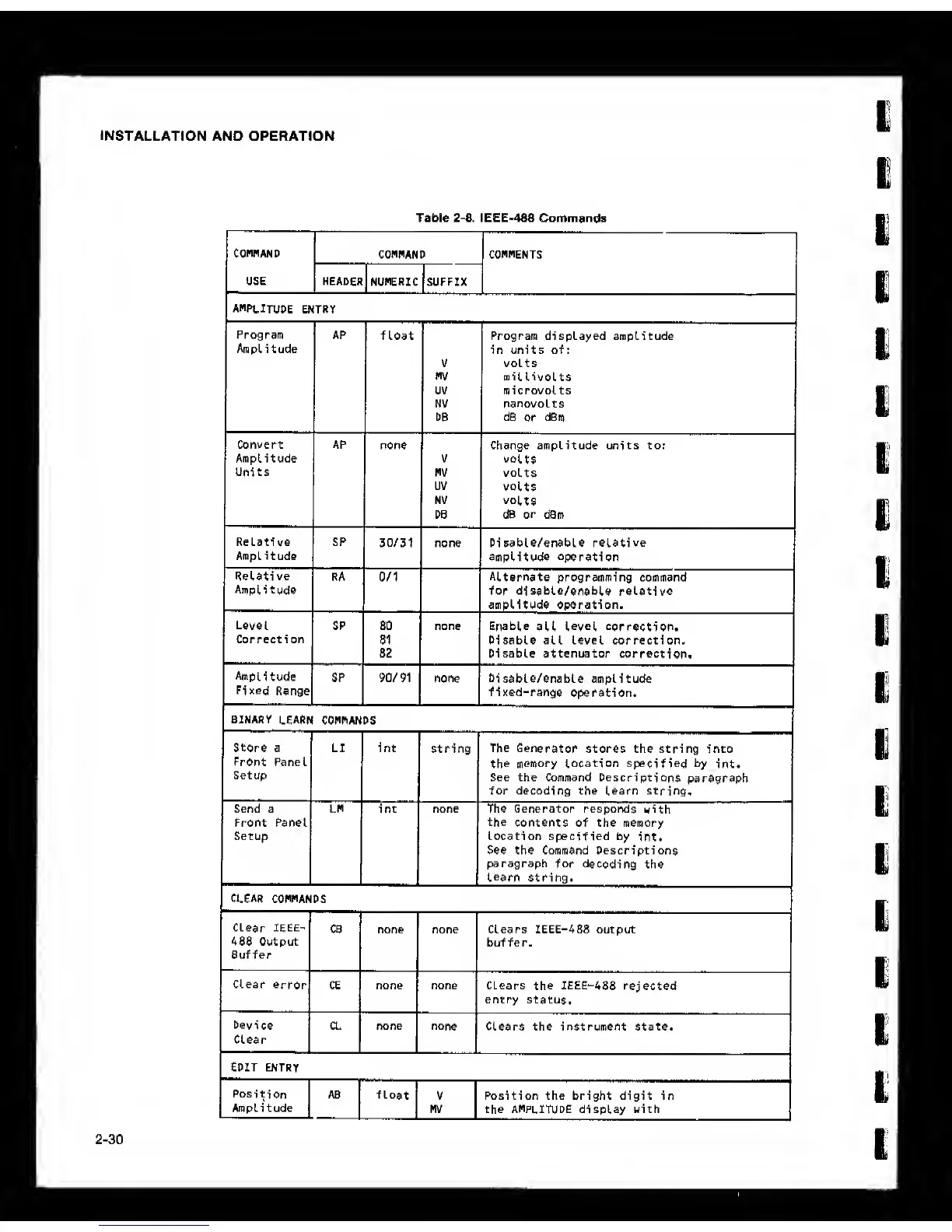
Table
2-8.
IEEE'488 Commands
COMMAND
COMMAND COMMENTS
USE HEADER
NUMERIC SUFFIX
AMPLITUDE
ENTRY
1 1
1
Program
Amplitude
AP
float Program displayed amplitude
in units of:
volts
mil
livoLtS
microvolts
nanovolts
d5
or
dPm
Convert
Amplitude
Units
AP
none
V
MV
uv
NV
DB
Change amplitude units to:
volts
volts
volts
volts
d6 or dBm
Relative
Amplitude
SP
30/31 none Di
sable/enable relative
amplitude
operation
Relati ve
Amplitude
RA 0/1
Alternate
programming command
for
disable/enable relative
amplitude operation.
Level
Correction
SP 80
81
82
none Enable
all
Level correction.
Disable all level correction.
Disable attenuator
correction.
Amplitude
SP 90/91
none
Disable/enable
amplitude
Fixed
Range
BINARY
learn
CONhANDS
fixed-range
operation.
Store a
Front Panel
Setup
Send a
Front Panel
Setup
clear
connands
Clear IEEE-
488 Output
Buffer
Device
Clear
EDIT ENTRY
Position
Amplitude
String
CB none none
CE none none
CL none
none
AB float
V
MV
The
Generator
stores the string into
the
memory Location
specified
by
int.
See the Command Descriptions
paragraph
for decoding the learn string.
The Generator responds
with
the
contents of the memory
Location specified by
int.
See the Command Descriptions
paragraph
for decoding
the
Learn
string.
Clears IEEE-488 output
buffer.
Clears
the
IEEE-488
rejected
entry status.
Clears the instrument state.
Position the bright digit in
the amplitude display with



 To Next Page