INSTALLATION AND OPERATION
I
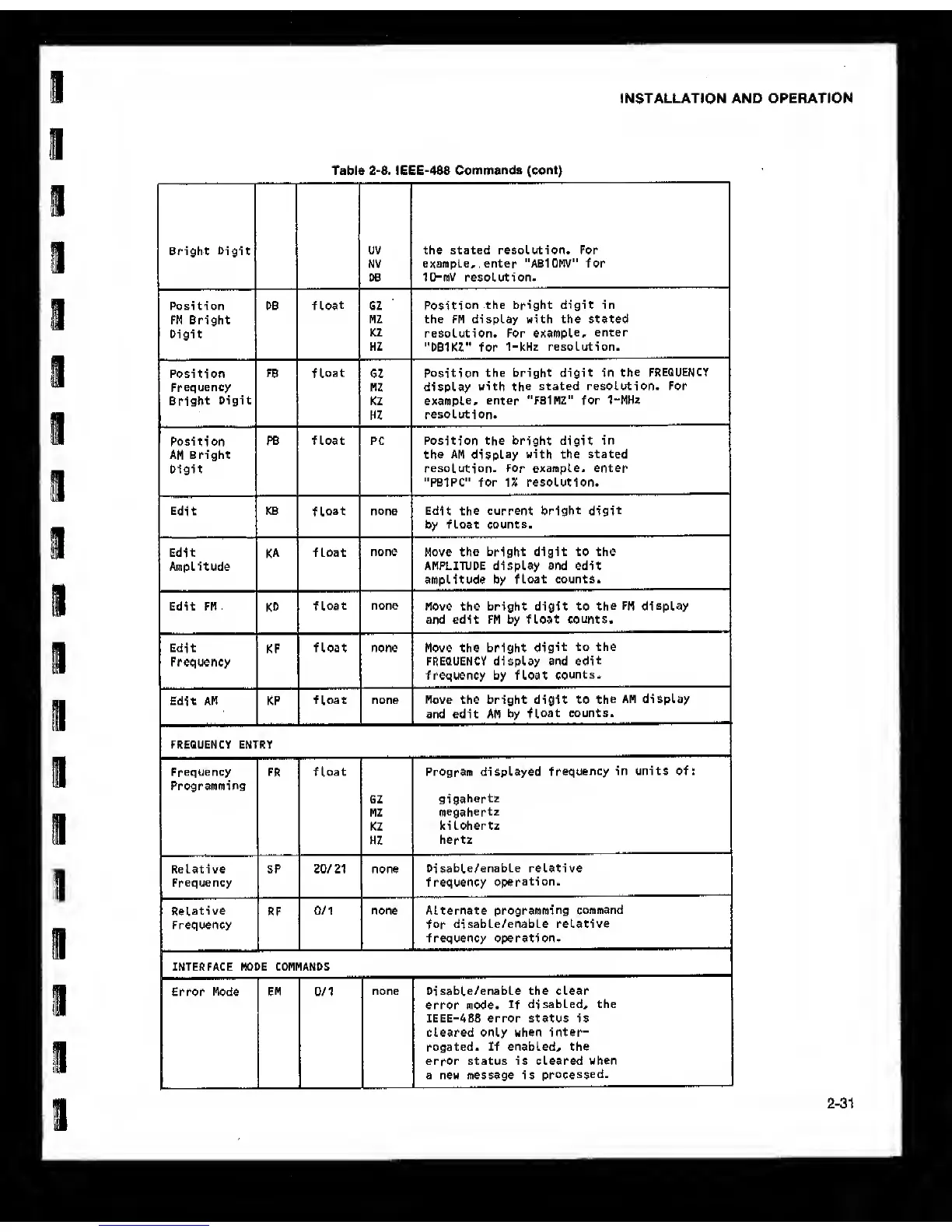
Table
2-8.
IEEE-488
Commands (cont)
Bright
Digit
UV the stated resolution. For
NV
example, enter "AB10MV" for
DB 10-mV resolution.
Position DB
float
GZ
Position
the bright digit in
FM Bright
HZ the FM display with the stated
Digit
KZ
resolution. For
example,
enter
HZ
"DB1KZ" for
1-kHz resolution.
Position
FB
float
GZ
Position
the bright digit in
the FREQUENCY
Frequency HZ display
with the
stated resolution. For
Bright
Digit
KZ
example,
enter "FBIMZ" for 1“MHz
HZ
resolution.
Position
PB float PC Position the bright digit
in
AM Bright the AM
display
with the stated
Digit
resolution. For example, enter
"PBIPC" for 1% resolution.
Edit KB
float
none Edit the current
bright
digit
by float counts.
Edit
KA
float
none
Move the bright
digit to
the
Amplitude
AMPLITUDE display and edit
amplitude
by
float counts.
Edit FM
KD
float
none
Move the bright digit to
the FM display
and edit FM by float
counts.
Edit
KF
float none Move the bright
digit
to the
Frequency
FREQUENCY display and
edit
frequency by float
counts.
Edit AM KP
float none Move the bright digit to
the
AM display
and edit AM by
float counts.
FREQUENCY ENTRY
Frequency
Programming
FR
float Program displayed
frequency
in units of:
6Z
gigahertz
MZ
megahertz
KZ
ki Lohertz
HZ
hertz
Relative SP 20/21 none
Di
sable/enable relative
Frequency frequency
operation.
Relative
RF
0/1 none Alternate
programming
command
Frequency
for
di sable/enable relative
frequency operation-
INTERFACE MODE COMMANDS
Error Mode EM 0/1
none Di sable/enable the clear
error mode,
if
disabled, the
IEEE-488 error status is
cleared only when inter-
rogated. If enabled^ the
error status is cleared when
a new message is
processed.



 To Next Page