Redwood Global Ltd - ST6D42
Operator and Maintenance Manual
Chapter 1: Machine Overview
1.7 FEED ROLLER CONTROLS
Red stop bar
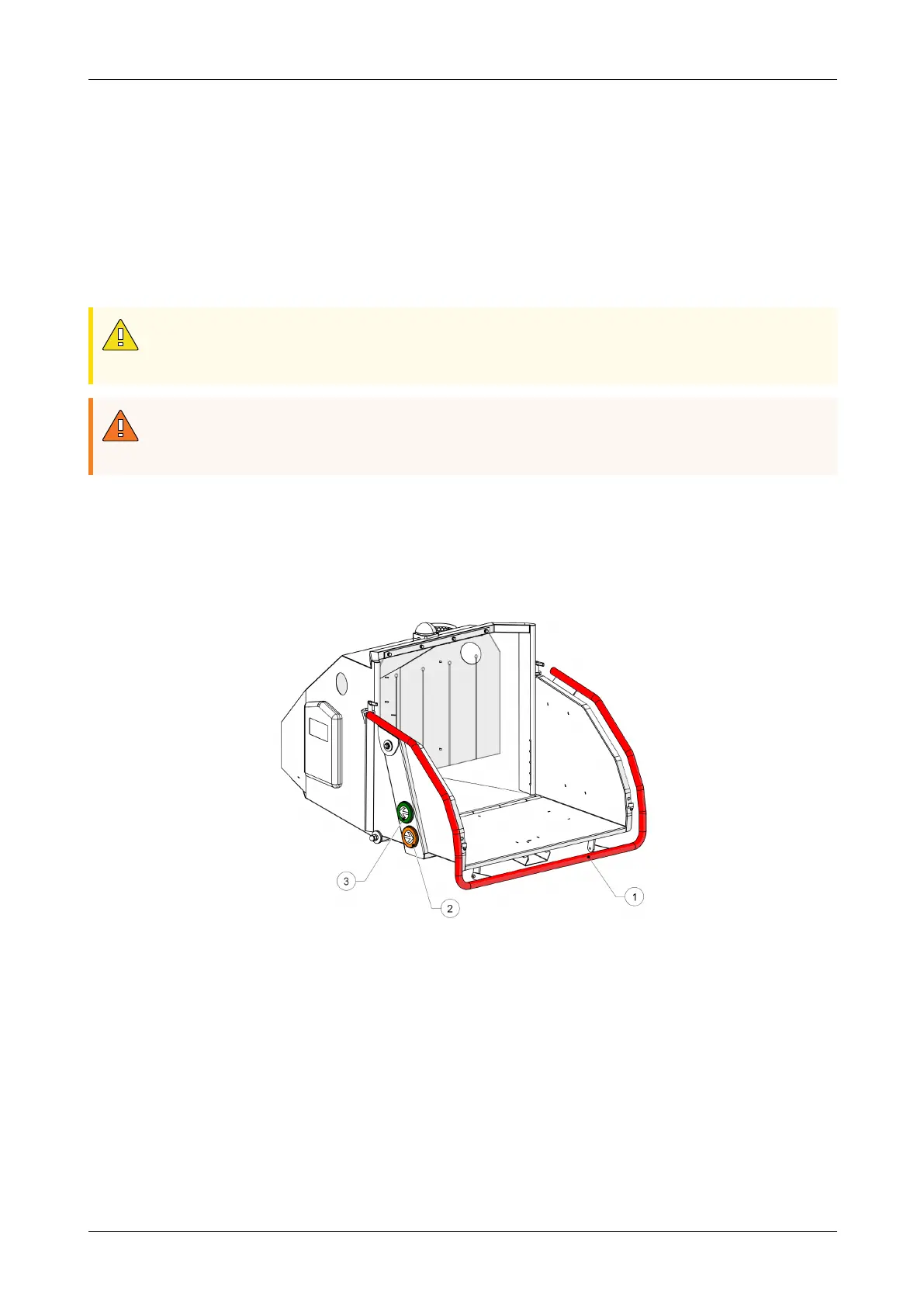
The red stop bar (1, Figure 6) located on the folding tray is used to stop the feed rollers
during normal operation. When pushed, the spring-loaded bar interrupts power to the
feed rollers, and they stop instantly.
The stop bar must be pushed through its full travel to activate the proximity switch.
CAUTION
When the red stop bar is pushed, the engine will continue to run and the
flywheel will still be turning.
WARNING
If you push the red stop bar in an emergency, you must also push an E-stop
button, this will make sure the feed rollers do not start moving accidentally.
Forward and backwards buttons
The green and orange buttons are used to control the feed roller direction.
l
The green button (3, Figure 6) turns the feed rollers forward.
l
The orange button (2, Figure 6) turns the feed rollers backward.
1 Red stop bar 3 Green forward button
2 Orange reverse button
Figure 6 - Feed roller controls
12-00-004 v2.1 26



 To Next Page