Redwood Global Ltd - ST6D42
Operator and Maintenance Manual
Chapter 1: Machine Overview
1.10.3 HOME SCREEN
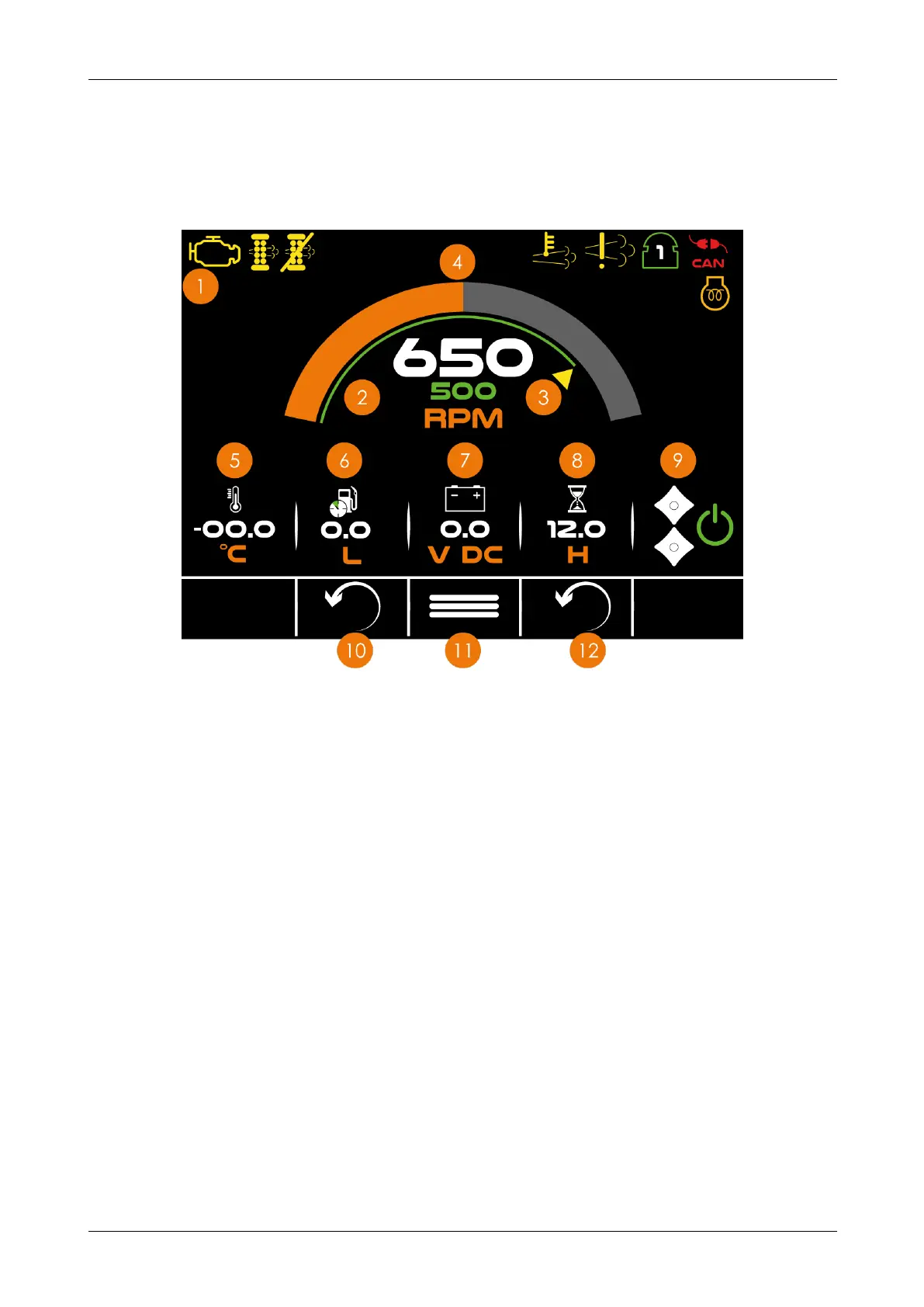
The home screen displays by default once the machine is powered on. On the home
screen you can see the actual engine speed, the target speed of the flywheel, the amount
of fuel used and the engine running time since the last manual reset.
Figure 11 - Home screen
No. Description
1 Warning icons - these display if the machine has a fault
2 Actual speed - displays the actual engine speed
3 Target speed - displays the engine target speed
4 Flywheel speed - displays the actual flywheel speed
5 Thermometer - displays the air temperature
6 Fuel - displays the fuel consumed since the last manual reset
7 Battery - displays the battery voltage
8 Hours - displays the hours since last manual reset
9 Feed rollers - displays if feed rollers are active
10 Fuel reset button
11 Menu button
12 Hour reset button
12-00-004 v2.1 32



 To Next Page