Redwood Global Ltd - ST6D42
Operator and Maintenance Manual
Chapter 1: Machine Overview
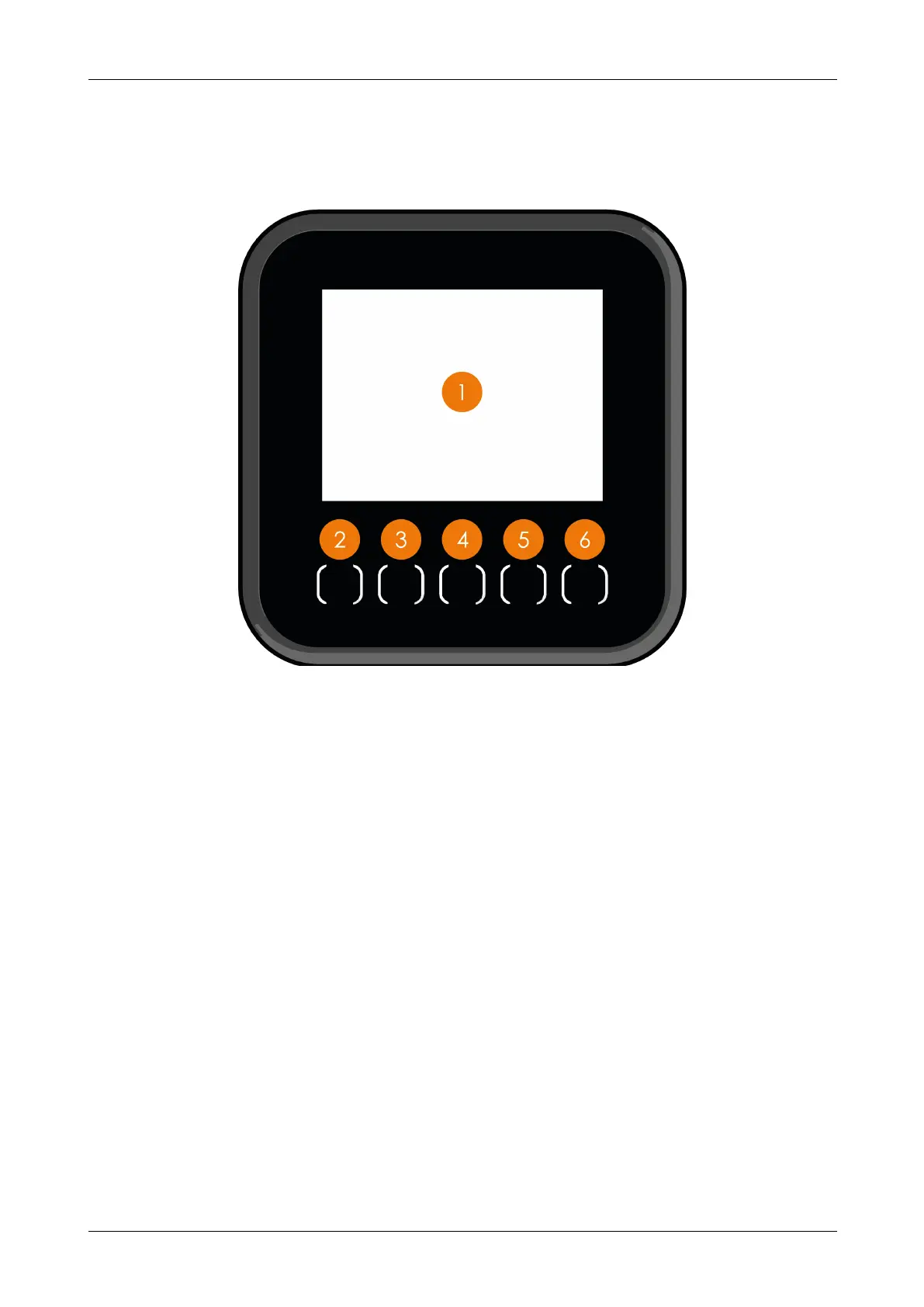
1.10.1 BUTTON FUNCTIONS
Each page displays different information therefore each button performs multiple
functions depending on which screen is displayed.
Figure 9 - Button functions
No. Description
1 Screen - displays information
2
Minus button - press to switch between options of highlighted icon, this button also
activates the DPF (Diesel Particulate Filter) forced regeneration sequence, or reduces
engine speed
3
Left button - press to navigate left through the on-screen icons and reset the fuel
counter to zero
4
Menu button - press to cycle through screens, press and hold to return to the home
screen
5
Right button - press to navigate right through the on-screen icons and reset the timer to
zero
6
Plus button - press to switch between options of highlighted the highlighted icon, this
button also inhibits the DPF regeneration sequence. When in TR mode pressing the
button increases the engine speed, when in ST mode pressing the button toggles
between high and low engine speed
12-00-004 v2.1 30



 To Next Page