GT7 Terminal
Electrical Connections
www.gantner.com
HB_GT7-2x00-3x00--EN_12
23
4
ELECTRICAL CONNECTIONS
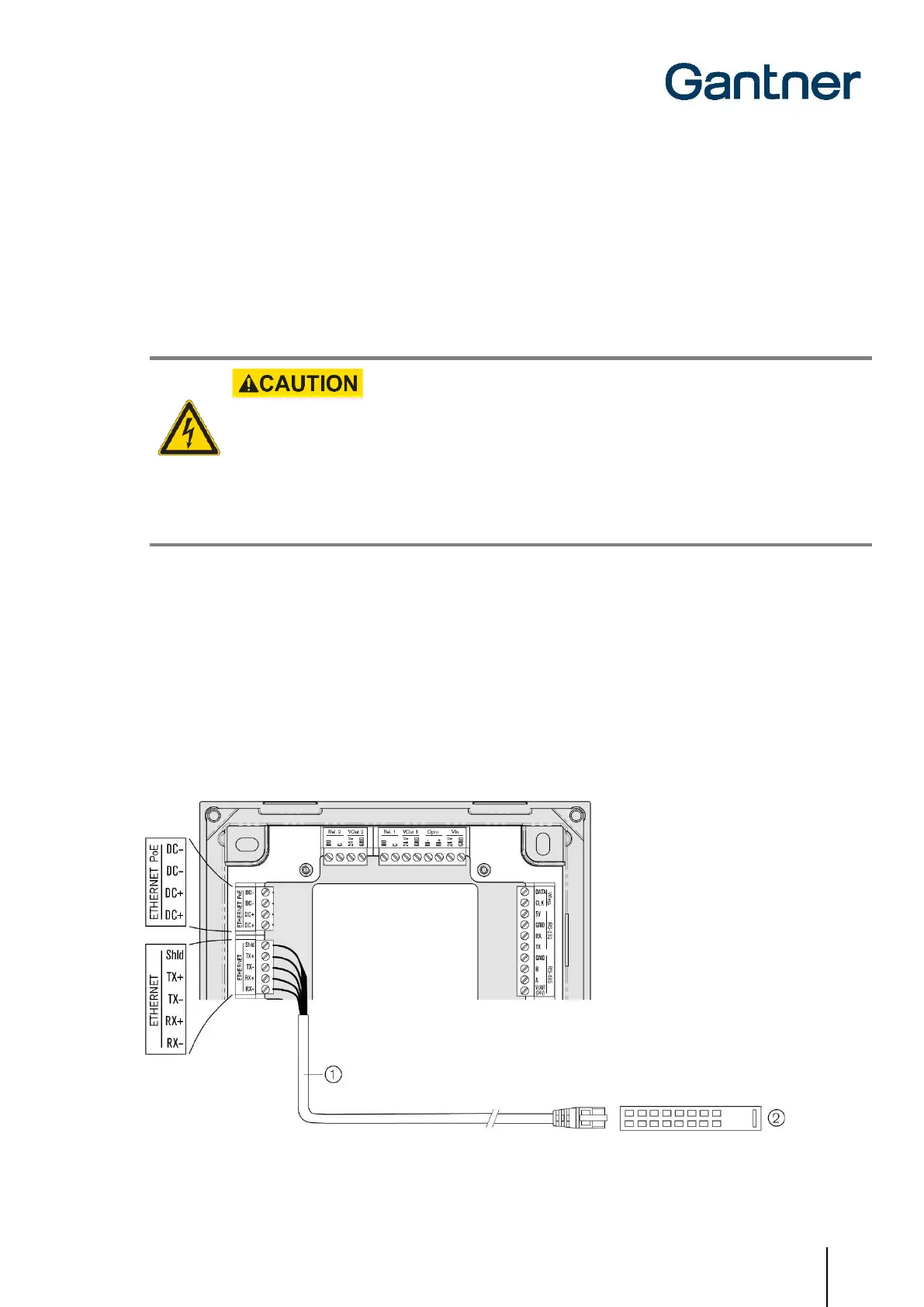
The GT7 terminal is connected to a network via a LAN interface. This configuration is used for configuration and
communication during operation. Power can be supplied via a separate power supply or via Power over Ethernet
(PoE).
The electrical connection described in this chapter is valid for the GT7.2x00, GT7.3x00, and GT7.3x01.
Electrical Shock
➔ Touching current-conducting parts may result in injury due to electrical shock.
- Always disconnect the power supply before working on the device or installation/deinstallation.
- The applicable safety and accident prevention regulations must be observed.
- Carefully observe the measurement diagrams and technical specifications.
- Do not remove safety protection and covers.
4.1 Target Group
This chapter describes the electrical connections required for the GT7 terminal. The information is intended for
trained personnel responsible for completing the electrical connections. Previous knowledge of the GT7 terminal or
other GANTNER devices is not required.
4.2 Network Connection (LAN / Ethernet)
Figure 4.1 – Connecting the network cable



 To Next Page
 Loading...