Moving the Flag
You can take a closer look at the green and move the pin location.
1
From the hole information screen, press .
2 Select View Green.
3 If necessary, use the slider on the right side of the screen to zoom in or out.
4 Tap or drag to move the pin location.
5
Press .
The distances on the hole information screen are updated to show the new pin location. The pin location is
saved for only the current round.
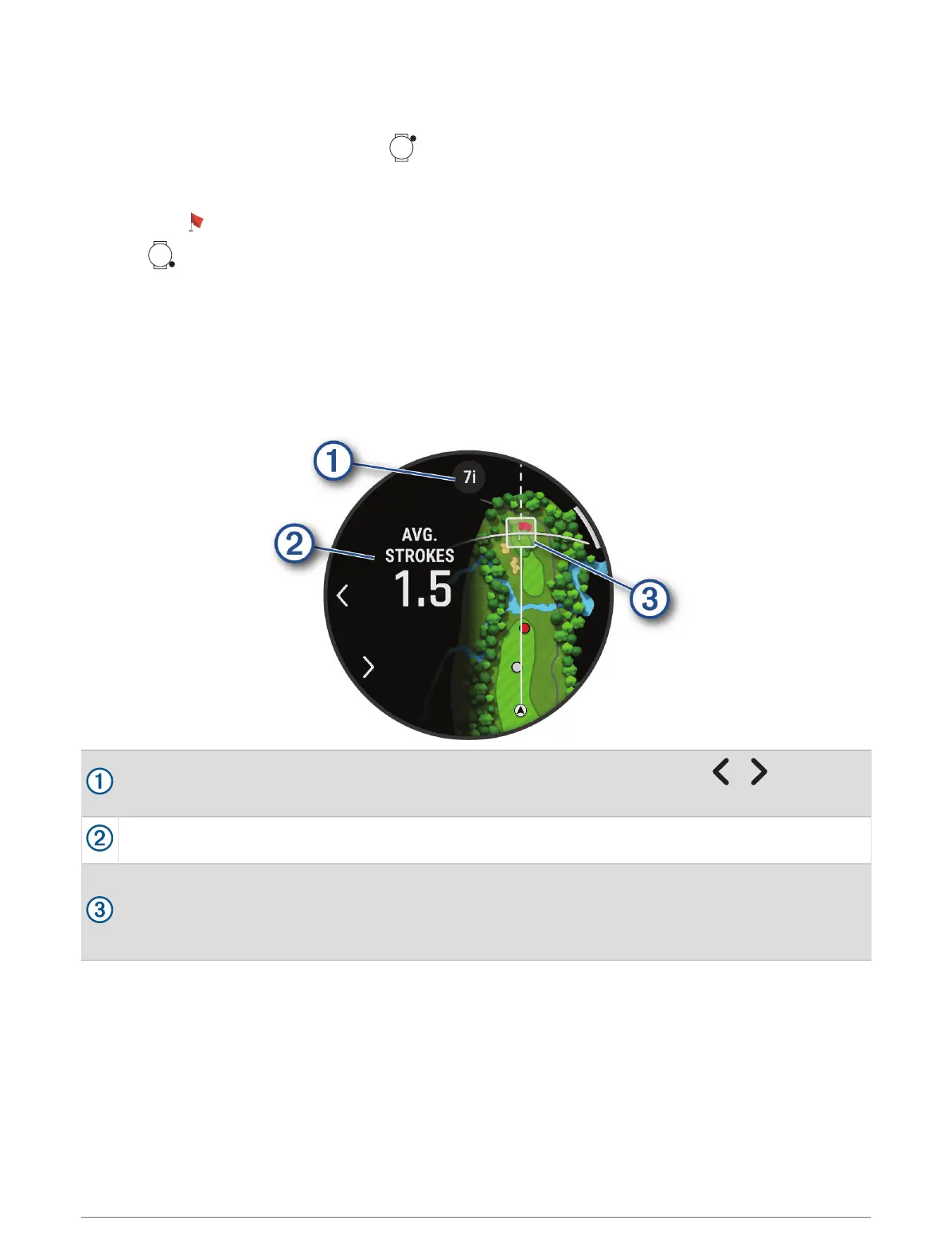
Virtual Caddie
Before you can use the virtual caddie, you must play five rounds with Approach club tracking sensors or enable
the Club Prompt setting (Activity Settings, page45), and upload your scorecards. For each round, you must
connect to a paired phone with the Garmin Golf app. The virtual caddie provides recommendations based on the
hole, wind data, and your past performance with each club.
Displays the club or club combination recommendation for the hole. You can select or to view other
club options.
Displays the average number of strokes expected to score with the club recommendation.
Displays the shot dispersion area for your next shot with the club recommendation, based on your shot
history with the club.
NOTE: If the shot dispersion area overlaps with the green, the shot's chances of reaching the green will
display as a percentage.
22 Apps and Activities















 To Next Page